
WordPress Website Developer: The Complete Guide to Hiring the Right Expert for Your Website
If you are planning to build, redesign, or improve your online presence, chances are you have already come across the term WordPress website developer. WordPress powers a huge share of websites on the internet today, from small personal blogs to large e-commerce stores and corporate portals. But building a WordPress site that actually looks professional, loads fast, ranks well on search engines, and functions smoothly requires more than just installing a theme and adding some content. That is where a skilled WordPress website developer comes in.
In this guide, we will walk through everything you need to know about working with a WordPress website developer — what they do, the skills they should have, how much they typically cost, the different types of developers available, and how to choose the right one for your specific project. Whether you are a small business owner, a startup founder, or someone simply looking to launch a blog, this article will help you make an informed decision.
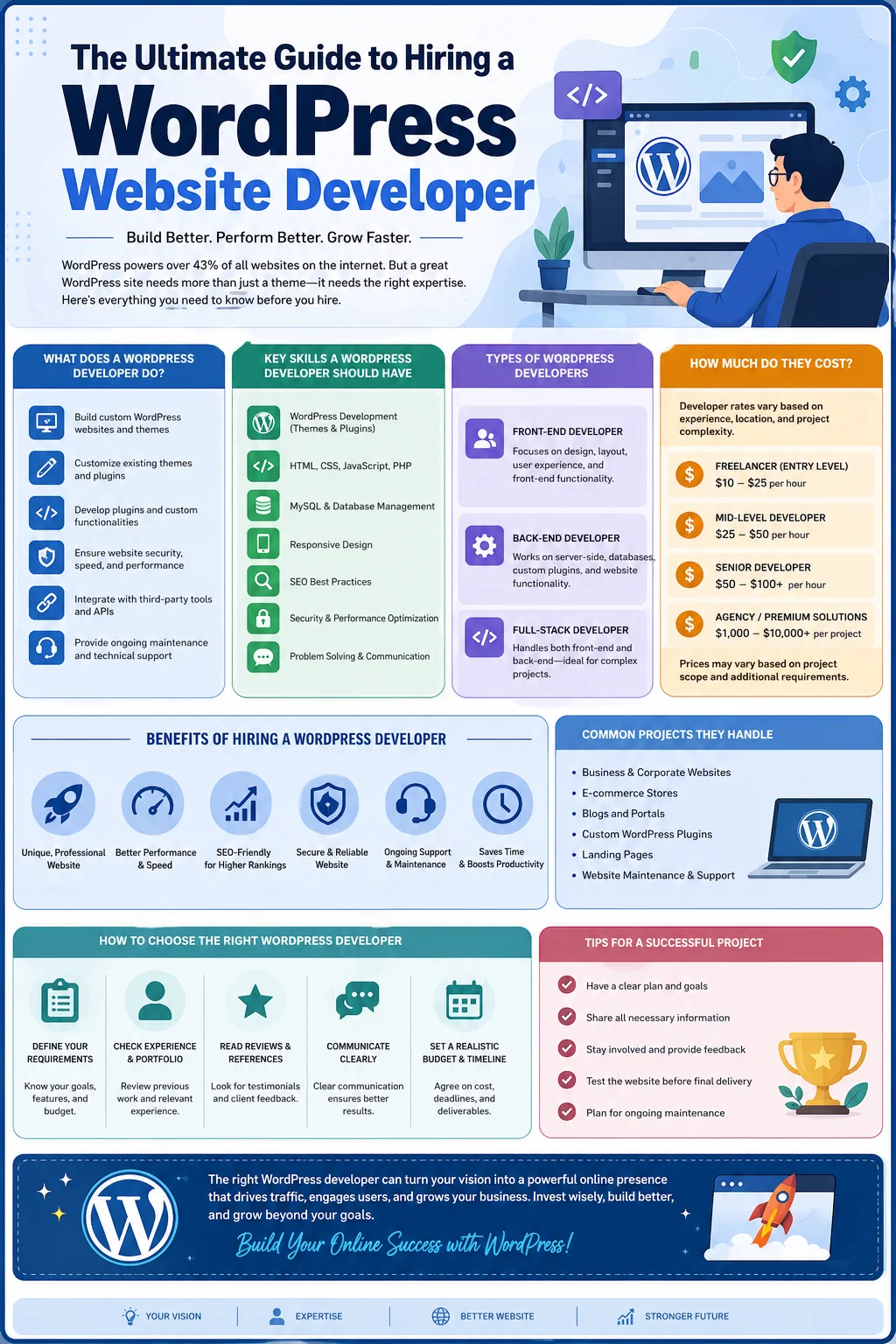
What Is a WordPress Website Developer?
A WordPress website developer is a professional who specializes in designing, building, customizing, and maintaining websites using the WordPress content management system (CMS). Unlike a general web developer who might work across many platforms and coding frameworks, a WordPress developer focuses specifically on the WordPress ecosystem — its themes, plugins, core architecture, and the PHP-based backend that powers it.
Their work can range from simple tasks, such as installing and configuring a theme, to highly complex projects like building custom plugins, integrating third-party APIs, developing membership portals, or creating fully custom themes from scratch. A good WordPress website developer understands not just how to write code, but also how to translate a client’s business goals into a functional, user-friendly, and search-engine-optimized website.
Many people assume that because WordPress is known for being “easy to use,” anyone can build a website with it. While it is true that WordPress makes website creation more accessible than coding a site from scratch, professional-level results — including strong performance, security, and scalability — usually require the expertise of a trained developer.
What Does a WordPress Website Developer Actually Do?
The day-to-day responsibilities of a WordPress website developer can vary widely depending on the project, but generally include the following tasks:
1. Website Design and Development
This includes setting up the WordPress installation, choosing or building a theme, structuring pages, and ensuring the overall layout matches the client’s brand and goals. Some developers work from a pre-designed mockup (often created by a UI/UX designer), while others handle both design and development themselves.
2. Theme Customization
Most WordPress websites start with a base theme, which is then customized to fit specific branding, layout, and functionality requirements. This can involve editing CSS, modifying PHP template files, or using a page builder like Elementor, Divi, or WPBakery.
3. Custom Plugin Development
Sometimes an off-the-shelf plugin cannot deliver the exact functionality a business needs. In these cases, developers write custom plugins to add unique features, such as booking systems, custom forms, or specialized integrations with third-party tools.
4. Performance Optimization
A slow website hurts both user experience and search engine rankings. Developers optimize image loading, implement caching solutions, minimize code bloat, and configure content delivery networks (CDNs) to make sites load faster.
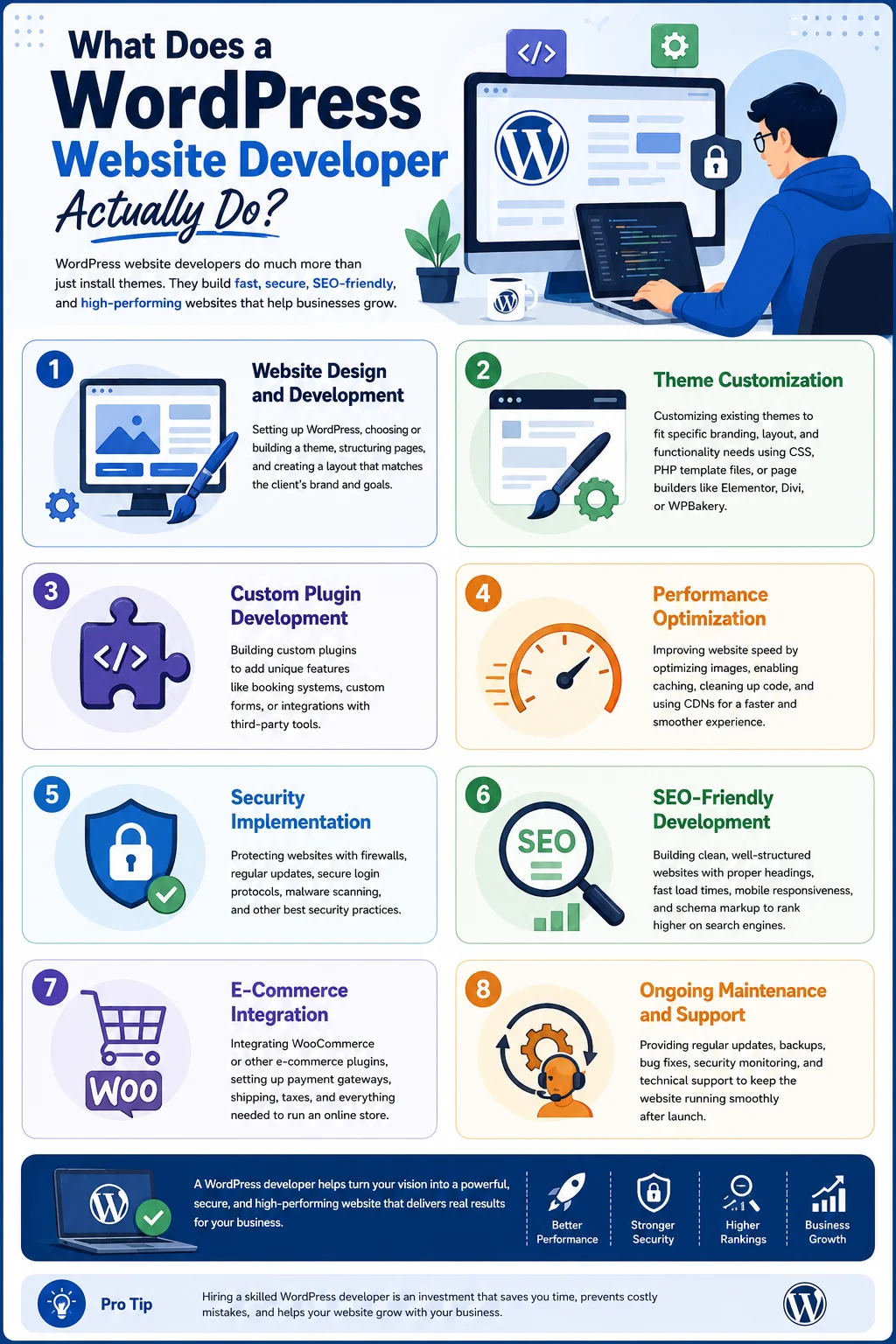
5. Security Implementation
WordPress is a popular target for hackers simply because of how widely it is used. Developers implement security best practices such as firewalls, regular updates, secure login protocols, and malware scanning tools to protect the website from threats.
6. SEO-Friendly Development
An experienced developer builds websites with search engine optimization in mind from the ground up — clean code, proper heading structures, fast load times, mobile responsiveness, and schema markup are all part of building an SEO-friendly WordPress site.
7. E-Commerce Integration
For businesses that want to sell products or services online, developers often integrate WooCommerce or other e-commerce plugins, configure payment gateways, and set up shipping and tax calculations.
8. Ongoing Maintenance and Support
Once a website is live, it still needs regular updates, backups, bug fixes, and monitoring. Many WordPress developers offer maintenance packages to keep sites running smoothly long after launch.
Why Hire a Professional WordPress Website Developer?
You might be wondering whether it’s really necessary to hire a professional, especially with so many drag-and-drop website builders available today. Here are several reasons why working with a skilled WordPress website developer is often worth the investment.
Faster, Cleaner Development
Experienced developers know how to avoid common pitfalls, use efficient coding practices, and complete projects faster than someone learning WordPress from scratch. This can save significant time, especially for businesses on a launch deadline.
Custom Functionality
If your business has specific needs — like a custom quote calculator, an appointment booking system, or an integration with your CRM — a developer can build exactly what you need rather than forcing you to rely on generic plugins that may not fit perfectly.
Better Performance and SEO
A poorly built WordPress site can be riddled with bloated code, unnecessary plugins, and slow-loading pages. Professional developers know how to structure a website for speed and search visibility, which directly impacts your traffic and conversions.
Stronger Security
Website security breaches can be costly, both financially and in terms of reputation. A knowledgeable developer sets up proper security layers to reduce the risk of hacks, malware, and data breaches.
Scalability
As your business grows, your website needs to grow with it. A developer can build a site with scalability in mind, ensuring it can handle increased traffic, additional pages, or new features without needing a complete rebuild.
Professional Support
Things can go wrong — plugin conflicts, broken layouts, hosting issues. Having a developer you can rely on for ongoing support means these problems get resolved quickly rather than sitting unresolved and hurting your business.
Key Skills to Look For in a WordPress Website Developer
Not all WordPress developers have the same skill set. Depending on your project’s complexity, you may need someone with a broader range of technical expertise. Here are the core skills worth checking for:
PHP Programming
WordPress is built on PHP, so a strong developer should be comfortable reading and writing PHP code, especially for custom theme and plugin development.
HTML, CSS, and JavaScript
Front-end skills are essential for creating visually appealing, responsive designs and for adding interactive elements to a website.
MySQL Database Knowledge
WordPress stores content, settings, and user data in a MySQL database. Developers who understand database structure can troubleshoot issues and optimize performance more effectively.
Experience with Page Builders
Tools like Elementor, Beaver Builder, and Divi are widely used for building custom layouts without heavy coding. Familiarity with these tools speeds up development and gives clients more flexibility for future edits.
API Integration Experience
Many modern websites need to connect with external services — payment processors, email marketing platforms, CRMs, or social media APIs. A developer with integration experience can make these connections seamless.
Understanding of SEO Principles
Even if a developer isn’t an SEO specialist, they should understand technical SEO fundamentals like clean URL structures, proper heading hierarchy, image optimization, and mobile responsiveness.
Security Best Practices
Knowledge of common vulnerabilities, secure coding practices, and WordPress-specific security measures is critical, especially for websites handling sensitive customer data.
Version Control (Git)
For larger projects, especially those involving a team, familiarity with version control systems like Git helps manage code changes efficiently and avoid conflicts.
Communication and Project Management
Technical skills alone aren’t enough. A good developer should be able to explain technical concepts in plain language, meet deadlines, and keep you updated throughout the project.
Types of WordPress Website Developers
When searching for the right professional, it helps to understand the different categories of WordPress developers available in the market.
Freelance Developers
Freelancers often offer more competitive pricing and flexibility. They are a good option for small to medium-sized projects, especially when you have a clear vision of what you need. However, availability and long-term reliability can vary from person to person.
Development Agencies
Agencies typically have a team of specialists — designers, developers, SEO experts, and project managers — working together on your project. This can be a better fit for larger, more complex websites, though it usually comes at a higher price point.
In-House Developers
Larger businesses with ongoing website needs sometimes hire an in-house developer. This option provides dedicated attention to your website but comes with the overhead of a full-time salary and benefits.
WordPress-Specific Development Shops
Some agencies specialize exclusively in WordPress, as opposed to general web development. These teams often have deep expertise in the platform’s quirks, best practices, and ecosystem of themes and plugins.
How Much Does a WordPress Website Developer Cost?
Pricing for WordPress development varies widely depending on the developer’s experience, location, and the complexity of the project. Here’s a general breakdown to help set expectations:
- Basic Website (Template-Based): For a simple business website using a pre-built theme with light customization, costs can range from a few hundred dollars to around $1,500.
- Custom Business Website: For a website with custom design elements, unique functionality, and more thorough SEO setup, pricing often falls between $1,500 and $5,000.
- E-Commerce Website: WooCommerce stores with custom features, payment integrations, and inventory management typically range from $3,000 to $10,000 or more, depending on complexity.
- Enterprise-Level or Highly Custom Projects: Large-scale websites with custom plugins, advanced integrations, and unique architecture can cost $10,000 and up.
Hourly rates for freelance WordPress developers generally range from $25 to $150 per hour, depending on their location and experience level. Agencies tend to charge more due to overhead costs but often provide a more comprehensive service, including design, development, and ongoing support.
It’s worth noting that the cheapest option is not always the best value. A poorly built website can lead to higher costs down the road due to security issues, poor performance, or the need for a complete rebuild.
How to Choose the Right WordPress Website Developer
Selecting the right developer for your project can feel overwhelming, especially with so many options available. Here are some practical steps to guide your decision.
1. Define Your Project Requirements
Before reaching out to developers, take time to outline what you need. Do you need a simple brochure website, an online store, a membership site, or something more complex? Having clear requirements helps you communicate effectively and get accurate quotes.
2. Review Their Portfolio
Look at previous projects the developer or agency has completed. Pay attention to design quality, functionality, and whether their past work aligns with the style and complexity of what you’re looking for.
3. Check Client Reviews and References
Reviews on platforms like Google, Clutch, or freelance marketplaces can provide insight into a developer’s reliability, communication style, and quality of work. Don’t hesitate to ask for references and actually follow up with them.
4. Ask About Their Development Process
A professional developer should be able to explain their workflow — from initial planning and design to development, testing, and launch. This transparency helps you understand what to expect and when.
5. Discuss Post-Launch Support
Websites need ongoing maintenance. Ask whether the developer offers support packages, how they handle bug fixes, and what their response time looks like for urgent issues.
6. Evaluate Communication Skills
Throughout the hiring process, notice how promptly and clearly the developer communicates. Good communication early on is often a strong indicator of how the working relationship will go.
7. Compare Pricing Structures
Some developers charge a flat project fee, while others bill hourly. Make sure you understand exactly what is included in the quoted price to avoid unexpected costs later.
8. Confirm Technical Compatibility
If you have specific hosting requirements, existing tools, or a particular tech stack, confirm that the developer has experience working within those constraints.
Common Mistakes to Avoid When Hiring a WordPress Developer
Even with careful research, businesses sometimes make avoidable mistakes during the hiring process. Here are a few to watch out for:
- Choosing based on price alone: The lowest bid isn’t always the best value, especially if it means cutting corners on security, performance, or design quality.
- Not asking about ownership of the website: Make sure you retain full ownership of your website files, domain, and hosting account after the project is completed.
- Skipping a written agreement: Always have a clear contract outlining deliverables, timelines, payment terms, and revision policies.
- Ignoring long-term maintenance needs: A website is not a one-time purchase. Factor in ongoing costs for updates, security monitoring, and potential redesigns.
- Overlooking mobile responsiveness: With most web traffic now coming from mobile devices, ensure your developer prioritizes a fully responsive design.
DIY WordPress vs. Hiring a Developer
Many people start by building their own WordPress site using free themes and page builders. This approach can work well for very simple projects, hobby blogs, or businesses with extremely limited budgets. WordPress’s user-friendly dashboard and drag-and-drop tools have made it possible for non-technical users to create basic websites without writing a single line of code.
However, as your website’s needs grow — custom functionality, better performance, stronger security, and polished design — the limitations of a DIY approach often become apparent. Free themes may look generic, plugins can conflict with one another, and without coding knowledge, troubleshooting issues can become time-consuming and frustrating.
Hiring a professional WordPress website developer becomes especially valuable when:
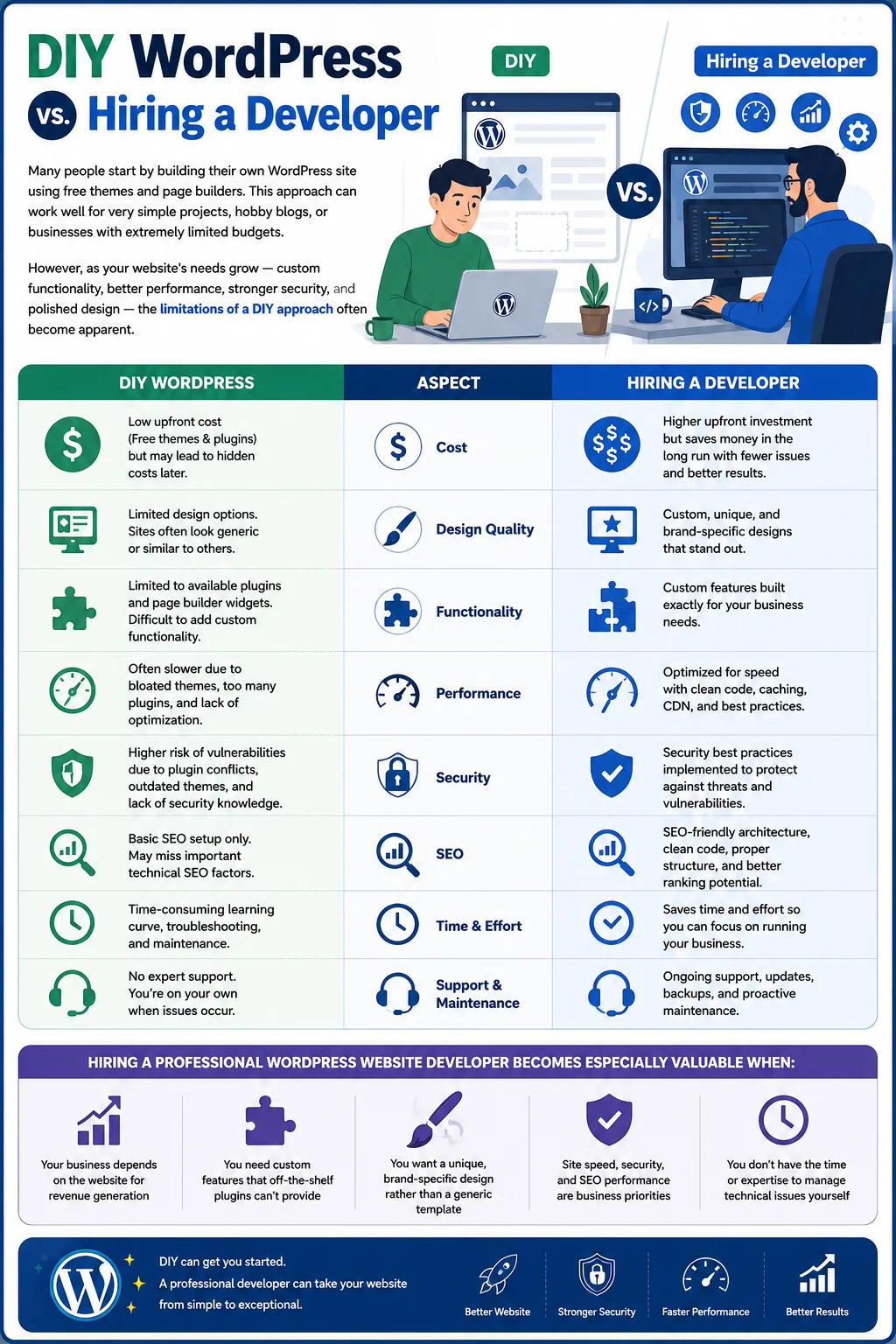
- Your business depends on the website for revenue generation
- You need custom features that off-the-shelf plugins can’t provide
- You want a unique, brand-specific design rather than a generic template
- Site speed, security, and SEO performance are business priorities
- You don’t have the time or expertise to manage technical issues yourself
The Role of a WordPress Developer in SEO Success
Search engine optimization and website development go hand in hand. While content strategy and keyword research are often handled by marketing teams, the technical foundation of your website plays a massive role in how well it ranks on search engines like Google.
A skilled WordPress website developer contributes to SEO success in several ways:
- Clean Code Structure: Bloated or poorly structured code can slow down a website and confuse search engine crawlers.
- Mobile Responsiveness: Google prioritizes mobile-friendly websites in its rankings, making responsive design a technical SEO necessity.
- Site Speed Optimization: Page load time is a confirmed ranking factor, and developers can implement caching, image compression, and code minification to improve it.
- Proper URL Structures: Clean, descriptive URLs are easier for both users and search engines to understand.
- Schema Markup Implementation: Adding structured data helps search engines better understand your content, which can lead to rich snippets in search results.
- Secure HTTPS Setup: Security is a ranking factor, and developers ensure your site is properly configured with SSL certificates.
Working with a developer who understands both technical development and SEO fundamentals can give your website a significant advantage in search visibility.
Future Trends in WordPress Development
The WordPress ecosystem continues to evolve, and staying informed about emerging trends can help you make smarter decisions when planning your website.
Block-Based Editing (Gutenberg)
WordPress’s block editor, Gutenberg, has become the standard for content creation, offering more design flexibility without relying entirely on third-party page builders.
Headless WordPress
Some businesses are adopting a “headless” approach, using WordPress purely as a backend content management system while building custom front-end experiences with frameworks like React or Vue.js. This offers greater design flexibility and performance but requires more advanced development skills.
AI-Assisted Development
Developers are increasingly using AI tools to speed up coding tasks, generate content suggestions, and even assist with basic design decisions, streamlining the overall development process.
Increased Focus on Core Web Vitals
As Google continues to emphasize user experience metrics, developers are placing greater importance on optimizing for Core Web Vitals — metrics related to loading speed, interactivity, and visual stability.
Enhanced Security Measures
With cyber threats becoming more sophisticated, WordPress developers are adopting more advanced security protocols, including multi-factor authentication, automated malware scanning, and stricter access controls.
Local vs. Remote WordPress Website Developers
Another decision many businesses face is whether to hire a local developer or work with someone remotely. Both options have distinct advantages, and the right choice often depends on your project’s nature and your personal working preferences.
Advantages of Hiring Locally
Working with a local WordPress website developer allows for face-to-face meetings, which can be helpful for projects that involve detailed branding discussions or ongoing collaboration. It also makes it easier to build trust, especially for business owners who prefer in-person communication. Local developers may also have a better understanding of your regional market, competitors, and target audience.
Advantages of Hiring Remotely
Remote developers open up access to a much larger talent pool, often at more competitive rates. Many highly skilled WordPress developers work remotely and collaborate with clients across different time zones using tools like Zoom, Slack, and project management platforms such as Trello or Asana. For businesses with a clear project scope and good communication habits, remote developers can deliver excellent results without the constraints of geographic location.
Ultimately, whether you choose local or remote support, the most important factors remain the same: relevant experience, clear communication, and a portfolio that demonstrates quality work.
Industries That Benefit Most from Custom WordPress Development
While WordPress is flexible enough to serve almost any type of business, certain industries see particularly strong benefits from working with a dedicated WordPress website developer.
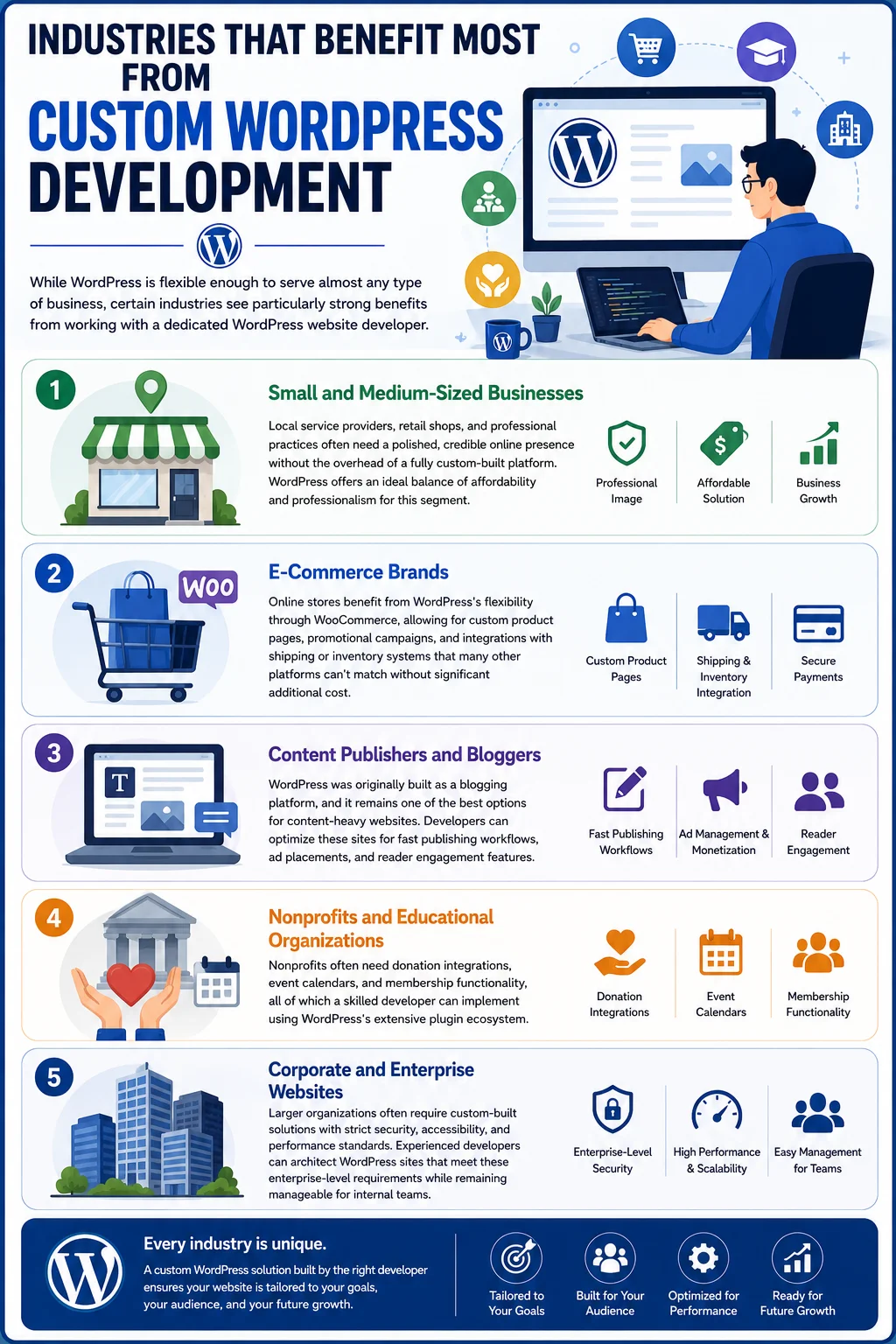
Small and Medium-Sized Businesses
Local service providers, retail shops, and professional practices often need a polished, credible online presence without the overhead of a fully custom-built platform. WordPress offers an ideal balance of affordability and professionalism for this segment.
E-Commerce Brands
Online stores benefit from WordPress’s flexibility through WooCommerce, allowing for custom product pages, promotional campaigns, and integrations with shipping or inventory systems that many other platforms can’t match without significant additional cost.
Content Publishers and Bloggers
WordPress was originally built as a blogging platform, and it remains one of the best options for content-heavy websites. Developers can optimize these sites for fast publishing workflows, ad placements, and reader engagement features.
Nonprofits and Educational Organizations
Nonprofits often need donation integrations, event calendars, and membership functionality, all of which a skilled developer can implement using WordPress’s extensive plugin ecosystem.
Corporate and Enterprise Websites
Larger organizations often require custom-built solutions with strict security, accessibility, and performance standards. Experienced developers can architect WordPress sites that meet these enterprise-level requirements while remaining manageable for internal teams.
Questions to Ask a WordPress Website Developer Before Hiring
Before signing a contract, it’s worth asking a few direct questions to ensure the developer is the right fit for your project:
- How many WordPress websites have you built, and can you share examples similar to my project?
- What is your typical timeline for a project like mine?
- Do you build custom themes, or do you primarily work with existing templates and page builders?
- How do you handle website security and backups?
- What ongoing support or maintenance options do you offer after launch?
- Will I have full access to my website’s admin dashboard, hosting account, and files?
- How do you handle revisions or changes during the development process?
Asking these questions upfront helps set clear expectations and reduces the risk of miscommunication later in the project.
Frequently Asked Questions
Do I need coding knowledge to work with a WordPress website developer? No. Part of a developer’s job is to translate your ideas and business goals into a functional website. You don’t need any technical background to communicate your requirements effectively.
How long does it take to build a WordPress website? Timelines vary based on complexity. A simple website might take one to two weeks, while a custom e-commerce site or highly complex project can take several months.
Can a WordPress developer help with an existing website, or only new builds? Most developers are equipped to handle redesigns, migrations, troubleshooting, and ongoing maintenance for existing WordPress websites, not just new projects.
Is WordPress a good choice for e-commerce websites? Yes. With plugins like WooCommerce, WordPress can power robust online stores with product management, payment processing, and inventory tracking.
What’s the difference between a WordPress developer and a web designer? A web designer typically focuses on the visual layout and user experience, while a developer handles the technical implementation, coding, and functionality. Many professionals offer both skill sets.
Final Thoughts
Choosing the right WordPress website developer can make a significant difference in the success of your online presence. From ensuring your site looks professional and performs well, to implementing strong security measures and SEO-friendly structures, a skilled developer brings expertise that goes far beyond simply “building a website.”
Whether you’re launching a new business, revamping an outdated site, or building a custom e-commerce platform, taking the time to find a developer whose skills, communication style, and pricing align with your needs will pay off in the long run. A well-built WordPress website isn’t just a digital brochure — it’s a critical business asset that can drive growth, build credibility, and create lasting value for years to come.
If you’re ready to move forward, start by clearly defining your project goals, researching potential developers, and asking the right questions before making your final decision. With the right WordPress website developer on your team, your website can become a powerful tool for achieving your business objectives.