
WordPress vs Shopify for E-commerce: Which Platform Should You Choose in 2026?
When you decide to launch an online store, one of the very first questions you’ll run into is WordPress vs Shopify for e-commerce — and it’s not an easy one to answer. Both platforms power millions of online stores worldwide, both have passionate communities behind them, and both are capable of building anything from a small hobby shop to a multi-million-dollar retail brand. Yet they take very different approaches to get you there.
WordPress, paired with WooCommerce, is an open-source, self-hosted solution that gives you almost unlimited control over your store. Shopify, on the other hand, is a fully hosted, all-in-one platform built specifically for selling online, designed to get you up and running with minimal technical effort.
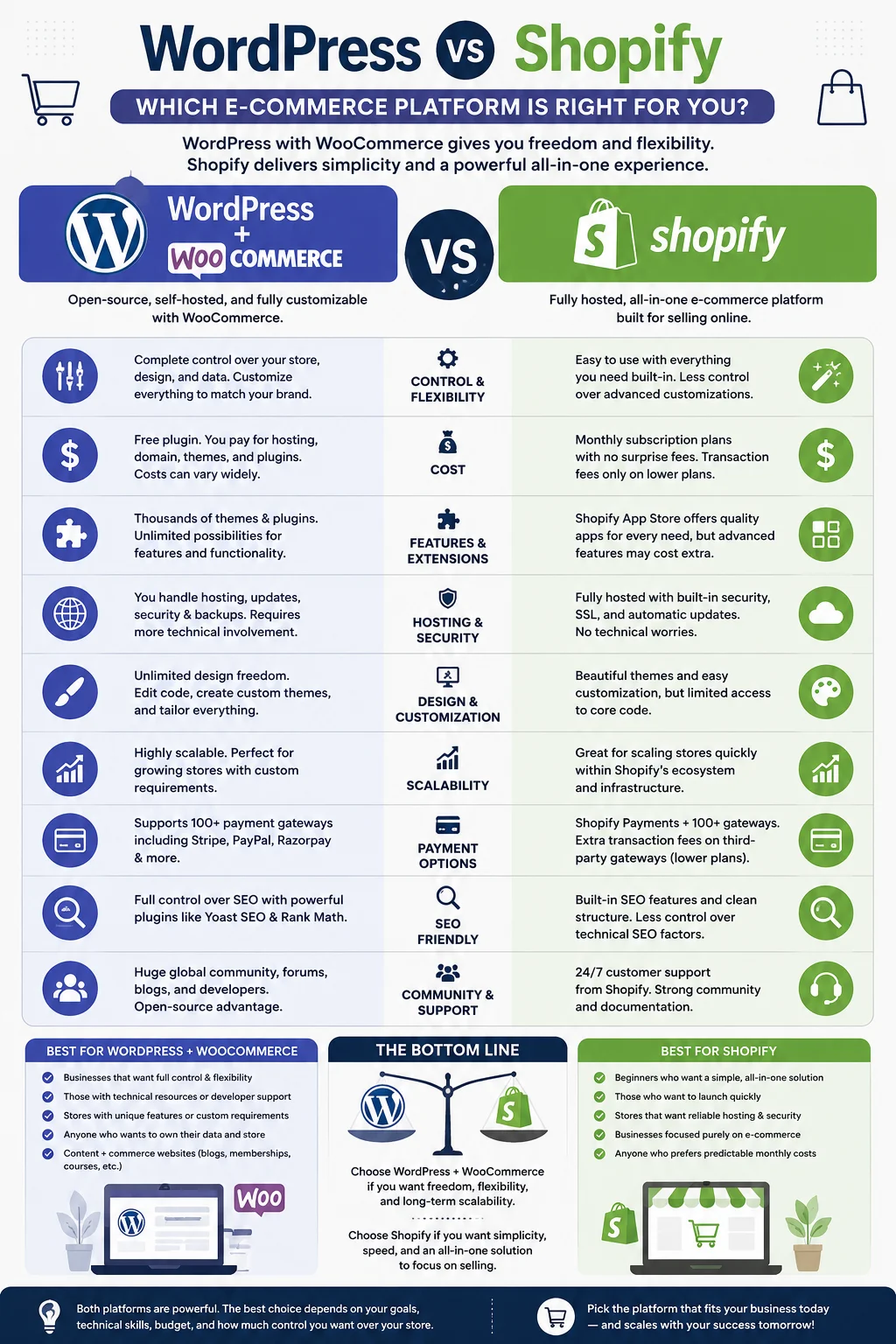
In this guide, we’ll break down everything you need to know about WordPress vs Shopify for e-commerce — from cost and ease of use to design flexibility, SEO, scalability, security, and long-term maintenance — so you can make a confident, informed decision for your business.
Table of Contents
- Quick Overview: WordPress vs Shopify
- What is WordPress (WooCommerce) for E-commerce?
- What is Shopify?
- Ease of Use
- Pricing Comparison
- Design and Customization
- E-commerce Features
- SEO Capabilities
- Scalability and Performance
- Security and Maintenance
- Payment Gateways and Transaction Fees
- Apps, Plugins, and Extensions
- Customer Support
- Multi-channel Selling
- Pros and Cons Summary
- Which One Should You Choose?
- Frequently Asked Questions
- Final Verdict
1. Quick Overview: WordPress vs Shopify
Before diving deep, here’s a snapshot of how these two platforms differ at a glance.
WordPress is a content management system (CMS) that, on its own, isn’t built for selling products. To turn it into an online store, you need to install a plugin called WooCommerce, which is free and adds full shopping cart functionality. Because WordPress is open-source, you have to arrange your own hosting, install your own SSL certificate, and take responsibility for updates and security — but in exchange, you get complete freedom over how your site looks, functions, and scales.
Shopify is a Software-as-a-Service (SaaS) platform designed exclusively for e-commerce. You sign up, pick a plan, choose a theme, and start adding products — hosting, security, and backups are all handled for you. The trade-off is that you’re working within Shopify’s ecosystem and rules, and ongoing costs can climb as your store grows.
In short: WordPress gives you control at the cost of complexity, while Shopify gives you convenience at the cost of some flexibility.
2. What is WordPress (WooCommerce) for E-commerce?
WordPress began as a blogging platform in 2003 and has since grown into the most widely used CMS on the internet, powering a substantial share of all websites globally. On its own, WordPress handles content — pages, blog posts, media — but it does not include native e-commerce functionality.
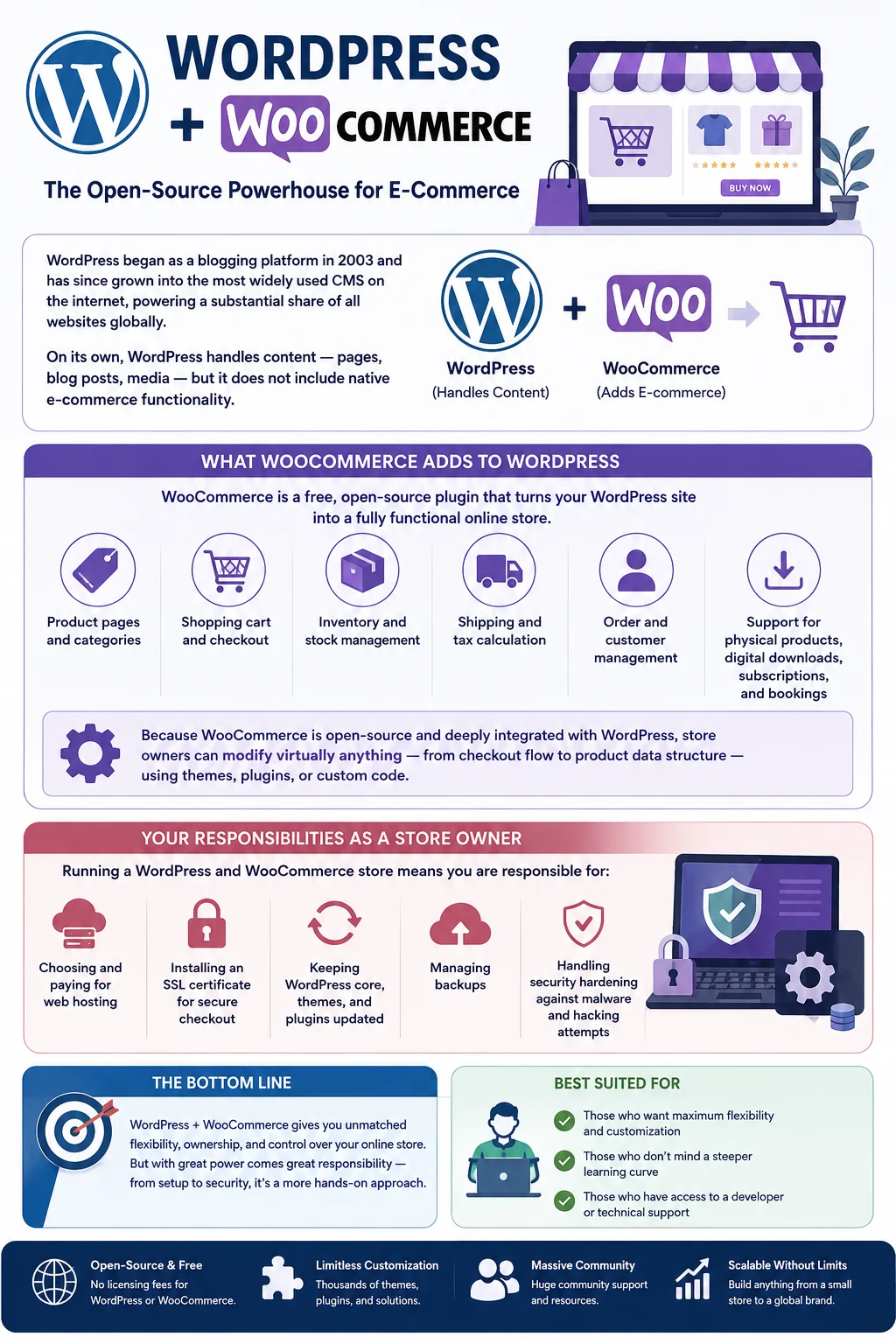
That’s where WooCommerce comes in. WooCommerce is a free, open-source plugin developed specifically to turn a WordPress site into a fully functional online store. Once installed, it adds:
- Product pages and categories
- Shopping cart and checkout
- Inventory and stock management
- Shipping and tax calculation
- Order and customer management
- Support for physical products, digital downloads, subscriptions, and bookings
Because WooCommerce is open-source and deeply integrated with WordPress, store owners can modify virtually anything — from checkout flow to product data structure — using themes, plugins, or custom code.
However, running a WordPress and WooCommerce store means you are responsible for:
- Choosing and paying for web hosting
- Installing an SSL certificate for secure checkout
- Keeping WordPress core, themes, and plugins updated
- Managing backups
- Handling security hardening against malware and hacking attempts
This makes WordPress a more hands-on option, best suited to those who want maximum flexibility and don’t mind a steeper learning curve, or who have access to a developer.
3. What is Shopify?
Shopify launched in 2006 with a singular focus: making it as easy as possible for anyone to start selling online. It is a fully hosted platform, meaning Shopify takes care of the technical infrastructure — servers, security, backups, and uptime — so you can focus purely on running your store.
With Shopify, you get:
- Built-in hosting and a free SSL certificate on every plan
- A drag-and-drop store builder with professionally designed themes
- Integrated payment processing through Shopify Payments (or third-party gateways)
- Inventory, order, and customer management dashboards
- Built-in tools for marketing, discounts, and abandoned cart recovery
- A large app marketplace to extend functionality
- Point-of-sale (POS) tools for businesses that also sell in person
Because everything is bundled together, Shopify significantly lowers the technical barrier to launching a store. You don’t need to know how to code, manage servers, or worry about compatibility issues between plugins. This convenience, however, comes at a recurring monthly cost, and customization beyond what Shopify’s theme editor allows often requires hiring a Shopify developer familiar with its Liquid templating language.
4. Ease of Use
For most beginners, this is often the deciding factor.
Shopify is built for simplicity. The setup wizard walks you through adding products, configuring shipping, and connecting a payment processor. The interface is clean and intuitive, and most non-technical users can have a basic store live within a day. Because Shopify controls the entire environment, there’s little risk of things breaking unexpectedly due to plugin conflicts or server misconfigurations.
WordPress with WooCommerce has a steeper learning curve. You’ll need to:
- Purchase hosting and a domain
- Install WordPress
- Install and configure WooCommerce
- Choose and configure a theme
- Install additional plugins for SEO, security, caching, and backups
Each of these steps introduces more decisions and more room for technical hiccups, especially for first-time users. That said, once set up, many store owners find the WordPress dashboard just as manageable day-to-day as Shopify’s.
Verdict: Shopify wins for beginners who want a fast, guided setup. WordPress requires more upfront effort but rewards you with more control once you’re comfortable with it.
5. Pricing Comparison
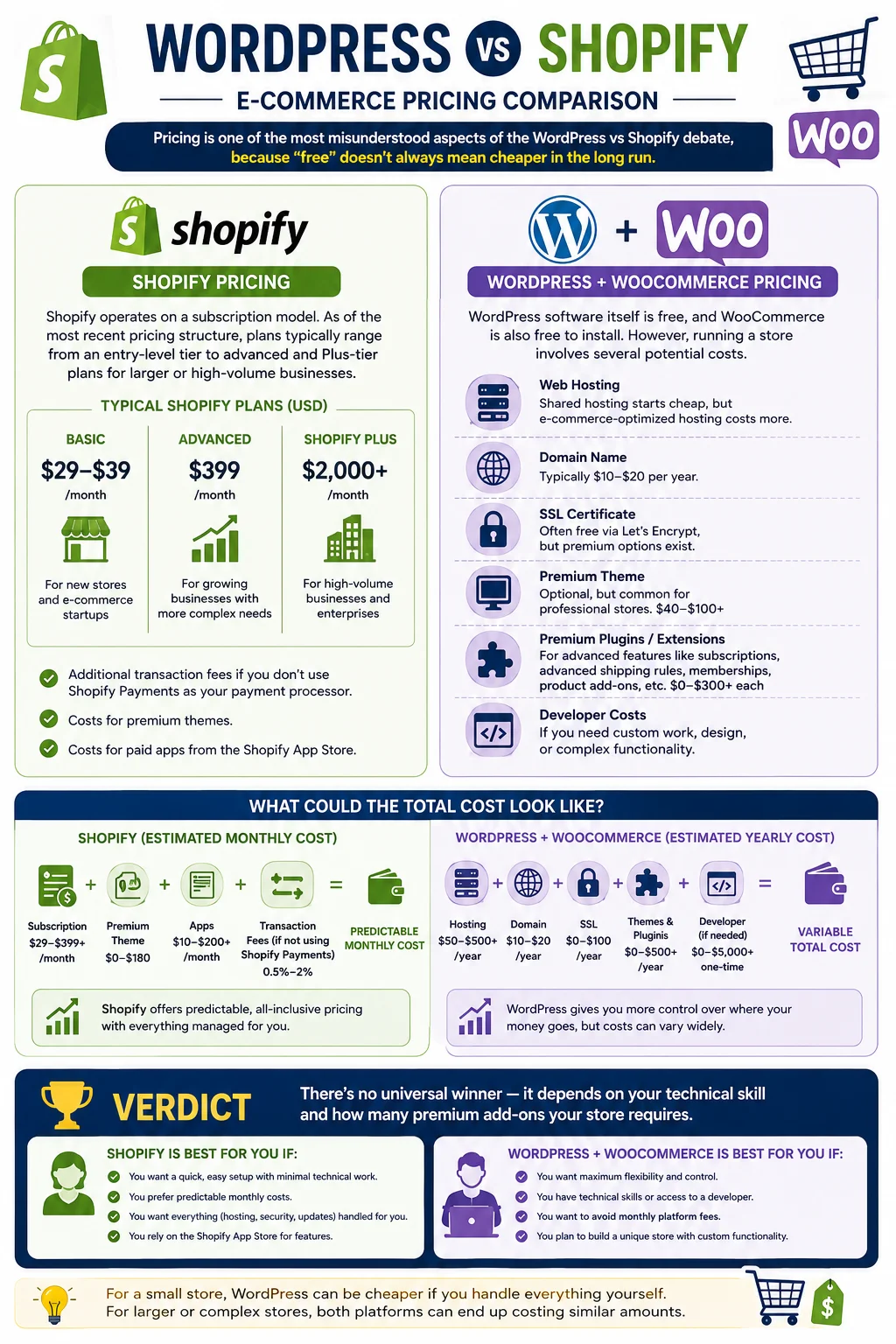
Pricing is one of the most misunderstood aspects of the WordPress vs Shopify for e-commerce debate, because “free” doesn’t always mean cheaper in the long run.
Shopify Pricing
Shopify operates on a subscription model. As of the most recent pricing structure, plans typically range from an entry-level tier (around $29-$39/month) for new stores, up to advanced and Plus-tier plans (hundreds to thousands of dollars per month) for larger or high-volume businesses. On top of the subscription, Shopify may charge additional transaction fees if you don’t use Shopify Payments as your payment processor, along with costs for premium themes and paid apps.
WordPress + WooCommerce Pricing
WordPress software itself is free, and WooCommerce is also free to install. However, running a store still involves costs such as:
- Web hosting (shared hosting starts cheap, but e-commerce-optimized hosting costs more)
- A domain name
- An SSL certificate (often free via Let’s Encrypt, but premium options exist)
- A premium theme (optional, but common for professional stores)
- Premium plugins/extensions for advanced features like subscriptions, advanced shipping rules, or memberships
- Developer costs if you need custom work done
For a small store, WordPress can sometimes be cheaper than Shopify’s monthly fee, especially if you’re comfortable doing your own setup and maintenance. But once you factor in premium plugins, a good host, and possibly developer help, the total cost can end up similar to or even higher than Shopify, depending on your needs.
Verdict: There’s no universal winner here — it depends on your technical skill and how many premium add-ons your store requires. Shopify offers predictable, all-inclusive pricing; WordPress offers more control over where your money goes but requires more careful budgeting.
6. Design and Customization
Shopify Themes
Shopify offers a curated theme store with free and premium options, all professionally designed and mobile-responsive. The built-in theme editor allows drag-and-drop customization of layout, colors, and fonts without touching code. For deeper customization, Shopify uses its own templating language called Liquid, which requires developer knowledge to modify extensively.
WordPress Themes
WordPress has an enormous library of both free and premium themes — arguably far larger and more varied than Shopify’s, since WordPress themes aren’t limited to e-commerce alone. Combined with page builders like Elementor or the native WordPress block editor, you can achieve a high level of design flexibility without deep coding knowledge. Because WordPress is open-source, developers can also modify virtually any aspect of a site’s design or functionality from the ground up.
Verdict: WordPress offers greater design freedom and a larger pool of themes, especially for highly customized or content-heavy stores. Shopify’s themes are more polished out of the box but relatively more restrictive without developer help.
7. E-commerce Features
Both platforms cover the essentials — product listings, cart, checkout, inventory, and order management — but there are differences worth noting.
Shopify was built specifically for selling, so features like abandoned cart recovery, discount codes, gift cards, and multi-currency selling are built in or easily enabled, even on lower-tier plans. It also includes POS integration for businesses selling both online and in physical retail locations.
WooCommerce matches or exceeds Shopify’s feature set once you add the right plugins, since there’s a plugin for nearly every conceivable e-commerce need — subscriptions, bookings, memberships, wholesale pricing, and more. The catch is that you often need to source, install, and pay for these plugins individually, and ensure they remain compatible with each other and with future WordPress updates.
Verdict: Shopify offers a more unified, ready-to-go feature set. WordPress offers similar (or greater) capability through plugins, but with more setup work.
8. SEO Capabilities
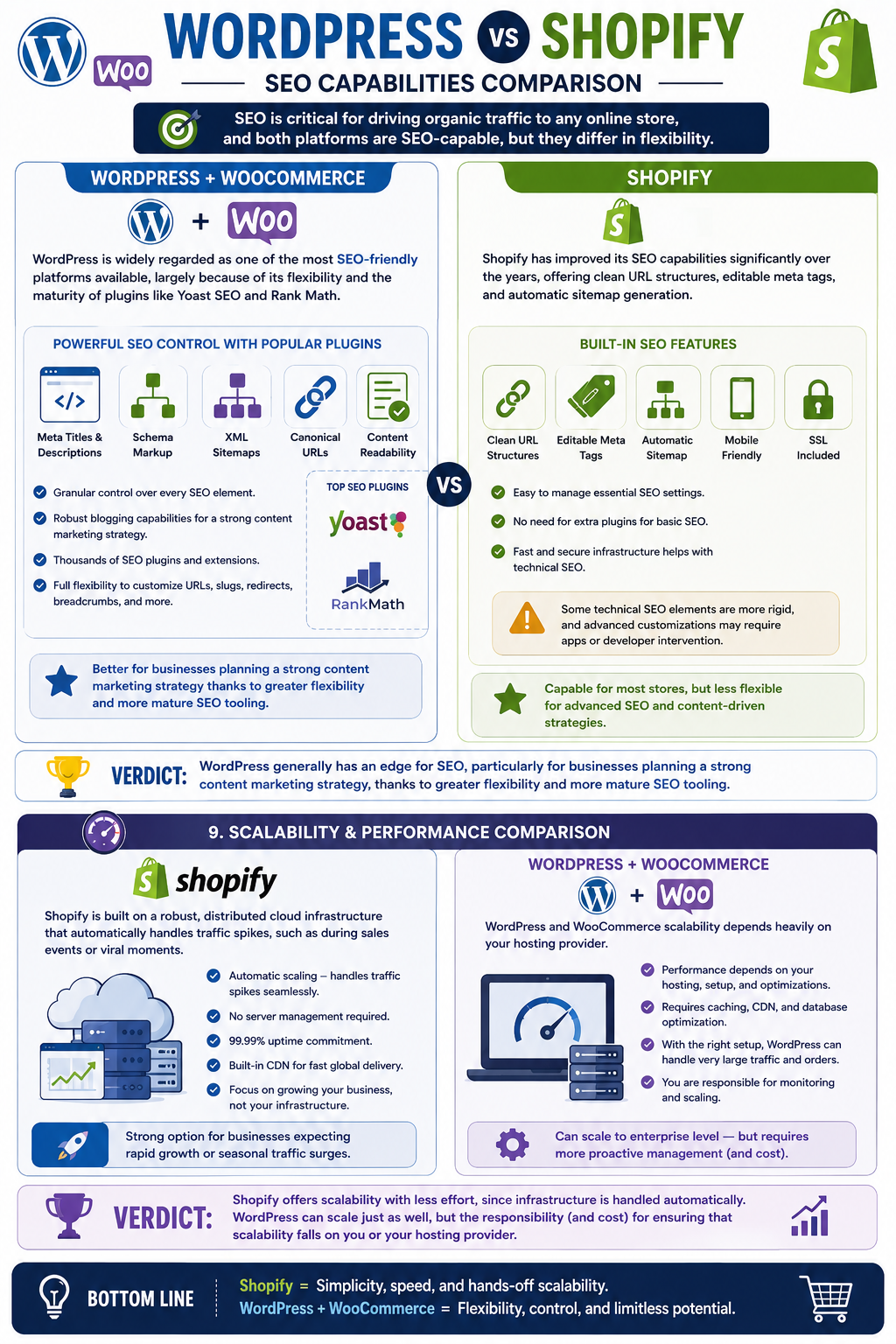
SEO is critical for driving organic traffic to any online store, and both platforms are SEO-capable, but they differ in flexibility.
WordPress website is widely regarded as one of the most SEO-friendly platforms available, largely because of its flexibility and the maturity of plugins like Yoast SEO and Rank Math. These plugins give you granular control over meta titles, descriptions, schema markup, sitemaps, canonical URLs, and content readability scoring. WordPress’s blogging capabilities are also more robust than Shopify’s, making it easier to build out a strong content marketing strategy alongside your store — an important factor since blogging and content are major organic traffic drivers.
Shopify has improved its SEO capabilities significantly over the years, offering clean URL structures, editable meta tags, and automatic sitemap generation. However, some technical SEO elements — like URL structure conventions for blog posts and collections — are more rigid than WordPress’s, and achieving certain advanced SEO customizations may require app installations or developer intervention.
Verdict: WordPress generally has an edge for SEO, particularly for businesses planning a strong content marketing strategy, thanks to greater flexibility and more mature SEO tooling.
9. Scalability and Performance
Shopify is built on a robust, distributed cloud infrastructure that automatically handles traffic spikes, such as during sales events or viral moments. You don’t need to worry about server capacity — Shopify manages it behind the scenes. This makes it a strong option for businesses expecting rapid growth or seasonal traffic surges.
WordPress and WooCommerce scalability depends heavily on your hosting provider. With basic shared hosting, a WooCommerce store can slow down or even crash under heavy traffic. However, with proper hosting (managed WordPress or WooCommerce-specific hosting, caching, and a content delivery network), WordPress stores can scale to handle very large volumes of traffic and transactions — it just requires more proactive management on your part.
Verdict: Shopify offers scalability with less effort, since infrastructure is handled automatically. WordPress can scale just as well, but the responsibility (and cost) for ensuring that scalability falls on you or your hosting provider.
10. Security and Maintenance
Shopify handles security entirely on the backend. SSL certificates, PCI DSS compliance, server security, and backups are all included and managed by Shopify. You don’t need to install security plugins or worry about server-level vulnerabilities.
WordPress requires you to manage security yourself. Because it’s open-source and widely used, WordPress sites (and outdated plugins/themes in particular) are common targets for hackers and malware. To keep a WooCommerce store secure, you’ll need to:
- Keep WordPress core, themes, and plugins updated
- Use a security plugin (like Wordfence or Sucuri)
- Set up regular backups
- Choose a reputable, security-conscious host
- Monitor for suspicious activity
This is more work, but it also means you’re not solely dependent on one company’s infrastructure decisions.
Verdict: Shopify is easier and more hands-off for security. WordPress demands more ongoing maintenance but offers more control over how that security is implemented.
11. Payment Gateways and Transaction Fees
Shopify supports numerous third-party payment gateways, but if you don’t use Shopify Payments (Shopify’s own processor), you’ll typically pay an additional transaction fee on top of standard card processing fees. Using Shopify Payments removes this extra fee.
WooCommerce, by contrast, doesn’t charge any platform-level transaction fees. You simply pay the standard processing fees charged by whichever payment gateway you integrate (such as Stripe or PayPal), since WooCommerce itself isn’t a payment processor.
Verdict: WordPress/WooCommerce has an edge here, since it avoids extra platform transaction fees regardless of which payment gateway you choose.
12. Apps, Plugins, and Extensions
Shopify’s App Store offers thousands of apps to extend your store’s functionality — from marketing automation to shipping calculators to loyalty programs. Many of the most useful apps come with their own monthly subscription costs, which can add up quickly.
WordPress’s plugin ecosystem is even larger, spanning far beyond e-commerce, since it covers the entire WordPress ecosystem (SEO, security, forms, page builders, and more, in addition to WooCommerce extensions). Many essential plugins are free, though premium ones are common for advanced functionality.
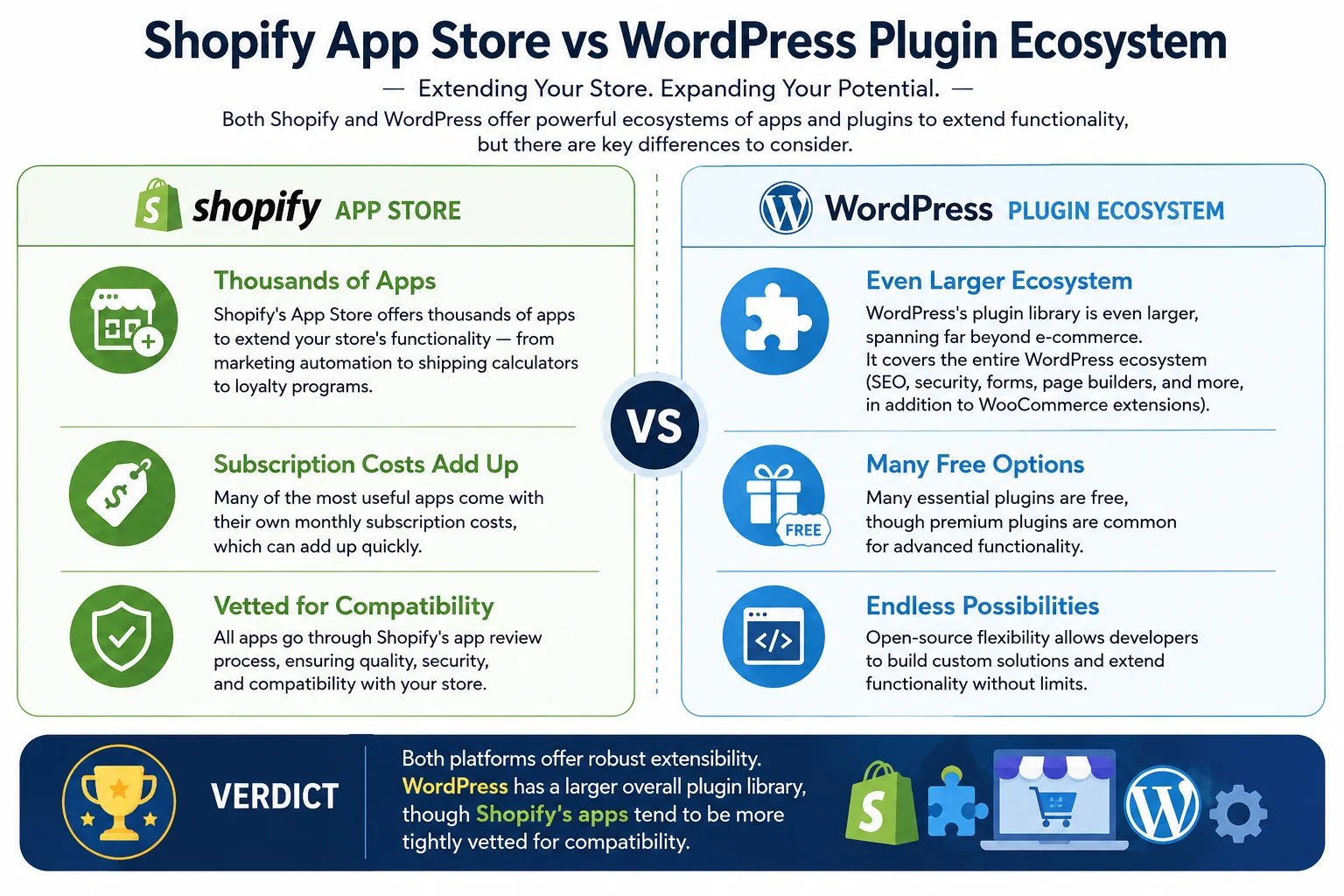
Verdict: Both platforms offer robust extensibility. WordPress has a larger overall plugin library, though Shopify’s apps tend to be more tightly vetted for compatibility since they go through Shopify’s app review process.
13. Customer Support
Shopify provides 24/7 customer support via live chat, email, and phone (availability can vary by plan and region), along with extensive documentation and a large community forum. Since Shopify controls the entire platform, their support team can often directly assist with technical issues.
WordPress doesn’t have a centralized support team, since it’s open-source software maintained by a community. However, WooCommerce offers its own documentation and support channels, and there’s a vast ecosystem of freelancers, agencies, and forums (including the WordPress.org support forums) available to help. Many hosting providers also offer WordPress-specific support as part of their packages.
Verdict: Shopify offers more direct, centralized support. WordPress relies on a broader (but more fragmented) community and third-party support ecosystem.
14. Multi-channel Selling
Shopify was built with omnichannel selling in mind. Its POS system integrates in-person sales with your online store’s inventory, and it connects seamlessly to marketplaces and social platforms like Instagram, Facebook, and Amazon, syncing inventory and orders across channels.
WooCommerce can also integrate with marketplaces and social selling channels through plugins, but this often requires more manual setup and configuration compared to Shopify’s more streamlined, native integrations.
Verdict: Shopify has a smoother, more integrated approach to multi-channel and omnichannel selling.
15. Pros and Cons Summary
Shopify Pros:
- Quick and easy setup, ideal for beginners
- Hosting, security, and backups fully managed
- Reliable scalability during traffic spikes
- Centralized 24/7 support
- Strong built-in e-commerce features and POS integration
Shopify Cons:
- Recurring monthly costs that increase with growth
- Potential extra transaction fees without Shopify Payments
- Less design and functional flexibility outside the Shopify ecosystem
- Ongoing app subscription costs
WordPress (WooCommerce) Pros:
- Free core software with full ownership and control
- Extremely flexible design and functionality
- Strong SEO and content marketing capabilities
- No mandatory transaction fees
- Massive plugin and theme ecosystem
WordPress (WooCommerce) Cons:
- Steeper learning curve for beginners
- You’re responsible for hosting, security, and updates
- Scalability depends on your hosting setup
- Support is community-based, not centralized
16. Which One Should You Choose?
The right choice in the WordPress vs Shopify for e-commerce decision ultimately comes down to your priorities, technical comfort level, and long-term business goals.
Choose Shopify if:
- You want to launch quickly with minimal technical setup
- You’d rather pay a predictable monthly fee than manage hosting and security yourself
- You plan to sell across multiple channels, including in-person via POS
- You don’t have (or want) a developer on hand for ongoing maintenance
Choose WordPress with WooCommerce if:
- You want full control over design, functionality, and data
- Content marketing and SEO are central to your growth strategy
- You’re comfortable managing (or hiring someone to manage) hosting, updates, and security
- You want to avoid recurring platform fees and transaction surcharges
Some businesses even start on Shopify for its simplicity and later migrate to WordPress and WooCommerce as they scale and want more customization — though migration in either direction does involve careful planning around SEO, product data, and design continuity.
17. Frequently Asked Questions
Is Shopify better than WordPress for e-commerce? Neither is universally “better” — Shopify is better for ease of use and hands-off management, while WordPress is better for flexibility, content-driven SEO, and long-term cost control if you have some technical know-how.
Is WordPress cheaper than Shopify? It can be, especially for smaller stores, but total cost depends on hosting, premium themes/plugins, and any developer help you need. Shopify’s pricing is more predictable, while WordPress’s cost depends on your specific setup.
Which platform is better for SEO, WordPress or Shopify? WordPress generally has an edge for SEO due to its flexibility, mature SEO plugins, and stronger blogging/content capabilities, though Shopify has made significant SEO improvements in recent years.
Can I switch from Shopify to WordPress (or vice versa) later? Yes, migration is possible in either direction, though it requires careful handling of product data, URLs, and redirects to preserve SEO rankings and avoid disrupting customer experience.
Do I need coding skills to use WordPress or Shopify? Neither platform strictly requires coding skills for basic setup, especially Shopify. However, WordPress customization beyond basic themes often benefits from at least some technical knowledge or developer assistance.
Which is more secure, WordPress or Shopify? Shopify manages security on your behalf as part of its hosted service. WordPress requires you to actively maintain security through updates, plugins, and good hosting, but can be made just as secure with proper management.
18. Final Verdict
There’s no single winner in the WordPress vs Shopify for e-commerce comparison — the “best” platform depends entirely on your business needs, technical comfort, and growth plans. If you want a fast, guided, all-in-one solution with minimal ongoing maintenance, Shopify is likely the better fit. If you value flexibility, content-driven SEO, and long-term control over your store’s design and functionality — and don’t mind a bit more setup and maintenance — WordPress with WooCommerce is a compelling choice.
Whichever platform you choose, the most important factor is aligning it with your business goals, budget, and willingness to manage the technical side of running an online store. Both WordPress and Shopify have proven, at scale, that they can support successful, growing e-commerce businesses — the right one is simply the one that fits how you want to work.