
How Much Does a WordPress Website Cost in 2026?
If you’ve been asking yourself “how much does a WordPress website cost in 2026,” you’re not alone. It’s one of the most searched questions among entrepreneurs, small business owners, bloggers, and anyone planning to launch an online presence this year. The honest answer to how much does a WordPress website cost in 2026 is: it depends entirely on your goals, your technical skill, and how much you’re willing to do yourself versus hand off to a professional.
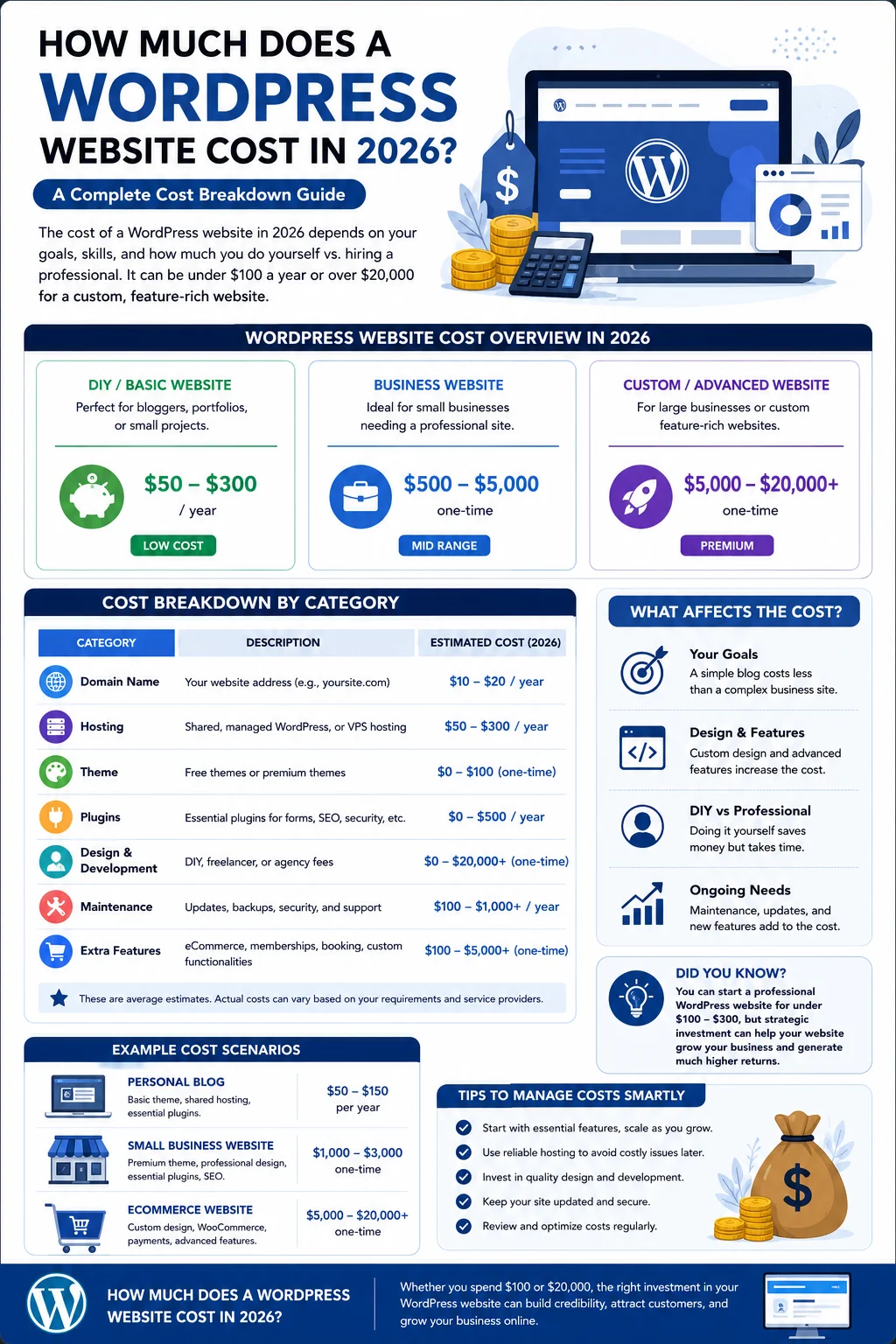
Some people build a simple WordPress site for under $100 a year. Others invest $20,000 or more into a custom-designed, feature-rich business website. Both are valid answers to how much does a WordPress website cost in 2026 — they just describe two completely different projects.
In this guide, we’ll break down every cost category associated with building and running a WordPress website in 2026, from domain names and hosting to themes, plugins, developer fees, and ongoing maintenance. By the end, you’ll have a realistic number in mind for your own project, and you’ll understand exactly why the answer to how much does a WordPress website cost in 2026 varies so widely from one website to the next.
WordPress.org vs. WordPress.com: Why This Matters for Pricing
Before diving into numbers, it’s important to clear up a common point of confusion. There are two versions of WordPress, and they have very different cost structures.
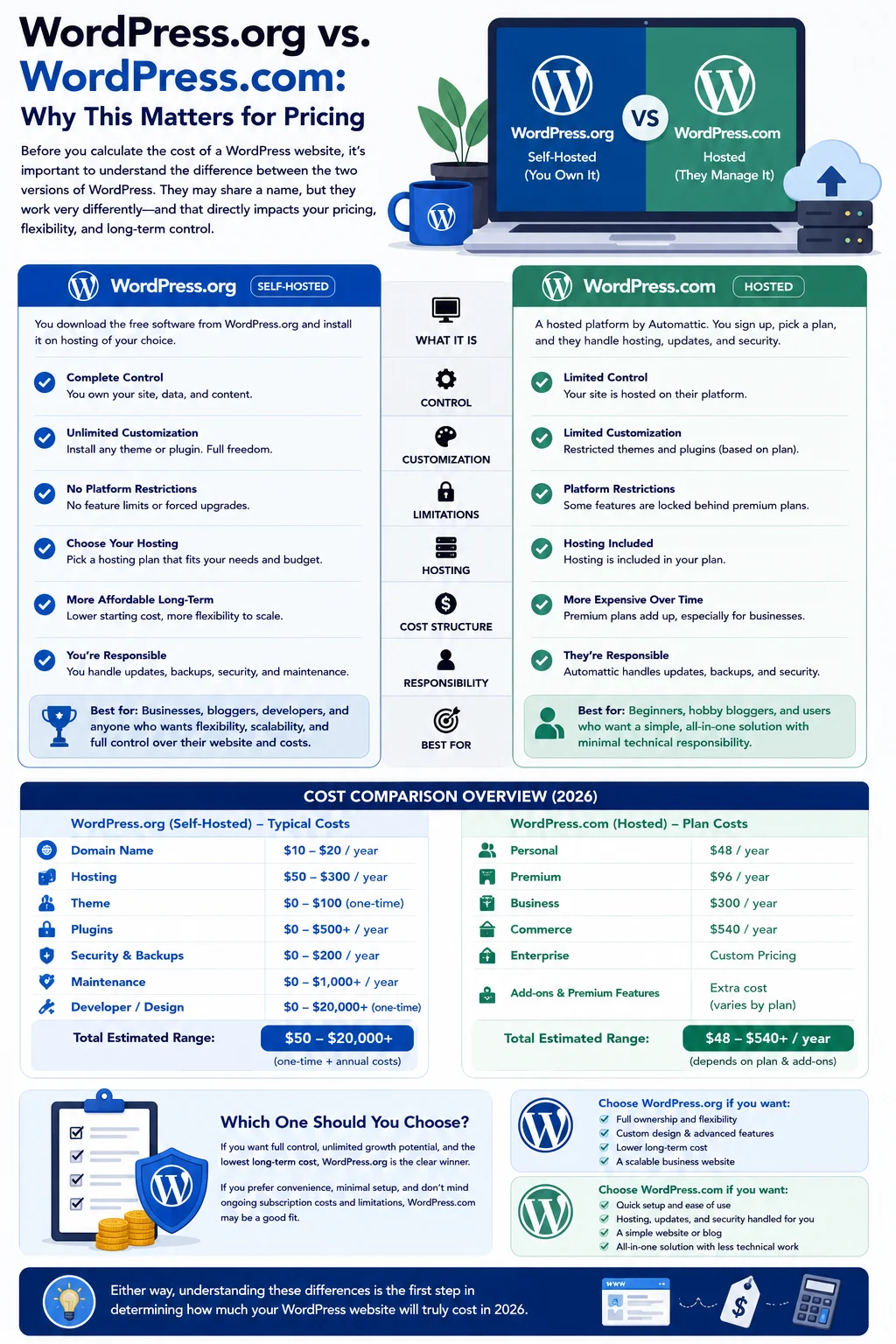
WordPress.com is a hosted platform. You sign up, pick a plan, and the company (Automattic) takes care of hosting, updates, and security for you. It’s more like Wix or Squarespace in terms of convenience, but it comes with more restrictions on customization, and premium plans can get expensive quickly.
WordPress.org is the free, open-source software that most people mean when they talk about “WordPress.” You download it for free and install it on hosting of your own choosing. This gives you complete control over design, functionality, and cost, but it also means you’re responsible for sourcing your own hosting, domain, security, and maintenance.
This guide focuses on WordPress.org, the self-hosted version, because that’s what the vast majority of freelancers, agencies, and businesses use when they talk about building a WordPress website. It’s also the version that gives you the most flexibility to control your budget, which is central to answering how much does a WordPress website cost in 2026 for your specific situation.
The Short Answer: WordPress Website Cost Ranges in 2026
If you want a quick answer to how much does a WordPress website cost in 2026, here’s a snapshot before we go deeper:
- DIY personal blog or portfolio: $50–$300 for the first year
- DIY small business website: $100–$800 for the first year
- Freelancer-built small business site: $500–$5,000
- Agency-built professional website: $3,000–$15,000
- eCommerce website (WooCommerce): $800–$25,000+
- Enterprise or highly custom website: $25,000–$100,000+
Ongoing annual costs, covering hosting renewals, plugin licenses, security, and maintenance, typically range from $50 a year for a bare-bones DIY blog to $10,000+ a year for a large business site with dedicated support. Now let’s unpack exactly where these numbers come from.
1. Domain Name Costs
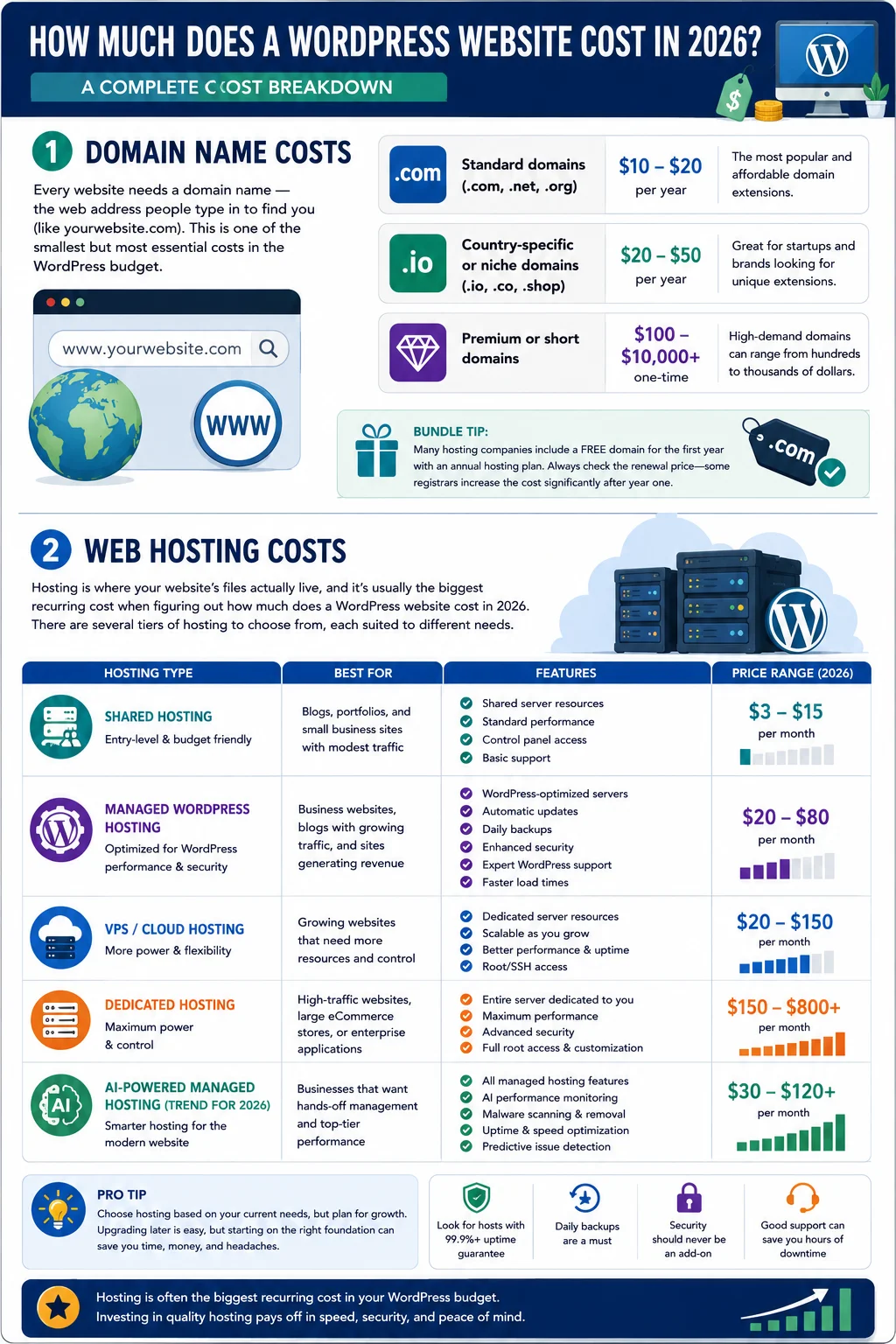
Every website needs a domain name — the web address people type in to find you (like yourwebsite.com). This is one of the smallest but most essential costs in the WordPress budget.
- Standard domains (.com, .net, .org): roughly $10–$20 per year
- Country-specific or niche domains (.io, .co, .shop): often $20–$50 per year
- Premium or short domains: can range from $100 to several thousand dollars, depending on demand
Many hosting companies bundle a free domain for the first year with an annual hosting plan, which can make your initial cost look lower than what you’ll actually pay at renewal. It’s worth checking the renewal price before committing, since some registrars raise the price significantly after the first year.
2. Web Hosting Costs
Hosting is where your website’s files actually live, and it’s usually the biggest recurring cost when figuring out how much does a WordPress website cost in 2026. There are several tiers of hosting to choose from, each suited to different needs.
Shared Hosting ($3–$15/month) This is the entry point for most new websites. Your site shares server resources with other websites, which keeps the price low but can slow things down during traffic spikes. It’s a reasonable starting point for blogs, portfolios, and small business sites with modest traffic.
Managed WordPress Hosting ($20–$80/month) Providers like WP Engine, Kinsta, and SiteGround specialize in WordPress-specific hosting. You get automatic updates, daily backups, enhanced security, and faster load times. This tier makes sense once your site starts generating real traffic or revenue, since downtime becomes more costly than the extra monthly fee.
VPS or Cloud Hosting ($20–$150/month) A virtual private server gives you dedicated resources without the full cost of a dedicated server. This is a good middle ground for growing sites that have outgrown shared hosting but don’t yet need enterprise-level infrastructure.
Dedicated Hosting ($150–$800+/month) Reserved for high-traffic websites, large eCommerce stores, or enterprise applications that need maximum performance, uptime, and control.
One trend worth noting for 2026 is the rise of AI-powered managed hosting plans, which bundle automated performance monitoring, malware scanning, and uptime optimization into the hosting price. These plans tend to sit slightly above traditional managed hosting in price but can reduce the time and money you’d otherwise spend on separate security and monitoring tools.
3. WordPress Themes: Free vs. Premium
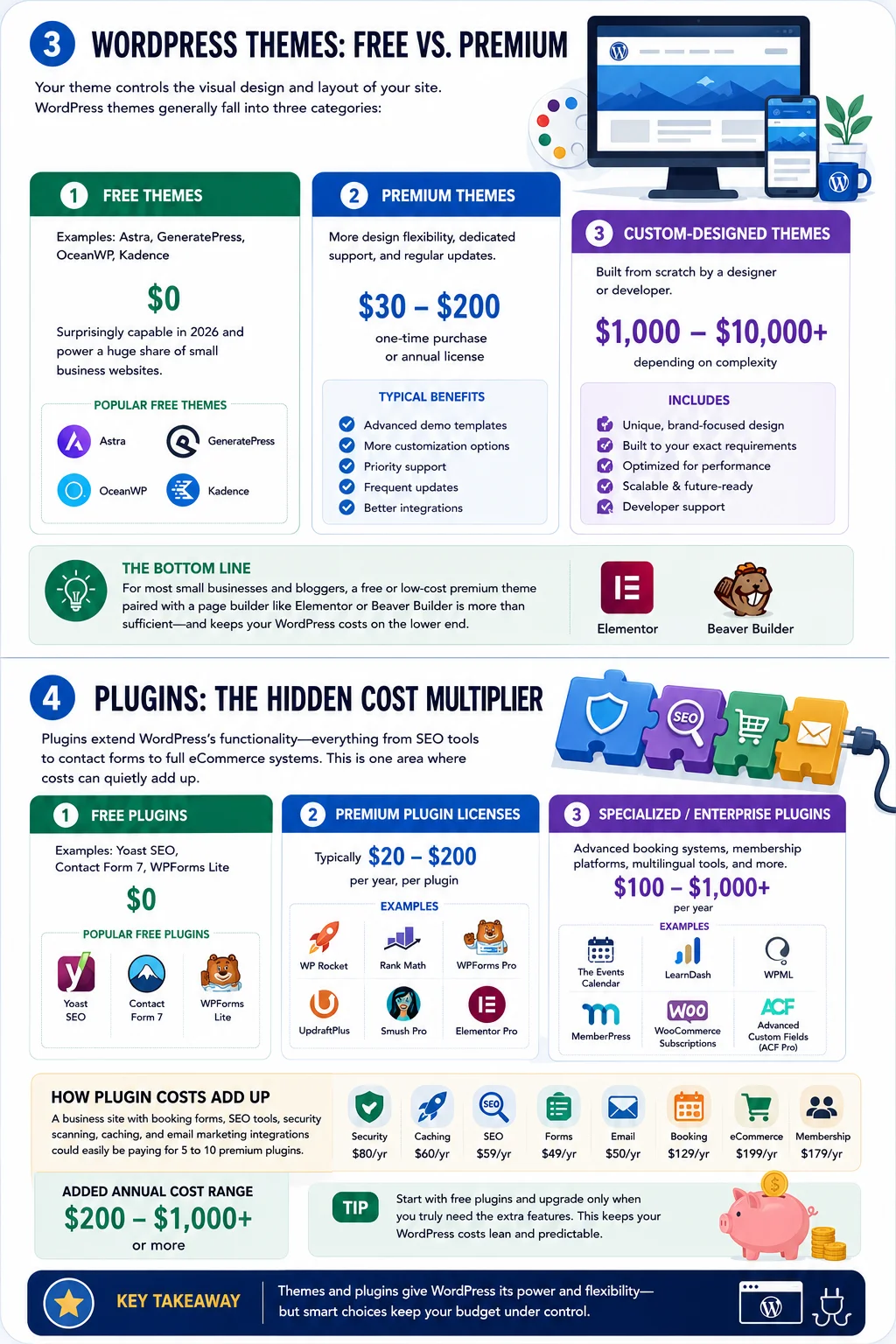
Your theme controls the visual design and layout of your site. WordPress themes generally fall into three categories:
- Free themes (Astra, GeneratePress, OceanWP, Kadence): $0. These are surprisingly capable in 2026 and power a huge share of small business websites.
- Premium themes: $30–$200 as a one-time purchase, or sometimes an annual license fee. These typically include more design flexibility, dedicated support, and regular updates.
- Custom-designed themes: Built from scratch by a designer or developer, these can range from $1,000 to $10,000+ depending on complexity.
For most small businesses and bloggers, a free or low-cost premium theme paired with a page builder like Elementor or Beaver Builder is more than sufficient, and it keeps the answer to how much does a WordPress website cost in 2026 on the lower end of the spectrum.
4. Plugins: The Hidden Cost Multiplier
Plugins extend WordPress’s functionality — everything from SEO tools to contact forms to full eCommerce systems. This is one area where costs can quietly add up.
- Free plugins (Yoast SEO, Contact Form 7, WPForms Lite): $0
- Premium plugin licenses: typically $20–$200 per year, per plugin
- Specialized or enterprise plugins (advanced booking systems, membership platforms, multilingual tools): $100–$1,000+ per year
A simple site might only need two or three free plugins. A business site with booking forms, SEO tools, security scanning, caching, and email marketing integrations could easily be paying for five to ten premium plugins, which can add $200–$1,000 or more per year to your total.
5. SSL Certificates and Security
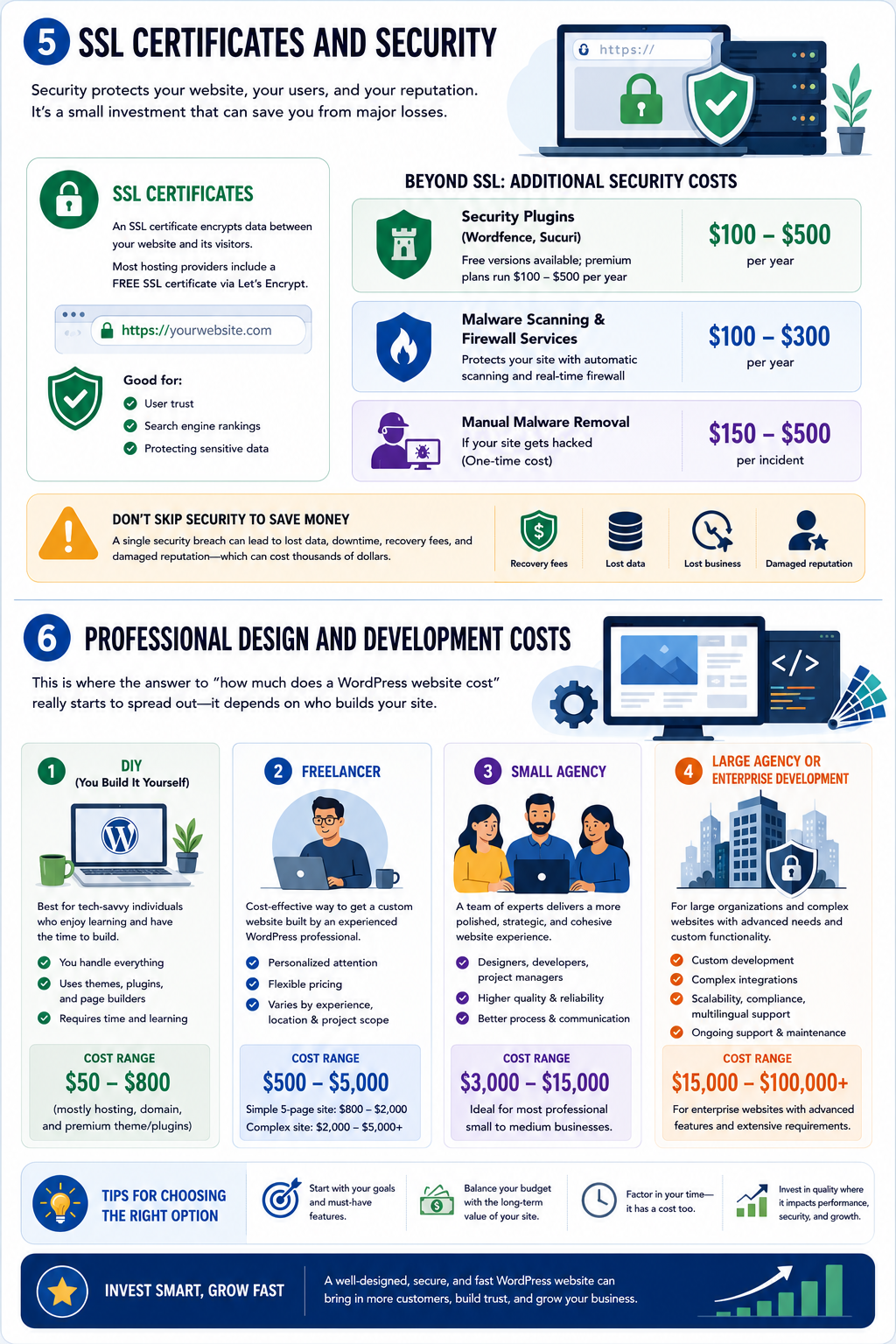
An SSL certificate encrypts data between your website and its visitors, and it’s now considered a non-negotiable requirement — both for user trust and for search engine rankings. The good news is that most hosting providers now include a free SSL certificate via Let’s Encrypt.
Beyond SSL, security costs can include:
- Security plugins (Wordfence, Sucuri): free versions available; premium plans run $100–$500 per year
- Malware scanning and firewall services: $100–$300 per year
- Manual malware removal (if your site gets hacked): $150–$500 per incident
Skipping security to save money is one of the most common mistakes business owners make, and it often ends up costing far more in recovery fees, lost data, and damaged reputation than the modest yearly investment in proper protection.
6. Professional Design and Development Costs
This is where the answer to how much does a WordPress website cost really starts to spread out, because it depends heavily on who builds your site.
DIY (You Build It Yourself) Cost: $50–$800 (mostly hosting, domain, and premium theme/plugins) If you’re comfortable using a page builder and following tutorials, you can build a perfectly functional website without hiring anyone. This is the most budget-friendly route, though it requires time and a willingness to learn.
Freelancer Cost: $500–$5,000 Freelancers typically charge less than agencies while still offering custom design and development. Rates vary based on experience, location, and project scope. A simple 5-page business website from a freelancer might cost $800–$2,000, while a more complex site with custom functionality could reach $5,000 or more.
Small Agency Cost: $3,000–$15,000 Agencies bring a team — designers, developers, project managers, and sometimes copywriters — which typically results in a more polished, cohesive final product. This range covers most professional small-to-medium business websites.
Large Agency or Enterprise Development Cost: $15,000–$100,000+ Enterprise websites often involve custom functionality, complex integrations with internal systems, multilingual support, advanced security compliance, and extensive content migration. Large corporations and organizations with complex needs fall into this bracket.
7. eCommerce-Specific Costs (WooCommerce)
If you’re building an online store, the calculation for how much does a WordPress website cost changes significantly. WooCommerce, the most popular WordPress eCommerce plugin, is free to install, but running a store involves several additional costs:
- Payment processing fees: typically around 2.9% + $0.30 per transaction
- Premium WooCommerce extensions (subscriptions, advanced shipping, bookings): $50–$300 each, often billed annually
- Product photography: $200–$2,000 depending on catalog size
- Inventory management tools: $20–$100/month
- More robust hosting: eCommerce sites generally need managed or VPS hosting to handle transaction traffic reliably
Altogether, a functional small-to-medium online store typically runs from $800 on the low end (DIY with free plugins and a modest product catalog) up to $10,000–$25,000+ for a professionally built store with custom design and advanced functionality.
8. Content Creation Costs
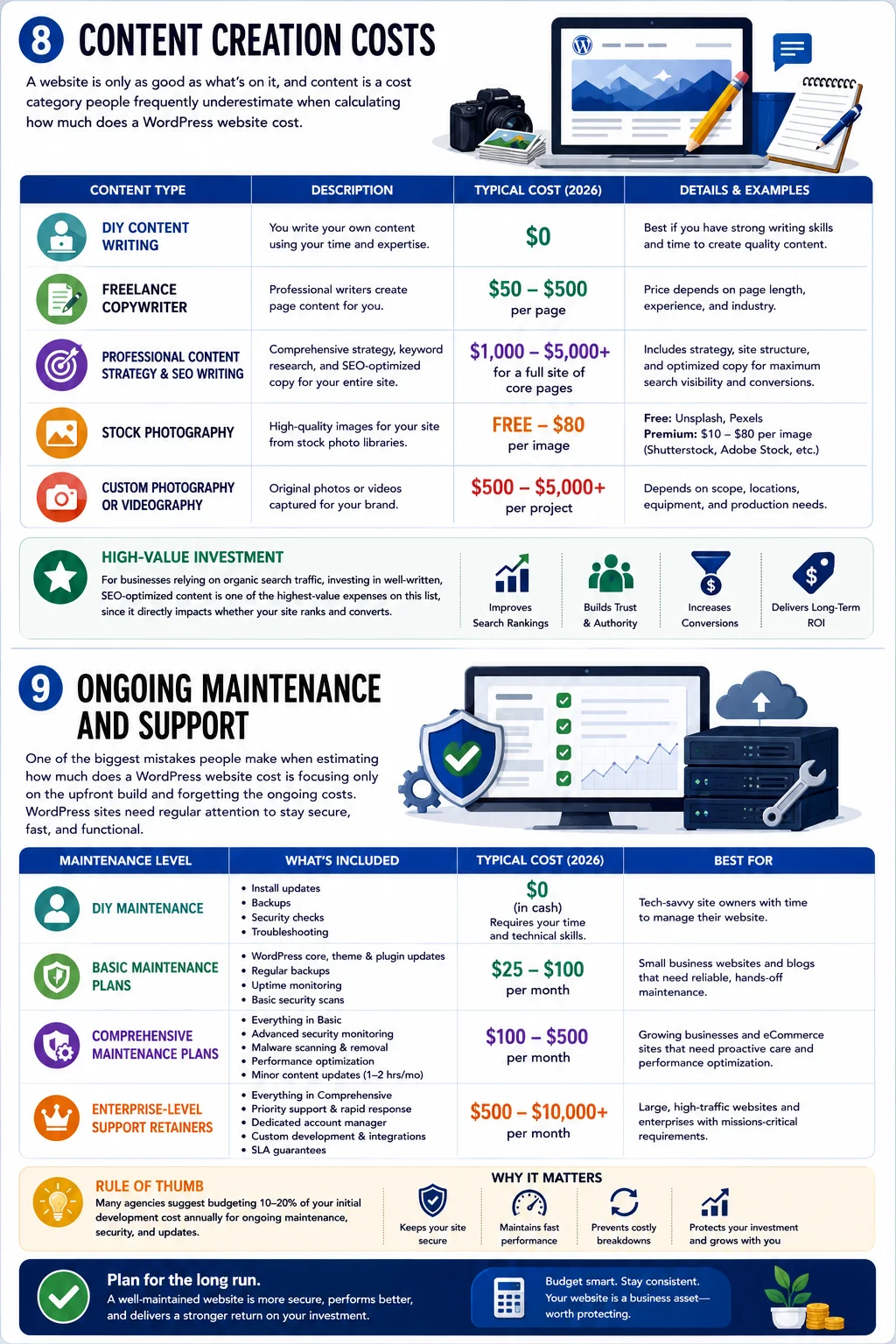
A website is only as good as what’s on it, and content is a cost category people frequently underestimate when calculating how much does a WordPress website cost.
- DIY content writing: $0 (your own time)
- Freelance copywriter: $50–$500 per page, depending on length and expertise
- Professional content strategy and SEO copywriting: $1,000–$5,000+ for a full site of core pages
- Stock photography: free (Unsplash, Pexels) to $10–$80 per image for premium stock
- Custom photography or videography: $500–$5,000+
For businesses relying on organic search traffic, investing in well-written, SEO-optimized content is often one of the highest-value expenses on this list, since it directly impacts whether your site ranks and converts.
9. Ongoing Maintenance and Support
One of the biggest mistakes people make when estimating how much does a WordPress website cost is focusing only on the upfront build and forgetting the ongoing costs. WordPress sites need regular attention to stay secure, fast, and functional.
Typical ongoing maintenance costs include:
- DIY maintenance: $0 in cash, but requires your time for updates and backups
- Basic maintenance plans: $25–$100/month (updates, backups, uptime monitoring)
- Comprehensive maintenance plans: $100–$500/month (includes security monitoring, performance optimization, and minor content updates)
- Enterprise-level support retainers: $500–$10,000+/month for large, high-traffic sites
As a rule of thumb, many agencies suggest budgeting 10–20% of your initial development cost annually for ongoing maintenance, security, and updates.
Putting It All Together: Realistic Budget Scenarios
To make the answer to how much does a WordPress website cost more concrete, here are three realistic scenarios.
Scenario 1: The Solo Blogger
- Domain: $15/year
- Shared hosting: $60/year
- Free theme and plugins: $0
- Total first-year cost: roughly $75–$150
Scenario 2: The Small Business Owner
- Domain: $15/year
- Managed hosting: $300/year
- Premium theme: $60 (one-time)
- Premium plugins (SEO, forms, security): $150/year
- Freelance developer for setup and design: $1,500 (one-time)
- Basic maintenance plan: $600/year
- Total first-year cost: roughly $2,600
- Ongoing annual cost: roughly $1,000–$1,200
Scenario 3: The Growing eCommerce Store
- Domain: $15/year
- Managed WooCommerce hosting: $600/year
- Premium theme: $80 (one-time)
- Premium plugins and extensions: $500/year
- Agency-built store with custom design: $8,000 (one-time)
- Comprehensive maintenance plan: $2,400/year
- Total first-year cost: roughly $11,600
- Ongoing annual cost: roughly $3,500
These scenarios show just how differently the numbers can shake out depending on your goals, and why there’s no single figure that answers how much does a WordPress website cost for every situation.
Factors That Push Your WordPress Costs Higher
Several factors consistently drive up the cost of a WordPress website, regardless of who builds it:
- Custom functionality — booking systems, membership portals, custom dashboards, or integrations with third-party software all add development time and cost.
- Number of pages — a 5-page site costs far less to design and write for than a 50-page site.
- Design complexity — fully custom designs cost more than templates, but they also offer more brand differentiation.
- Traffic and performance requirements — high-traffic sites need more robust (and more expensive) hosting.
- Compliance needs — accessibility standards, GDPR compliance, or industry-specific regulations (like HIPAA for healthcare sites) can add significant development and legal review costs.
- Redesign frequency — businesses that refresh their branding or website design every one to two years will naturally spend more over time than those who maintain a stable design for five-plus years.
Ways to Reduce WordPress Website Costs Without Cutting Corners
If your budget is tight, there are legitimate ways to bring down the cost of your WordPress site without sacrificing quality:
- Start with a quality free theme rather than jumping straight to a premium or custom design.
- Choose managed hosting only once you need it — shared hosting is perfectly fine for a new site with modest traffic.
- Use free versions of essential plugins and upgrade to premium only when you hit a genuine limitation.
- Write your own content first, then hire a copywriter to refine and optimize it, rather than outsourcing everything from scratch.
- Bundle services with one hosting provider where possible (domain, SSL, hosting) to reduce the number of separate bills and take advantage of introductory bundle pricing.
- Learn basic WordPress maintenance (running updates, checking backups) to delay the need for a paid maintenance plan.
Is WordPress Still Worth the Cost in 2026?
Despite newer no-code website builders entering the market, WordPress continues to power a large share of the web — a testament to its flexibility, its enormous plugin ecosystem, and the fact that it can scale from a simple blog to a full enterprise platform without switching systems. For most individuals and businesses, the range of options available means you can almost always find a configuration of WordPress that fits your budget, whether that’s $100 a year or $50,000 upfront.
The key takeaway when it comes to how much does a website cost in 2026 is that the platform itself is free, and your total cost is really a reflection of the choices you make: how much you do yourself versus hire out, how customized your design needs to be, and how much ongoing support your website requires to stay secure and effective.
Frequently Asked Questions
Is WordPress really free? The WordPress.org software itself is free and open-source. Your actual costs come from hosting, domain registration, themes, plugins, and any professional services you choose to use.
How much does a WordPress website cost for a small business? Most small businesses can expect to pay somewhere between $1,000 and $10,000 for a professionally built website, plus ongoing annual costs of $500–$2,000 for hosting, plugins, and maintenance.
Can I build a WordPress website for under $100? Yes. Using free hosting trials, a low-cost domain, and free themes and plugins, it’s possible to launch a basic site for under $100 for the first year, though you’ll still need to budget for renewal costs going forward.
How much does a WordPress website cost compared to Wix or Squarespace? WordPress.org typically offers more flexibility and can be cheaper long-term for larger, more complex sites, while hosted builders like Wix or Squarespace may have a lower barrier to entry but less customization and can become more expensive as you add advanced features.
Do I need to hire a developer to use WordPress? Not necessarily. Many people successfully build their own WordPress websites using page builders and free themes. A developer becomes valuable when you need custom functionality, complex integrations, or a highly polished, bespoke design.
Final Thoughts
So, how much does a website cost in 2026? As this guide shows, the honest answer is: anywhere from under $100 to well over $50,000, depending entirely on your specific goals, the complexity of your site, and whether you build it yourself or bring in professional help. The best approach is to start by defining what your website actually needs to do, then work backward to a budget that reflects those real requirements rather than an arbitrary number. With WordPress’s flexibility, there’s a realistic, well-planned option for virtually every budget in 2026.