
WooCommerce vs Shopify Comparison: Which eCommerce Platform Is Right for You in 2026?
When it comes to building an online store, the WooCommerce vs Shopify comparison is one of the most searched and debated topics among entrepreneurs, small business owners, and enterprise brands alike. Both platforms power millions of online stores worldwide, yet they take fundamentally different approaches to helping you sell products online. WooCommerce is a free, open-source plugin built on top of WordPress, offering unmatched flexibility and control. Shopify, on the other hand, is a fully hosted, all-in-one SaaS platform designed for simplicity and speed of setup.
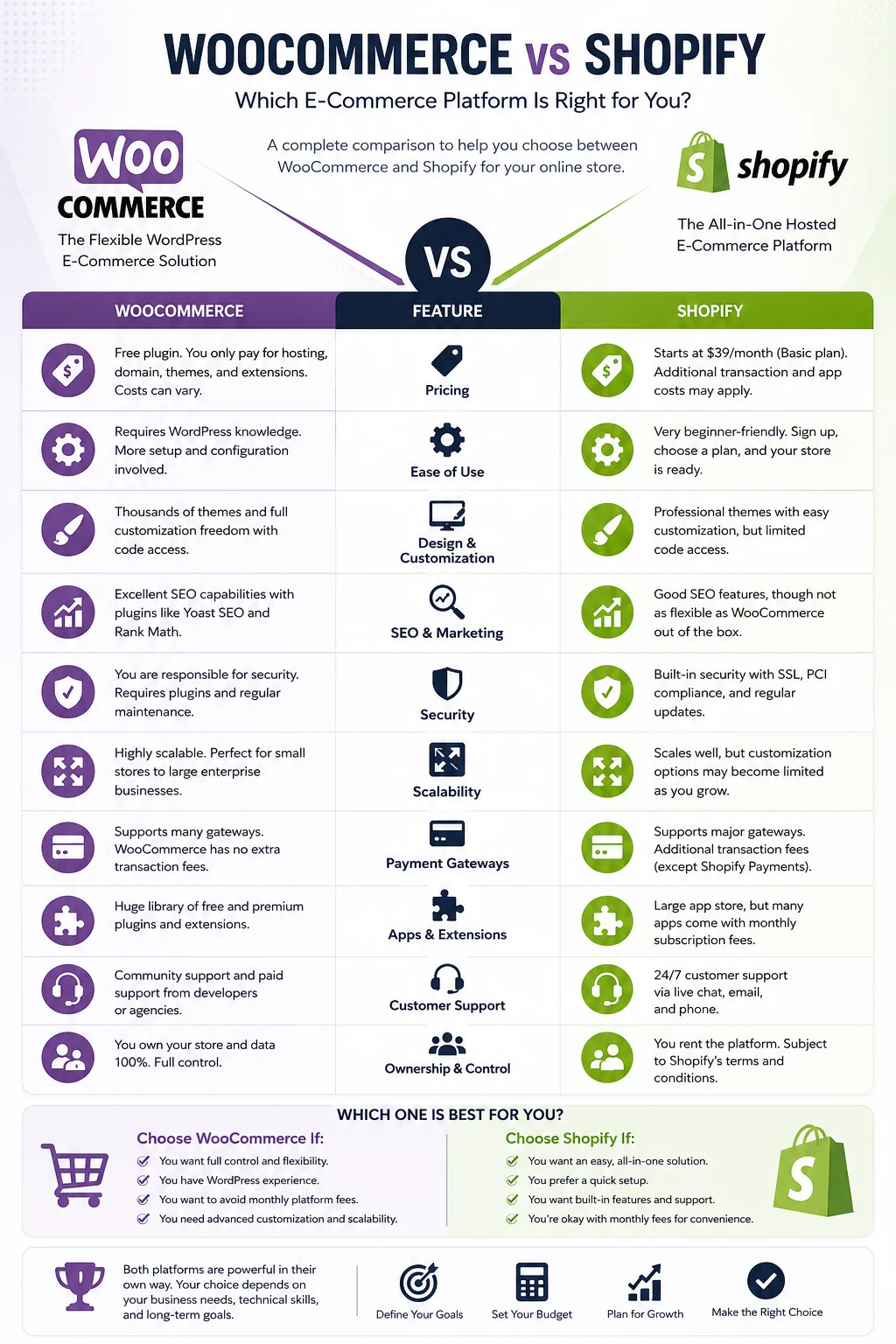
Choosing between them isn’t just a technical decision — it affects your budget, your ability to scale, your marketing capabilities, and how much time you’ll spend managing your store versus running your business. This comprehensive guide breaks down every major factor in the WooCommerce vs Shopify comparison, including pricing, ease of use, design flexibility, SEO performance, security, scalability, and customer support, so you can make an informed decision for your online store.
What Is WooCommerce?
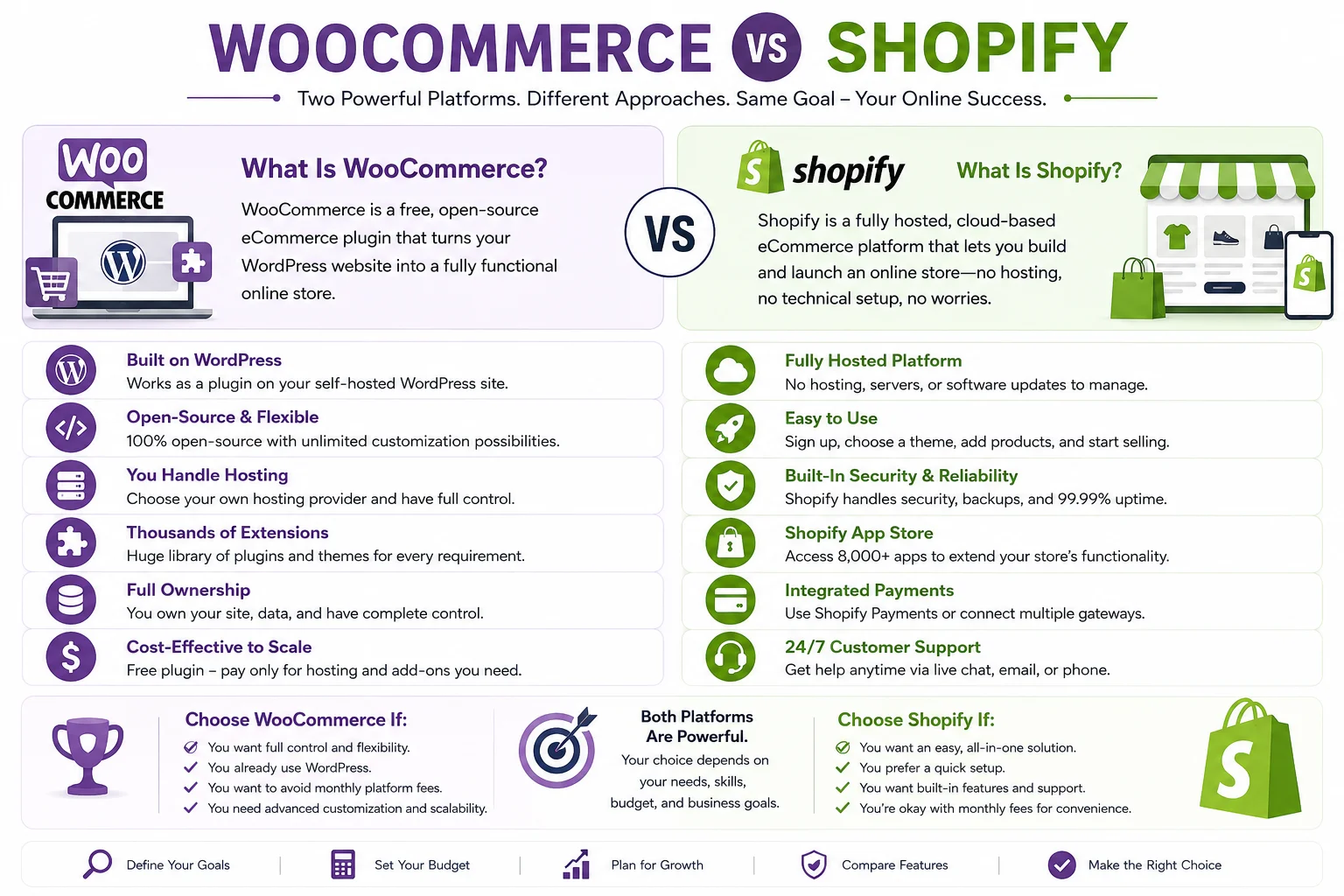
WooCommerce is a free, open-source eCommerce plugin that transforms a WordPress website into a fully functional online store. Launched in 2011 and later acquired by Automattic (the company behind WordPress.com), WooCommerce has grown into one of the most widely used eCommerce solutions on the internet, powering a significant share of all online stores globally.
Because WooCommerce is a plugin rather than a standalone platform, it requires a self-hosted WordPress installation to function. This means you’ll need to source your own web hosting, install WordPress, and then add the WooCommerce plugin on top. While this adds a layer of technical setup, it also means you retain complete ownership and control over your store’s code, data, and functionality — something that isn’t always possible with fully hosted platforms.
WooCommerce is particularly popular among businesses that already have a WordPress website (such as a blog or content-driven site) and want to add eCommerce functionality without migrating to an entirely new platform. It’s also a favorite among developers and agencies who want granular control over every aspect of the store’s design and behavior.
What Is Shopify?
Shopify is a fully hosted, cloud-based eCommerce platform that allows anyone to build and launch an online store without needing to manage hosting, servers, or software updates. Founded in 2006, Shopify has become one of the most recognizable names in eCommerce, powering millions of businesses ranging from small side-hustles to major global brands.
Unlike WooCommerce, Shopify is a closed, proprietary system — you don’t need to install anything or find your own hosting provider. Instead, you sign up for a subscription plan, choose a theme, add your products, and you’re ready to sell. Shopify handles all the technical infrastructure, including server maintenance, security patches, and uptime, which makes it an attractive option for entrepreneurs who want to launch quickly without dealing with the technical side of running a website.
Shopify also offers its own app marketplace, payment processing system (Shopify Payments), and point-of-sale (POS) hardware for businesses that sell in person as well as online.
WooCommerce vs Shopify: Core Differences at a Glance
Before diving into the details, here’s a high-level snapshot of how these two platforms differ:
| Factor | WooCommerce | Shopify |
|---|---|---|
| Platform type | Self-hosted (open source) | Fully hosted (SaaS) |
| Core cost | Free plugin | Paid subscription starting around $39/month |
| Hosting | You choose and pay separately | Included in subscription |
| Ease of setup | Moderate to advanced | Beginner-friendly |
| Customization | Extremely flexible | Flexible within Shopify’s ecosystem |
| Ownership of code/data | Full ownership | Limited (hosted environment) |
| Maintenance responsibility | You (or your developer) | Shopify |
| Best for | Businesses wanting full control, WordPress users, content-heavy sites | Businesses wanting speed, simplicity, and reliability |
With that overview in mind, let’s explore each factor in greater depth.
Pricing Comparison: WooCommerce vs Shopify
Pricing is often the first thing business owners look at when comparing WooCommerce and Shopify, but it’s also one of the most misunderstood aspects of this comparison. On the surface, WooCommerce appears free while Shopify has clear monthly fees — but the real cost picture is more nuanced.
WooCommerce Pricing Breakdown
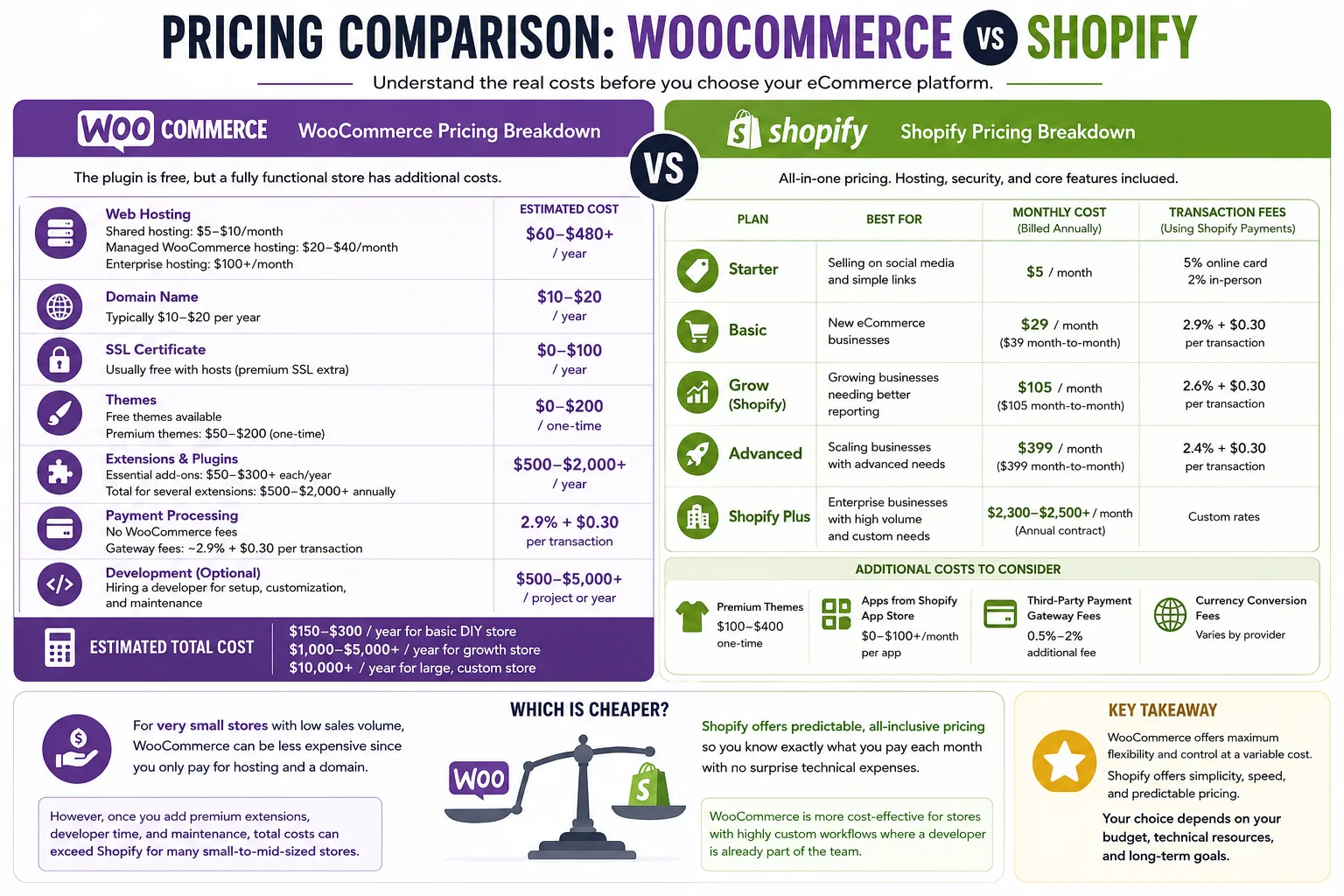
The WooCommerce plugin itself costs nothing to download and install. However, running a fully functional, production-ready WooCommerce store requires several additional expenses:
- Web hosting: This is the biggest recurring cost. Budget shared hosting can start as low as $5–$10 per month, while managed WooCommerce hosting (recommended for better performance and security) typically runs $20–$40 per month, and enterprise-grade hosting can climb into the hundreds per month.
- Domain name: Typically $10–$20 per year, though some hosting providers include a free domain for the first year.
- SSL certificate: Many hosts now include this for free, but some premium certificates cost extra.
- Themes: Free themes are widely available, but premium themes with more polished designs typically range from $50–$200 as a one-time purchase.
- Extensions and plugins: WooCommerce’s core functionality is limited without extensions. Popular add-ons for subscriptions, bookings, advanced shipping, and marketing automation can range from $50 to $300+ per year each, and stores that need several of these can easily spend $500–$2,000+ annually on extensions alone.
- Payment processing: WooCommerce doesn’t charge its own transaction fees, but your chosen payment gateway (such as WooPayments or Stripe) typically charges around 2.9% + $0.30 per domestic transaction, with additional fees for international cards or currency conversion.
- Development costs: If you’re not comfortable managing plugins, updates, and troubleshooting yourself, you may need to hire a developer, which can add significant ongoing costs.
When you add up hosting, themes, extensions, and payment processing, a realistic WooCommerce store can cost anywhere from around $150–$300 per year for a very basic DIY setup, up to several thousand dollars per year for a more feature-rich store, and well into five or six figures for large, custom-built, high-traffic stores.
Shopify Pricing Breakdown
Shopify’s pricing is more straightforward since hosting, security, and core infrastructure are bundled into your subscription. As of 2026, Shopify offers several tiers:
- Starter: A low-cost entry plan (around $5/month) designed mainly for selling through social media and simple links rather than a full standalone store.
- Basic: Around $39/month (or roughly $29/month when billed annually), suited to new eCommerce businesses. This plan includes standard transaction fees, typically around 2.9% + $0.30 for online card payments when using Shopify Payments.
- Grow (formerly the mid-tier “Shopify” plan): Around $105/month, aimed at growing businesses that need better reporting and lower transaction fees.
- Advanced: Around $399/month, designed for scaling businesses that need advanced reporting, international selling tools, and reduced processing rates.
- Shopify Plus: An enterprise-level plan starting at roughly $2,300–$2,500/month (often on annual contracts), intended for large brands with high sales volume, custom workflows, and dedicated support needs.
On top of the subscription fee, Shopify also charges transaction fees if you use a third-party payment gateway instead of Shopify Payments, plus additional costs for premium themes (typically a one-time fee) and paid apps from the Shopify App Store, which can range from a few dollars to over $100 per month depending on functionality.
Which Is Cheaper?
For very small stores with low sales volume, WooCommerce can be less expensive since you’re only paying for hosting and a domain. However, once you factor in premium extensions, a developer’s time, and the hidden costs of maintaining a self-hosted platform, WooCommerce’s total cost of ownership can actually exceed Shopify’s for many small-to-mid-sized stores. Shopify’s predictable, all-inclusive pricing tends to appeal to business owners who prefer to know exactly what they’re paying each month without unexpected technical expenses. WooCommerce tends to be more cost-effective for stores with highly custom workflows where a developer is already part of the team.
Ease of Use and Setup
One of the most significant differences in the WooCommerce vs Shopify comparison is how easy each platform is to set up and manage on a day-to-day basis.
Setting Up a WooCommerce Store
WooCommerce requires more technical involvement to get started. Before you can even install the plugin, you need to:
- Purchase a domain name.
- Sign up for web hosting.
- Install WordPress.
- Install and configure the WooCommerce plugin.
- Choose and customize a theme.
- Install additional plugins for payment processing, shipping, security, and SEO.
While there are many tutorials and the WordPress ecosystem is well-documented, this process can feel overwhelming for beginners without any web development experience. Once set up, though, WooCommerce’s dashboard is integrated directly into the familiar WordPress admin area, which many users find intuitive if they’ve used WordPress before.
Ongoing maintenance is also a consideration: WordPress core, themes, and plugins all need regular updates, and conflicts between plugins can sometimes cause issues that require troubleshooting or developer assistance.
Setting Up a Shopify Store
Shopify is designed with simplicity as a top priority. After signing up, you’re guided through a setup wizard that helps you choose a theme, add products, configure shipping settings, and connect a payment gateway — all within a single, unified dashboard. There’s no need to purchase separate hosting, install software, or worry about server configuration, since everything is managed by Shopify behind the scenes.
This streamlined approach means most users can have a basic store live within a day, even with no prior technical experience. Shopify also handles software updates automatically, so you never need to worry about compatibility issues between your theme and the platform’s core code.
Verdict on Ease of Use
For beginners or business owners who want to launch quickly without hiring a developer, Shopify has a clear advantage. WooCommerce offers more control but demands more technical knowledge, or a willingness to learn, or a budget to hire help.
Design and Customization
WooCommerce Customization
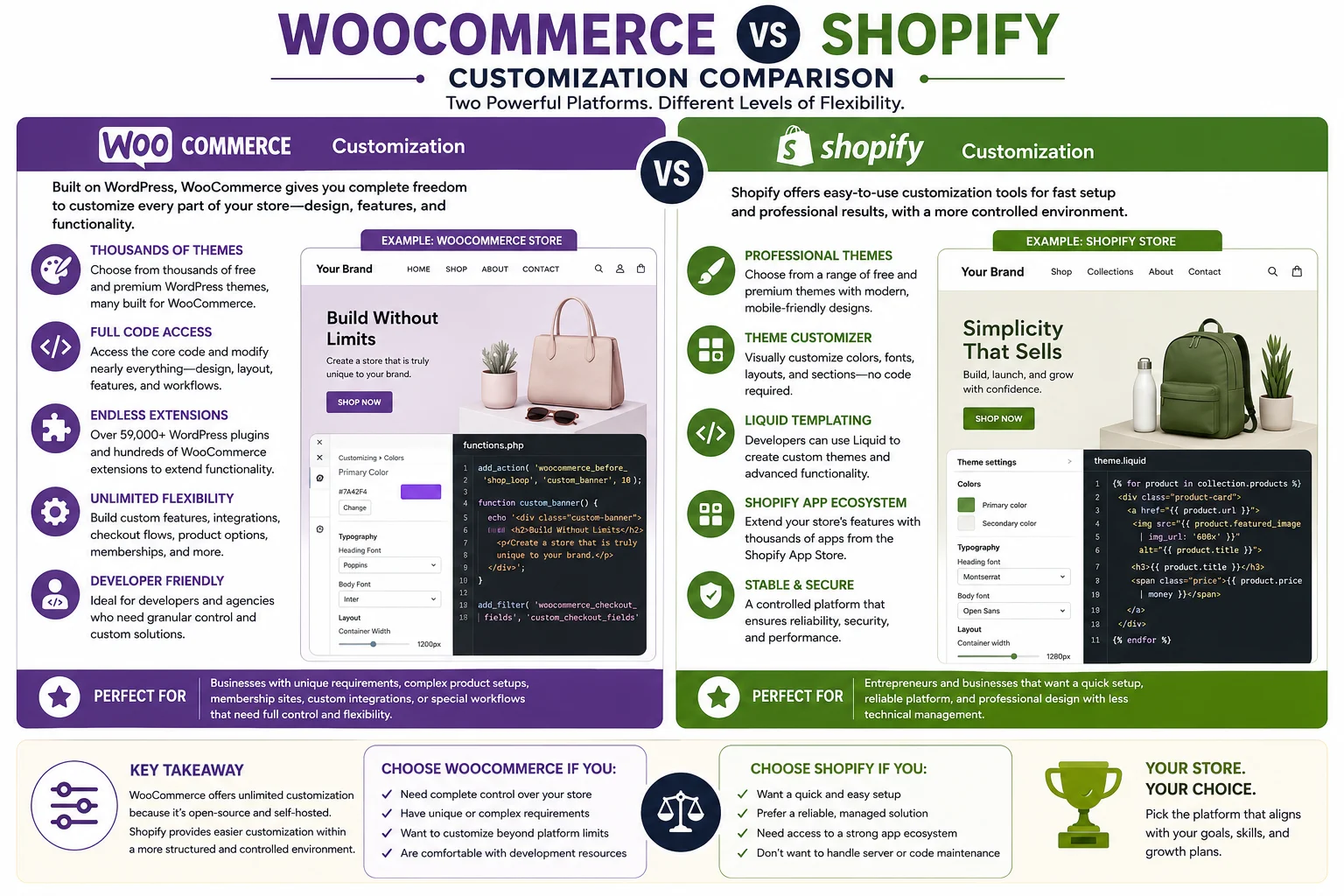
Because WooCommerce is built on WordPress — one of the most flexible content management systems in existence — it offers virtually unlimited customization potential. You can choose from thousands of free and premium WordPress themes, many of which are specifically designed for WooCommerce stores. Beyond themes, you have full access to the underlying code, meaning developers can modify nearly every aspect of a store’s design, layout, and functionality.
This level of access makes WooCommerce especially appealing for businesses with unique requirements — such as complex product configurators, membership sites combined with eCommerce, or highly customized checkout flows — that would be difficult or impossible to achieve on a more restricted platform.
Shopify Customization
Shopify also offers a solid selection of free and premium themes, and its theme editor allows non-technical users to customize colors, fonts, layouts, and sections without touching code. For more advanced customization, Shopify uses its own templating language called Liquid, which developers can use to build fully custom themes.
However, because Shopify is a closed platform, there are certain limitations on how deeply you can modify the underlying system. Businesses with highly specific or unconventional requirements may find Shopify’s customization options more restrictive compared to WooCommerce’s open-source flexibility, particularly for backend logic and complex integrations that fall outside Shopify’s supported app ecosystem.
Verdict on Customization
WooCommerce wins for businesses that need deep, unrestricted customization and have the technical resources to implement it. Shopify offers strong customization for typical eCommerce needs but is better suited to businesses that don’t require highly unconventional functionality.
SEO Capabilities
Search engine optimization is a critical factor for any online store, since organic traffic often represents one of the most cost-effective ways to attract customers.
WooCommerce and SEO
Because WooCommerce runs on WordPress, it benefits from WordPress’s strong reputation for SEO flexibility. WordPress offers extensive control over URL structures, meta tags, sitemaps, and content organization. Combined with popular SEO plugins, WooCommerce store owners can fine-tune nearly every technical SEO element, from schema markup to canonical tags. Additionally, since WooCommerce stores often live alongside a WordPress blog, it’s easier to build a strong content marketing strategy that integrates seamlessly with your product pages, which can be a significant advantage for organic search visibility.
Shopify and SEO
Shopify has made significant improvements to its built-in SEO capabilities over the years, including editable title tags, meta descriptions, alt text, and automatically generated sitemaps. It also includes built-in blogging functionality, though it’s generally considered less robust than WordPress’s content management capabilities. One historical limitation of Shopify has been less flexibility over URL structure for certain page types, though the platform has continued to improve in this area.
Verdict on SEO
Both platforms are capable of achieving strong SEO results, but WooCommerce (thanks to WordPress) generally offers more granular control for advanced SEO strategies and content marketing, while Shopify provides solid, beginner-friendly SEO tools that cover the essentials without requiring additional plugins.
Scalability and Performance
WooCommerce Scalability
WooCommerce can scale to support large stores, but scalability is directly tied to your hosting infrastructure and how well your site is optimized. As your product catalog and traffic grow, you may need to invest in more powerful hosting, caching solutions, content delivery networks, and database optimization to maintain fast load times. This gives you control over performance, but it also means the responsibility for maintaining that performance falls on you or your development team.
Shopify Scalability
Shopify’s infrastructure is built to handle high traffic volumes and sudden spikes (such as flash sales or viral product launches) without requiring store owners to manage server capacity themselves. Since Shopify handles hosting and infrastructure centrally, scalability is largely built into the platform, which is one reason many large, high-volume brands choose Shopify Plus for enterprise-level operations.
Verdict on Scalability
Shopify offers more predictable, hands-off scalability since infrastructure management is included in the platform. WooCommerce can scale just as effectively, but it requires more proactive management of hosting resources as your store grows.
Security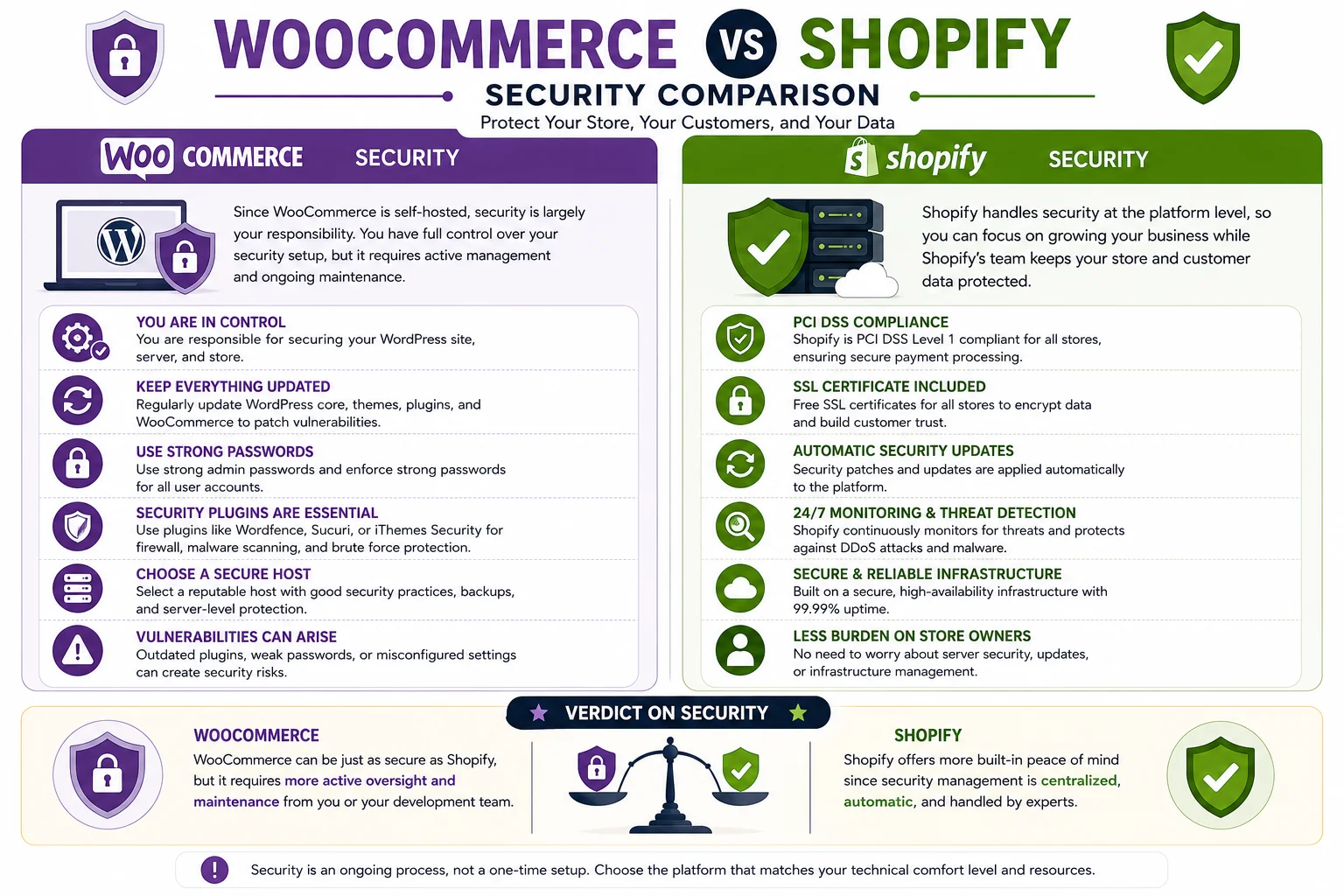
WooCommerce Security
Since WooCommerce is self-hosted, security is largely your responsibility. This includes keeping WordPress core, themes, and plugins updated, using strong passwords, installing security plugins, and choosing a reputable host with good security practices. While this gives you control over your security setup, it also means vulnerabilities can arise from outdated plugins or misconfigured settings if not properly maintained.
Shopify Security
Shopify handles security at the platform level, including PCI DSS compliance for payment processing, SSL certificates, and regular security updates applied automatically across all stores. This centralized approach reduces the burden on individual store owners, since Shopify’s team manages the underlying infrastructure security.
Verdict on Security
Shopify offers more built-in peace of mind since security management is centralized and automatic. WooCommerce can be just as secure, but it requires more active oversight and maintenance from the store owner or a development team.
Payment Processing and Transaction Fees
WooCommerce doesn’t charge its own transaction fees — your only cost comes from whichever payment gateway you choose, typically around 2.9% + $0.30 per transaction for standard cards, with variations depending on the provider and card type.
Shopify offers its own integrated payment processor, Shopify Payments, which eliminates additional transaction fees beyond standard card processing rates. However, if you choose to use a third-party payment gateway instead of Shopify Payments, Shopify applies an additional transaction fee on top of your gateway’s processing costs, with the exact percentage varying by plan tier (lower-tier plans incur higher additional fees, while higher tiers reduce or eliminate them).
App and Plugin Ecosystems
Both platforms offer extensive marketplaces for extending functionality, but they work somewhat differently.
WooCommerce benefits from the broader WordPress plugin ecosystem, which includes hundreds of thousands of plugins covering everything from SEO to page building to email marketing, in addition to WooCommerce-specific extensions for shipping, subscriptions, bookings, and more.
Shopify has its own dedicated App Store with thousands of apps built specifically for eCommerce use cases, including marketing automation, inventory management, customer reviews, and dropshipping integrations. Because these apps are built specifically for Shopify’s ecosystem, they tend to integrate smoothly, though many popular apps come with their own monthly subscription costs on top of your Shopify plan.
Customer Support
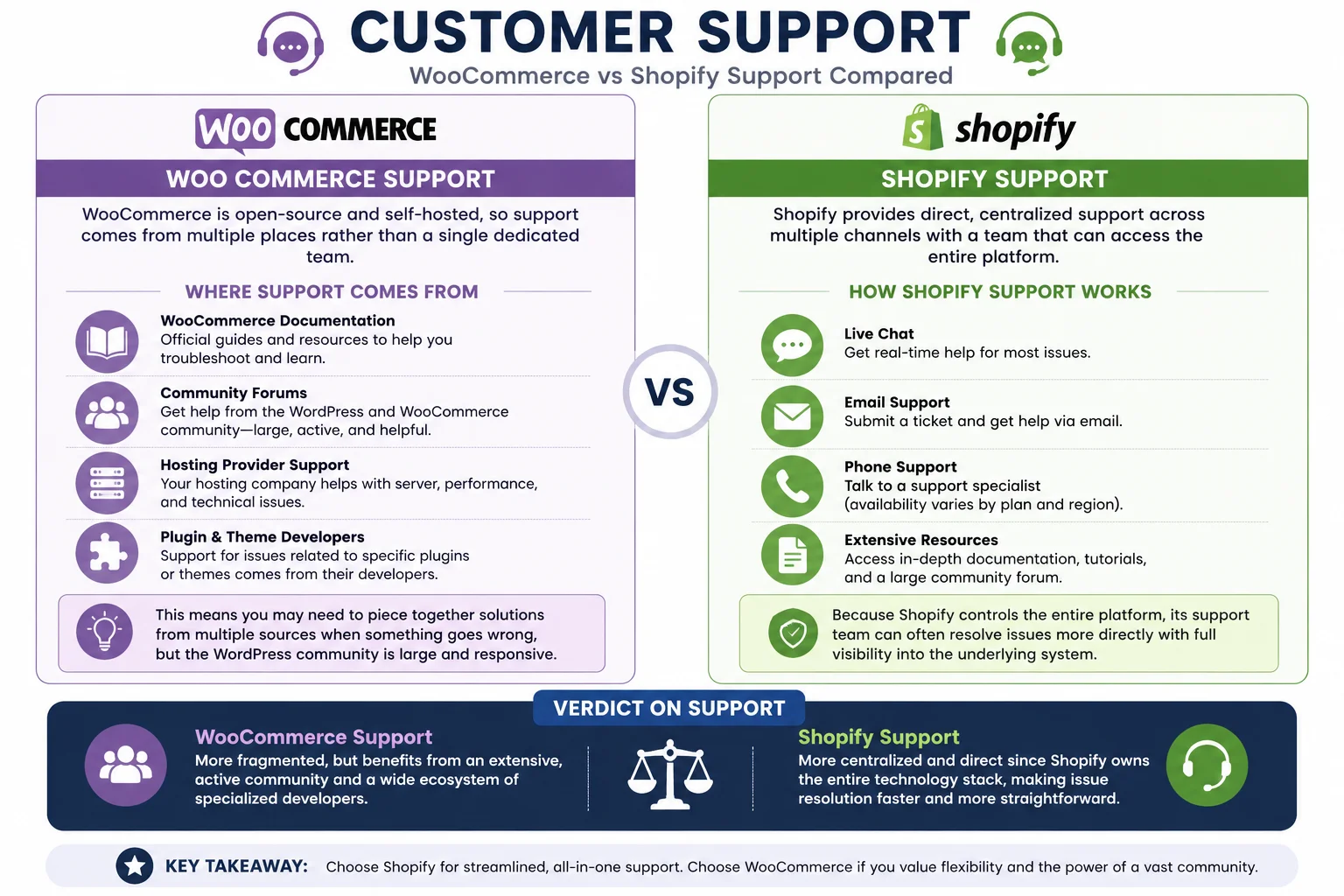
WooCommerce Support
Since WooCommerce is open-source and self-hosted, there’s no single dedicated support line for the platform as a whole. Instead, support is distributed across several channels: WooCommerce’s own documentation and community forums, your hosting provider’s support team, and individual plugin or theme developers for issues specific to those add-ons. This can mean piecing together solutions from multiple sources when something goes wrong, though the WordPress community is large and generally responsive.
Shopify Support
Shopify provides direct customer support through live chat, email, and phone (availability can vary by plan and region), along with extensive documentation and a large community forum. Because Shopify controls the entire platform, its support team can often resolve issues more directly since they have visibility into the underlying system, unlike WooCommerce’s distributed support model.
Verdict on Support
Shopify offers more centralized, direct support since it owns the entire technology stack. WooCommerce support is more fragmented but benefits from an extensive, active community and ecosystem of specialized developers.
Which Businesses Should Choose WooCommerce?
WooCommerce tends to be the better fit for:
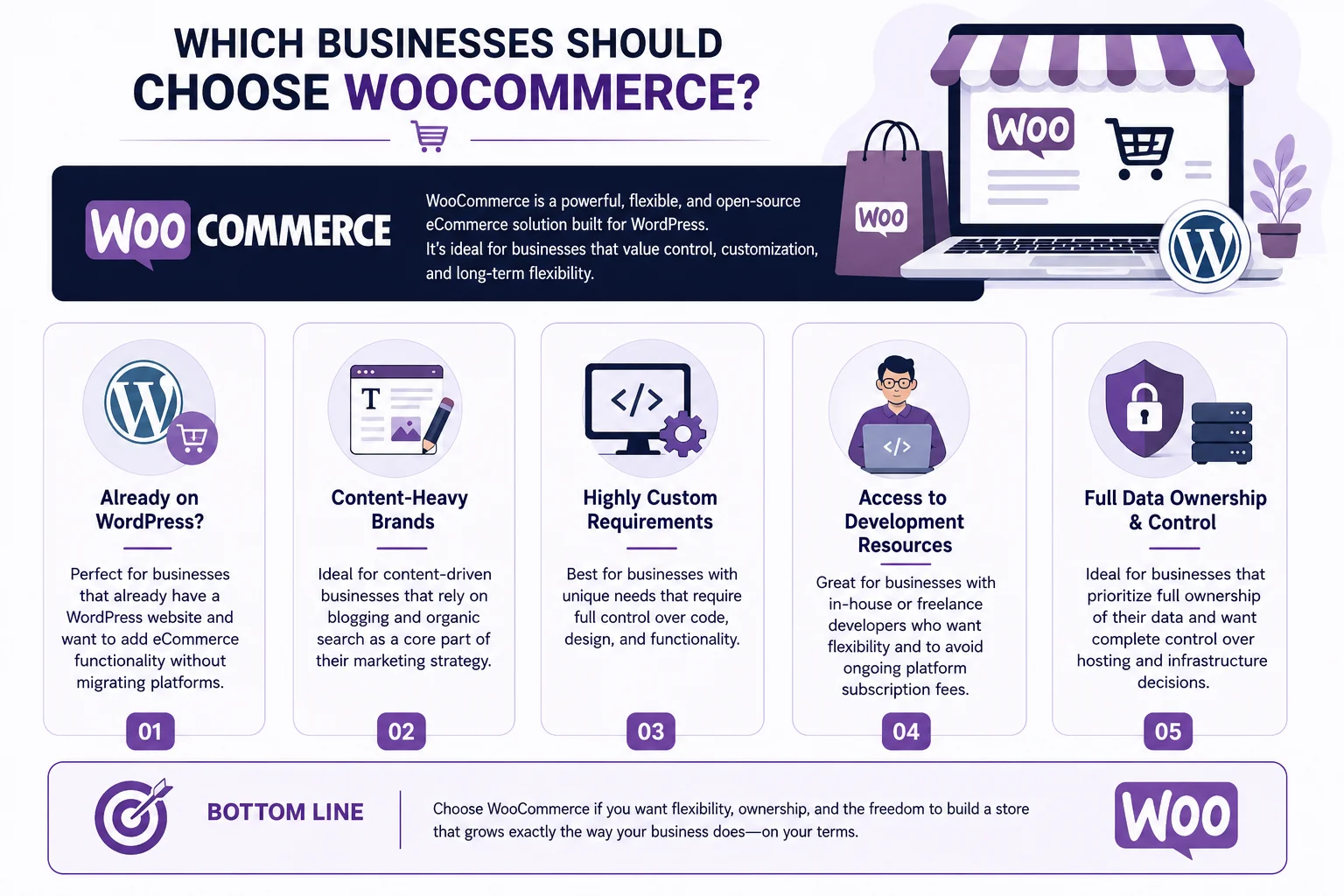
- Businesses that already have a WordPress website and want to add eCommerce functionality without migrating platforms.
- Content-heavy brands that rely on blogging and organic search as a core part of their marketing strategy.
- Businesses with highly custom requirements that need full control over code and functionality.
- Store owners who have access to development resources (in-house or freelance) and want to avoid ongoing platform subscription fees in favor of more flexible cost structures.
- Businesses that prioritize full data ownership and want complete control over hosting and infrastructure decisions.
Which Businesses Should Choose Shopify?
Shopify tends to be the better fit for:
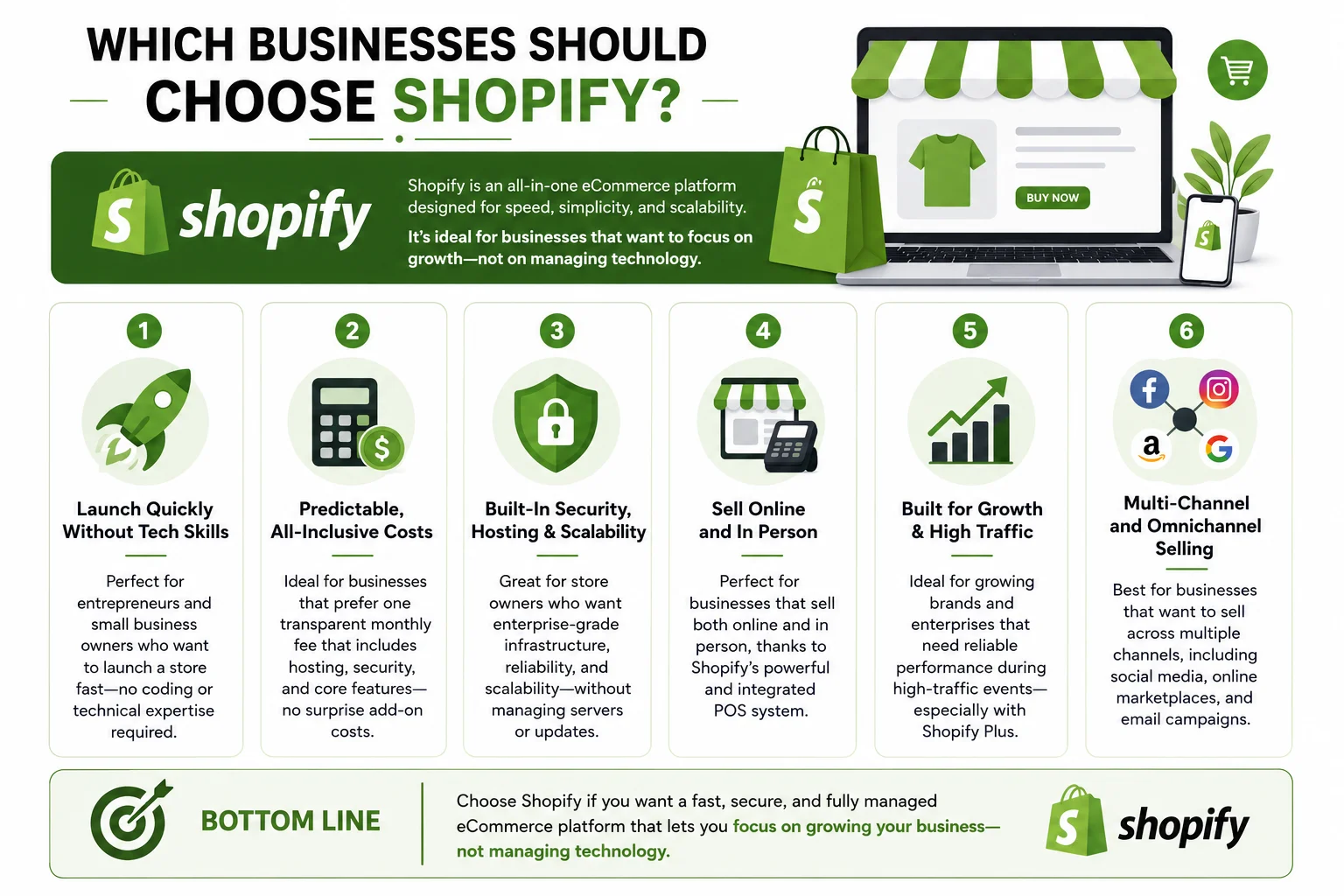
- Entrepreneurs and small business owners who want to launch a store quickly without needing technical expertise.
- Businesses that prefer predictable, all-inclusive monthly costs rather than managing multiple separate expenses.
- Store owners who want built-in security, hosting, and scalability without needing to manage infrastructure themselves.
- Businesses planning to sell both online and in person, thanks to Shopify’s integrated POS system.
- Growing or enterprise-level brands that need reliable performance during high-traffic events, particularly through Shopify Plus.
Multi-Channel and Omnichannel Selling
Modern eCommerce rarely happens on just one channel, so it’s worth examining how each platform supports selling across marketplaces, social media, and physical retail locations.
WooCommerce and Multi-Channel Selling
WooCommerce can connect to multiple sales channels, but this typically requires installing and configuring additional plugins for each integration — for example, separate extensions to sync inventory with Amazon, eBay, or social media shops. While this is very achievable, it means more moving parts to manage, and keeping inventory, pricing, and order data synchronized across channels becomes an ongoing task that often benefits from dedicated multi-channel management software layered on top of WooCommerce.
Shopify and Multi-Channel Selling
Shopify was built with omnichannel selling in mind from an early stage. Its dashboard includes native integrations for selling on social platforms, online marketplaces, and in person through Shopify POS hardware, all synced automatically with your central inventory and order management system. This tighter integration reduces the technical overhead of keeping multiple sales channels aligned, which is especially valuable for retailers who sell both online and in brick-and-mortar locations.
Verdict on Multi-Channel Selling
Shopify has a clear edge for businesses that want to sell across many channels without heavy technical setup, since these integrations are built into the core platform experience. WooCommerce can achieve similar results but generally requires more plugin configuration and ongoing maintenance to keep everything in sync.
Mobile Experience and App Management
Increasingly, store owners expect to manage their business from a phone, not just a desktop computer.
Shopify offers a polished, feature-rich mobile app that allows merchants to manage orders, track sales, message customers, and even fulfill shipments directly from a smartphone. Because Shopify controls the entire technology stack, this mobile experience tends to be consistently smooth and well-maintained across updates.
WooCommerce also offers a WordPress companion app that provides some store management capabilities, including order notifications and basic reporting. However, since WooCommerce relies on various third-party plugins for extended functionality, the mobile management experience can be less consistent, particularly for features handled by plugins that don’t have dedicated mobile support.
For store owners who plan to manage significant parts of their business on the go, Shopify’s mobile experience is generally considered more polished and comprehensive.
International Selling and Multi-Currency Support
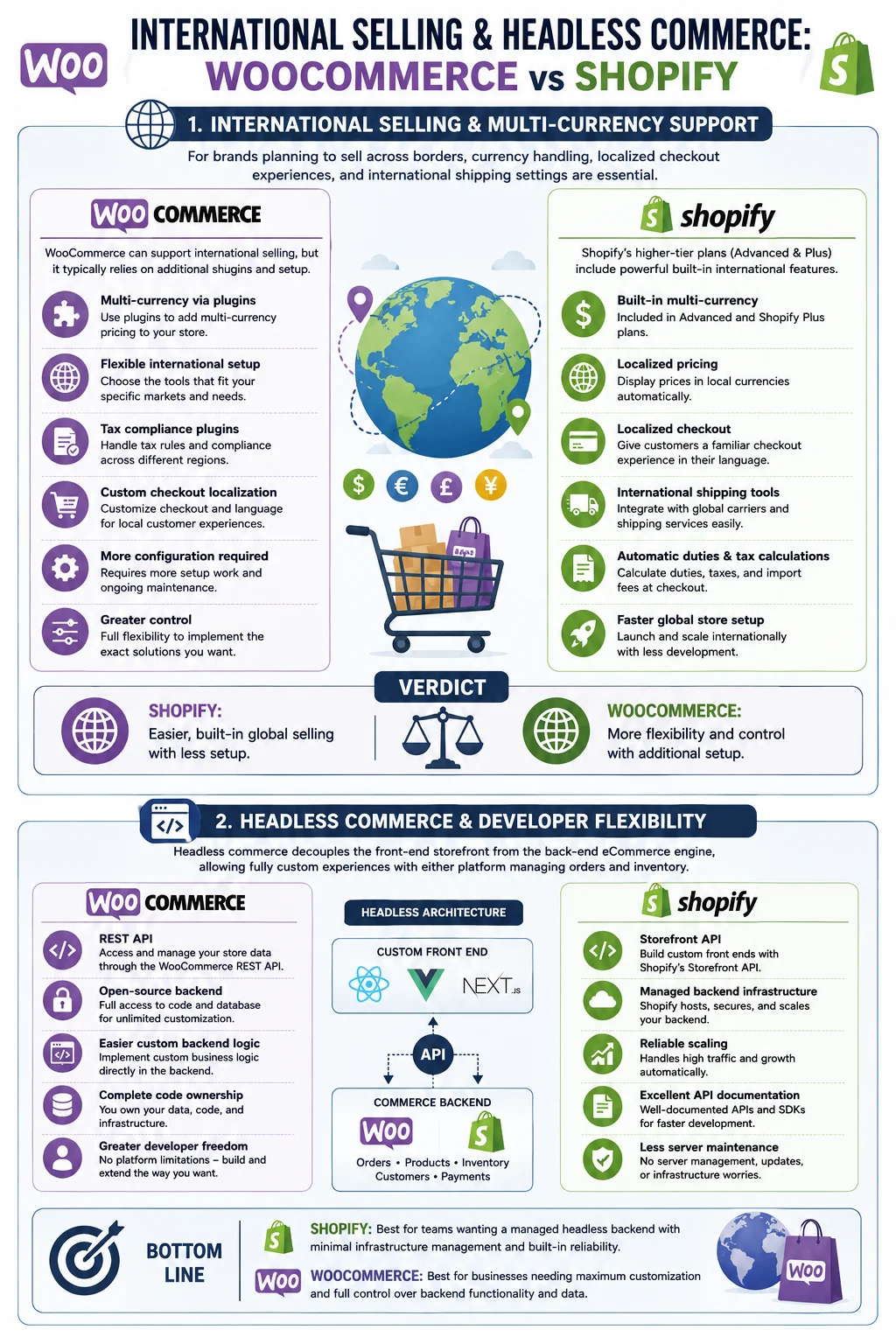
For brands planning to sell across borders, currency handling, localized checkout experiences, and international shipping settings become important considerations.
Shopify’s higher-tier plans (particularly Advanced and Shopify Plus) include built-in multi-currency support, localized pricing, and duty and tax calculations for international orders, making cross-border selling more straightforward without extensive custom development. Lower-tier plans have more limited international features, which is worth factoring into your plan selection if global sales are a priority from day one.
WooCommerce can also support international selling, but it typically relies on additional plugins to handle multi-currency pricing, tax compliance across regions, and localized checkout experiences. This gives you flexibility to choose the specific tools that fit your needs, but it also means more setup work and potentially more moving parts to maintain as regulations and tax rules change across different countries.
Headless Commerce and Developer Flexibility
For technically sophisticated teams, “headless” commerce — where the front-end storefront is decoupled from the back-end eCommerce engine — is an increasingly common architecture choice.
Both WooCommerce and Shopify support headless setups through their respective APIs (WooCommerce’s REST API and Shopify’s Storefront API), allowing developers to build fully custom front-end experiences using modern frameworks while relying on either platform for backend order and inventory management. WooCommerce’s open-source nature can make certain custom backend logic easier to implement directly, while Shopify’s APIs are well-documented and benefit from the platform’s managed infrastructure, meaning developers don’t need to worry about backend hosting or scaling even in a headless setup.
Teams considering a headless approach should weigh their in-house development capacity: WooCommerce headless builds often require more custom backend work, while Shopify headless builds still benefit from Shopify’s hosted reliability even though the front end is fully custom.
A Practical Decision Checklist
To help simplify your decision, consider working through the following questions:
- Do you already have a WordPress website? If yes, WooCommerce may integrate more naturally into your existing content and workflow.
- How much time do you want to spend on technical maintenance? If you’d rather focus entirely on marketing and sales, Shopify’s hands-off infrastructure may suit you better.
- What’s your budget structure preference? If you prefer one predictable monthly bill, Shopify is simpler to budget for. If you’re comfortable managing multiple smaller costs (hosting, plugins, developer time) in exchange for potentially lower long-term costs, WooCommerce may work better.
- How unique are your store’s functional requirements? Highly custom workflows, unconventional product configurators, or tight integrations with existing internal systems often favor WooCommerce’s flexibility.
- Do you plan to sell in person as well as online? Shopify’s integrated POS system offers a more seamless omnichannel experience out of the box.
- How important is content marketing to your growth strategy? If blogging and SEO-driven content are central to your plan, WooCommerce’s deep WordPress integration may give you an edge.
- Do you have access to developer support, either in-house or freelance? WooCommerce’s flexibility is most valuable when you have the technical resources to take advantage of it; without that support, Shopify’s guided experience may save you time and frustration.
Working through these questions honestly, rather than focusing solely on price, will generally lead to a more sustainable long-term choice than picking a platform based on marketing claims alone.
Migrating Between WooCommerce and Shopify
It’s worth noting that many businesses do switch platforms as their needs evolve. Migrating from WooCommerce to Shopify (or vice versa) typically involves exporting product data, customer information, and order history, then importing it into the new platform, along with rebuilding your theme and reconfiguring apps or plugins. Both platforms offer migration tools and third-party services to help with this process, though it can still require careful planning to avoid data loss or SEO disruptions (such as broken URLs), particularly around redirect management for previously indexed pages.
Frequently Asked Questions
Is WooCommerce really free? The WooCommerce plugin itself is free to download and use, but running a fully functional store requires hosting, a domain, and typically some paid extensions or themes, so there are real costs involved despite the free core software.
Is Shopify better for beginners than WooCommerce? Generally, yes. Shopify’s guided setup process and all-in-one infrastructure make it easier for beginners to launch a store without technical experience, while WooCommerce typically requires more comfort with website management.
Can I switch from Shopify to WooCommerce later, or vice versa? Yes, migration is possible in both directions, though it requires careful handling of product data, customer records, and SEO considerations like URL redirects to avoid losing search rankings.
Which platform is better for SEO? Both platforms support strong SEO practices, but WooCommerce (via WordPress) generally offers more granular control and stronger built-in content marketing capabilities, while Shopify provides solid, straightforward SEO tools suitable for most standard eCommerce needs.
Does WooCommerce or Shopify have lower transaction fees? WooCommerce itself doesn’t charge transaction fees, though your payment gateway will. Shopify’s own payment processor avoids extra fees, but using a third-party gateway on Shopify typically adds an additional fee on top of standard processing costs, especially on lower-tier plans.
Which platform is more secure? Shopify handles security centrally as part of its hosted platform, while WooCommerce security depends on how well you maintain your hosting environment, plugins, and WordPress core updates.
Final Thoughts on the WooCommerce vs Shopify Comparison
There’s no universal winner in the WooCommerce vs Shopify comparison — the right choice depends entirely on your business’s specific needs, technical comfort level, and long-term goals. If you value complete control, deep customization, and already have (or plan to build) technical resources, WooCommerce offers a flexible, cost-effective foundation, especially if you’re already invested in the WordPress ecosystem. If you prioritize speed, simplicity, and predictable costs with minimal technical overhead, Shopify’s all-in-one approach removes much of the complexity involved in running an online store.
Before making a final decision, consider mapping out your specific requirements: your budget (both upfront and ongoing), your technical skill level or access to development support, your growth projections, and how much control you want over your store’s underlying infrastructure. Many successful businesses have thrived on both platforms, which is a testament to the fact that the “best” eCommerce platform is ultimately the one that aligns most closely with how you plan to run and grow your business.