
Rank Math SEO Setup Guide 2026 — A Practical Walkthrough for WordPress Beginners
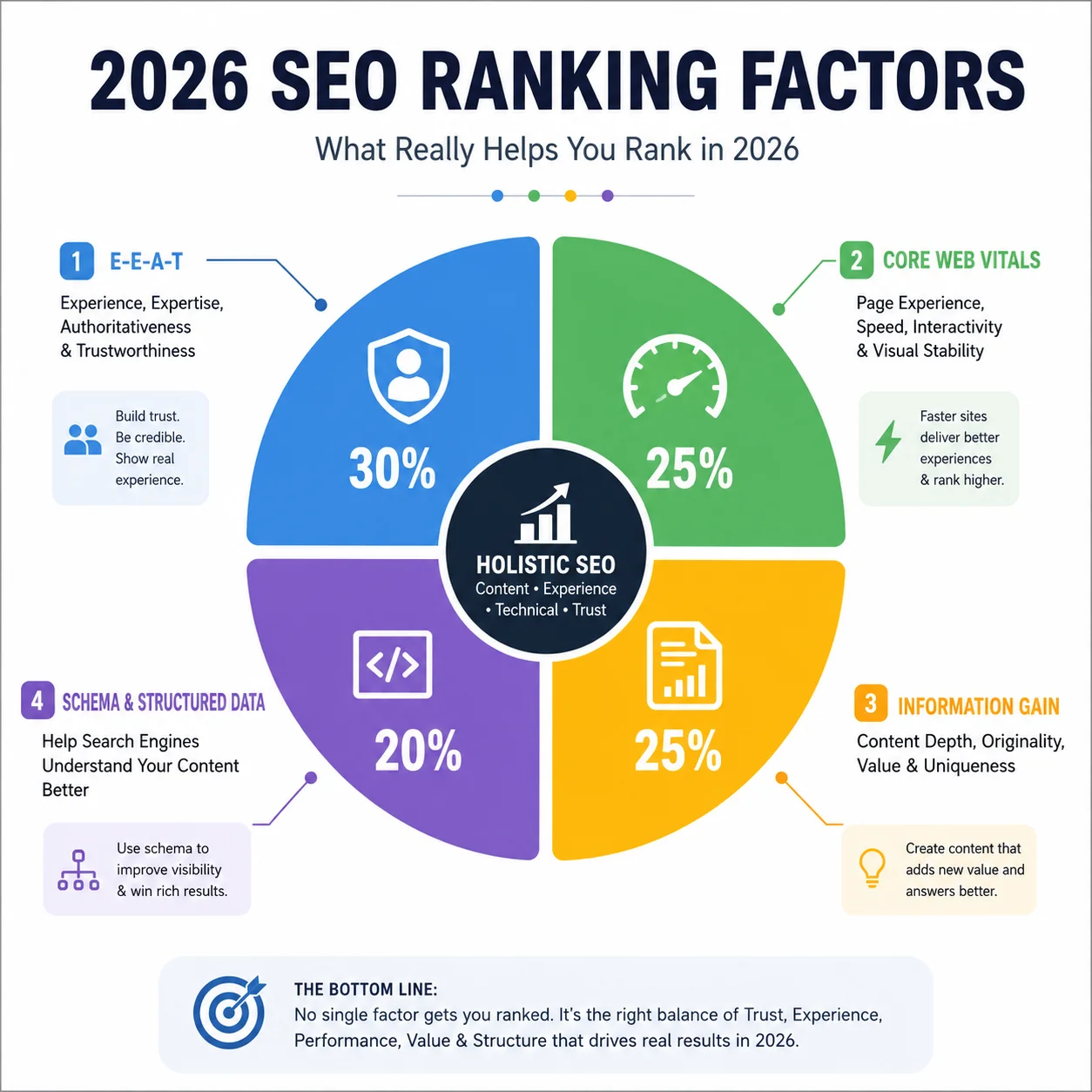
Installing an SEO plugin used to be the easy part of ranking on Google. In 2026, that’s no longer true. Google’s core updates — especially the March 2026 core update — now weigh Information Gain, verified author expertise, and genuine E-E-A-T signals far more heavily than plugin settings alone. That means Rank Math is still one of the best free tools for technical on-page SEO, but how you configure it — and what you build around it — determines whether your content actually competes.
This guide walks through a correct, current Rank Math setup and pairs each step with what actually matters for ranking today, not just what the settings screen asks you to click.
Why Rank Math Alone Won’t Get You Ranked in 2026
Before touching the plugin, it helps to understand the shift. Google’s re-weighting in 2026 clusters around three overlapping properties: whether content contains information that exists nowhere else, whether the author has a verifiable track record Google can confirm, and whether the site has built consistent authority within one subject area rather than publishing shallow content across many topics.
In practical terms: Rank Math handles the technical scaffolding — meta tags, sitemaps, schema, redirects. But the algorithm now looks past the scaffolding at whether a real person with real experience wrote something useful. Content that’s AI-assisted but substantially edited by a named human expert, grounded in original perspective, and attributed with verifiable credentials performs well — while content Google can’t attribute to a credible source loses confidence, and that shows up in rankings.
So treat this guide as step one of two: plugin setup, then genuinely useful content on top of it.
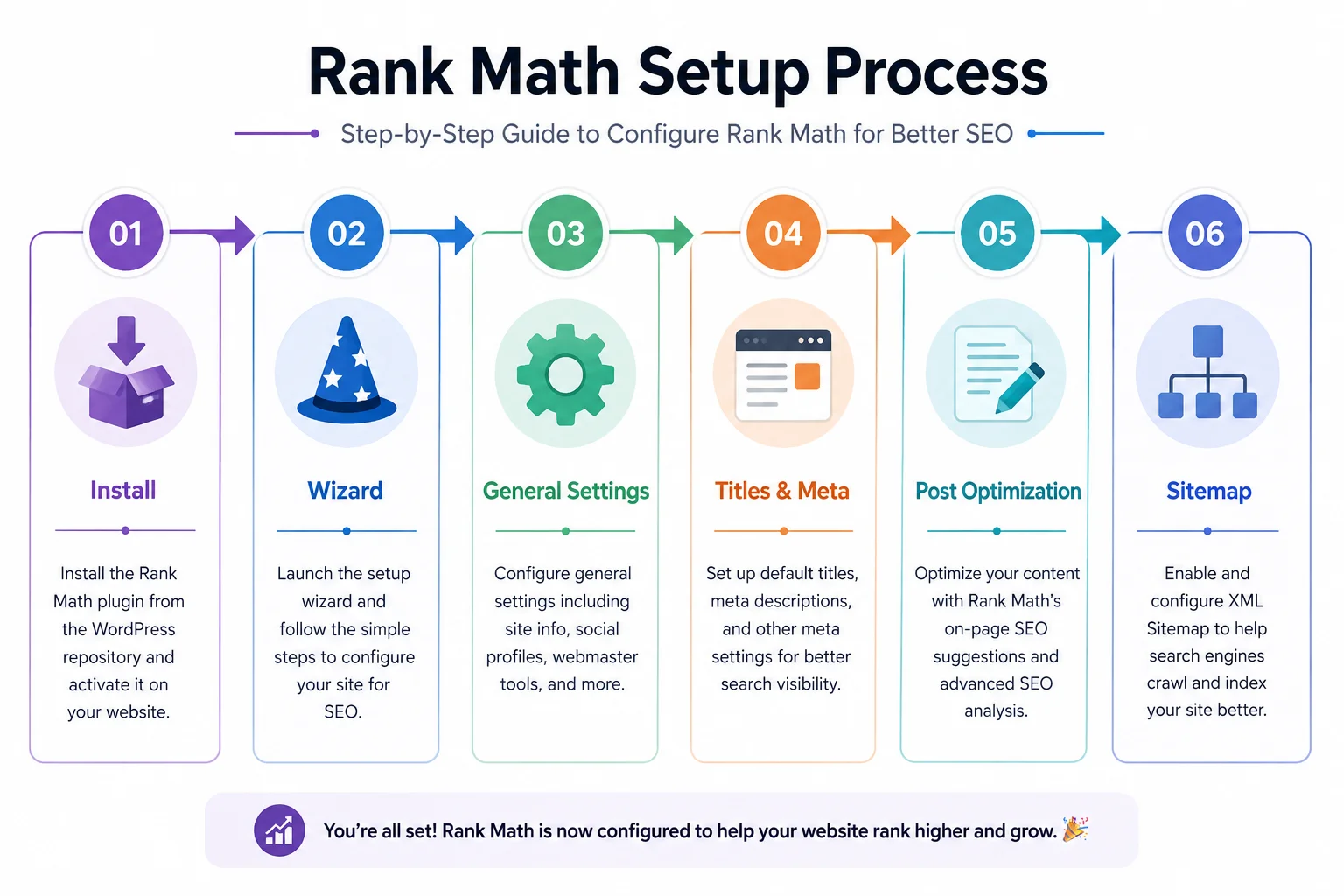
Step 1 — Install Rank Math the Right Way
- From your WordPress dashboard, go to Plugins → Add New.
- Search “Rank Math SEO” and confirm it’s the plugin by Rank Math (not a lookalike).
- Click Install Now, then Activate.
- WordPress will redirect you into the setup wizard automatically — don’t skip it, since it configures modules you’d otherwise have to find manually later.
If you’re migrating from Yoast or another plugin: use Rank Math’s built-in importer during setup. It carries over your existing meta titles, descriptions, and focus keywords so you don’t lose historical SEO work.
Step 2 — Account Connection and the Setup Wizard
Rank Math requires a free account to unlock the wizard and advanced modules (Schema, Redirections, 404 Monitor). Sign in or create one, then work through the wizard’s questions carefully:
- Website type — blog, e-commerce, or business. This choice affects which schema types Rank Math auto-suggests later, so pick the closest match rather than the most impressive-sounding option.
- WooCommerce integration — enable only if you’re actually selling products; unnecessary modules slow down your dashboard.
- Google Search Console connection — connect this now. In 2026, Search Console’s query-segmentation data is essential for telling the difference between an actual ranking drop and AI Overview click cannibalization on informational queries — two very different problems with different fixes.
- Sitemap generation — leave enabled.
Step 3 — General Settings Worth Getting Right
Head to Rank Math → General Settings and configure:
- Breadcrumbs — turn on. Beyond user navigation, breadcrumb schema helps Google understand site hierarchy, which feeds into topical authority signals.
- Links — enable “nofollow” for external links you don’t want to vouch for, but don’t blanket-nofollow everything; contextual outbound links to authoritative sources are themselves a trust signal in 2026.
- 404 Monitor — enable it. Broken internal links quietly damage both user experience and crawl efficiency, and Google’s technical evaluation in 2026 penalizes sites with poor structural hygiene.
Step 4 — Titles & Meta: Write for Humans First
Under Rank Math → Titles & Meta, set your default templates. This is where most beginners still write for the algorithm instead of the reader — a habit 2026’s helpful-content systems specifically detect and downrank.
- Keep title templates natural:
%title% %sep% %sitename%works, but the%title%itself should read like something a person would click, not a keyword string. - Write meta description templates that promise something specific — not “Learn about X,” but what the reader actually gets.
- Double-check “noindex” isn’t accidentally enabled on pages you want ranked — this is one of the most common launch-day mistakes.
Step 5 — Optimizing Individual Posts (Where 2026 SEO Actually Happens)
Open any post or page and scroll to the Rank Math meta box:
- Focus keyword — pick the term real users search for, not the term with the highest volume. Search intent match matters more than volume in 2026’s ranking model.
- SEO title & meta description — include the keyword, but write it so a human wants to click.
- Content analysis checklist — Rank Math will flag word count, keyword density, alt text, and readability. Green checks are a floor, not a goal. A perfectly “green” page with no original insight still loses to a shorter page written by someone with demonstrated first-hand experience.
- Schema markup — assign the correct schema type (Article, FAQ, Product, Review). Structured data increasingly feeds AI Overview eligibility as well as traditional rich results, so this step matters more than it used to.
What to add beyond Rank Math’s checklist:
- A short author bio with real credentials, linked to a bio page.
- At least one first-hand detail — a specific number, a screenshot, a result you observed — that competing pages don’t have.
- Internal links to 2–3 related pages on your site to reinforce topical depth.
Step 6 — Sitemap Submission
Go to Rank Math → Sitemap Settings, copy your XML sitemap URL, then submit it inside Google Search Console under Sitemaps. This doesn’t guarantee indexing, but it removes discovery as a bottleneck — Google can only evaluate pages it knows exist.
Technical Factors Rank Math Won’t Fix for You
Rank Math handles on-page tags, but 2026’s algorithm weighs technical performance independently:
- Core Web Vitals, particularly Interaction to Next Paint (INP), which replaced First Input Delay as a ranking signal.
- Mobile-first parity — your mobile content must match your desktop content exactly; most searches and most of Google’s evaluation happen on mobile.
- HTTPS and site security as baseline trust requirements.
If your hosting or theme is causing slow load times, no amount of meta description tweaking will offset it.
Common Mistakes That Still Hurt Rankings in 2026
- Keyword stuffing — now actively flagged by Google’s pattern-detection systems as a spam signal, not just “unnatural.”
- Empty meta descriptions — Google will auto-generate a snippet, often less compelling than one you’d write.
- Ignoring the 404 monitor — broken links compound technical distrust signals.
- Publishing AI-drafted content with no human editing or original insight — Google doesn’t penalize content simply for being AI-assisted, but it does downgrade content that’s automated, lacks originality, or fails to add real value.
- Spreading across unrelated topics — a site that expands opportunistically into unrelated subjects dilutes its authority signal, while one that covers a single topical domain thoroughly earns a compounding ranking advantage.
Final Thoughts
Rank Math still does exactly what it’s built for: giving you full control over meta tags, sitemaps, redirects, and schema without hiring a specialist for basic technical SEO. But in 2026, correct plugin configuration is the entry ticket, not the winning strategy. The sites pulling ahead are the ones combining clean technical setup with content that shows real expertise — original data, first-hand experience, and consistent depth in one subject area.
If your site’s technical foundation — speed, structure, schema, and on-page SEO — needs a professional setup from the ground up rather than a piecemeal fix, that’s exactly the kind of work we handle for clients across the US, UAE, Kuwait, Canada, and Pakistan at our WordPress development and SEO agency.
Pingback: Best WordPress SEO Plugins 2026: Top 5 Compared & Ranked