
Hostinger vs GoDaddy vs Bluehost: Which Web Host Should You Choose in 2026?
Choosing the right web host can make or break your website’s speed, reliability, and search engine rankings. If you’ve been researching hosting providers, chances are you’ve narrowed your options down to three of the biggest names in the industry: Hostinger, GoDaddy, and Bluehost. In this Hostinger vs GoDaddy vs Bluehost comparison, we’ll break down everything you need to know — pricing, performance, uptime, ease of use, customer support, security, and more — so you can make an informed decision that fits your budget and your website’s goals.
Whether you’re launching your first blog, building an online store, or migrating an existing site, this guide will walk you through the strengths and weaknesses of each provider in detail. By the end, you’ll have a clear picture of which host is the best match for your specific needs.
Why This Comparison Matters
Web hosting is the foundation of every website. A slow or unreliable host can hurt your search engine optimization (SEO), frustrate your visitors, and cost you sales or leads. On the other hand, a fast, secure, and well-supported host can help your site load quickly, stay online, and rank better on Google.
Hostinger, GoDaddy, and Bluehost are three of the most popular hosting companies in the world, each with millions of customers. They all offer shared hosting, WordPress hosting, VPS hosting, and more — but their pricing structures, performance benchmarks, and support quality differ significantly. Let’s dive into the details.
Quick Overview: Hostinger vs GoDaddy vs Bluehost
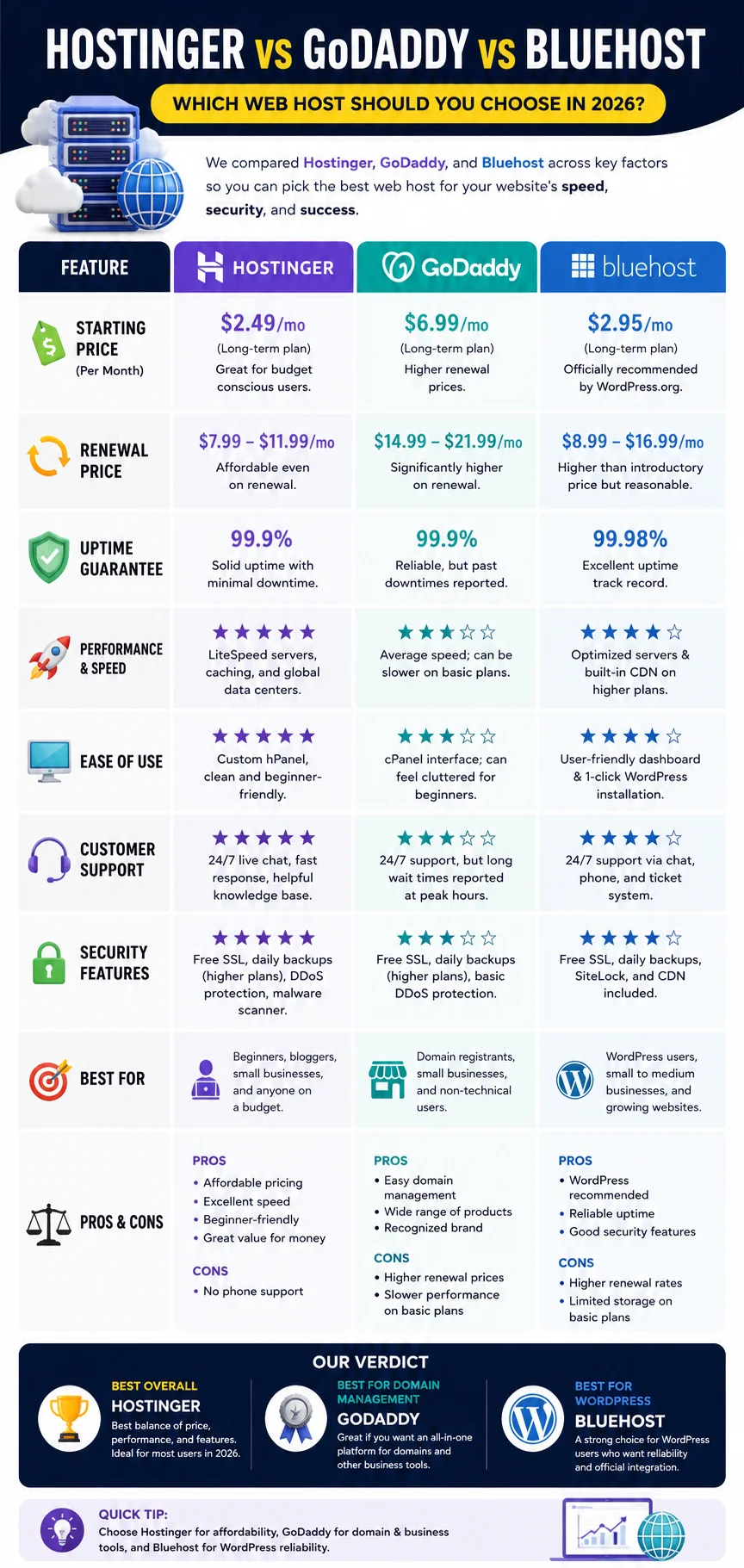
Before we get into the nitty-gritty details, here’s a high-level snapshot of what each provider brings to the table.
Hostinger is known for its budget-friendly pricing, fast-loading servers, and beginner-friendly control panel. It has grown rapidly in popularity because it offers excellent value without sacrificing performance.
GoDaddy is one of the oldest and most recognized names in the hosting and domain registration industry. It offers a wide range of products beyond hosting, including domains, email, and website builders, making it a one-stop shop for many small business owners.
Bluehost is officially recommended by WordPress.org and has long been a go-to choice for WordPress users. It’s known for its solid WordPress integration, though its pricing and renewal rates have drawn criticism over the years.
Each of these hosts has its own strengths, and the best choice depends on your budget, technical comfort level, and the type of website you’re building.
Pricing Comparison
Price is often the first thing people consider when comparing hosting providers, and it’s an important factor — but it’s not the only one. Let’s look at how these three hosts stack up in terms of cost.
Hostinger Pricing
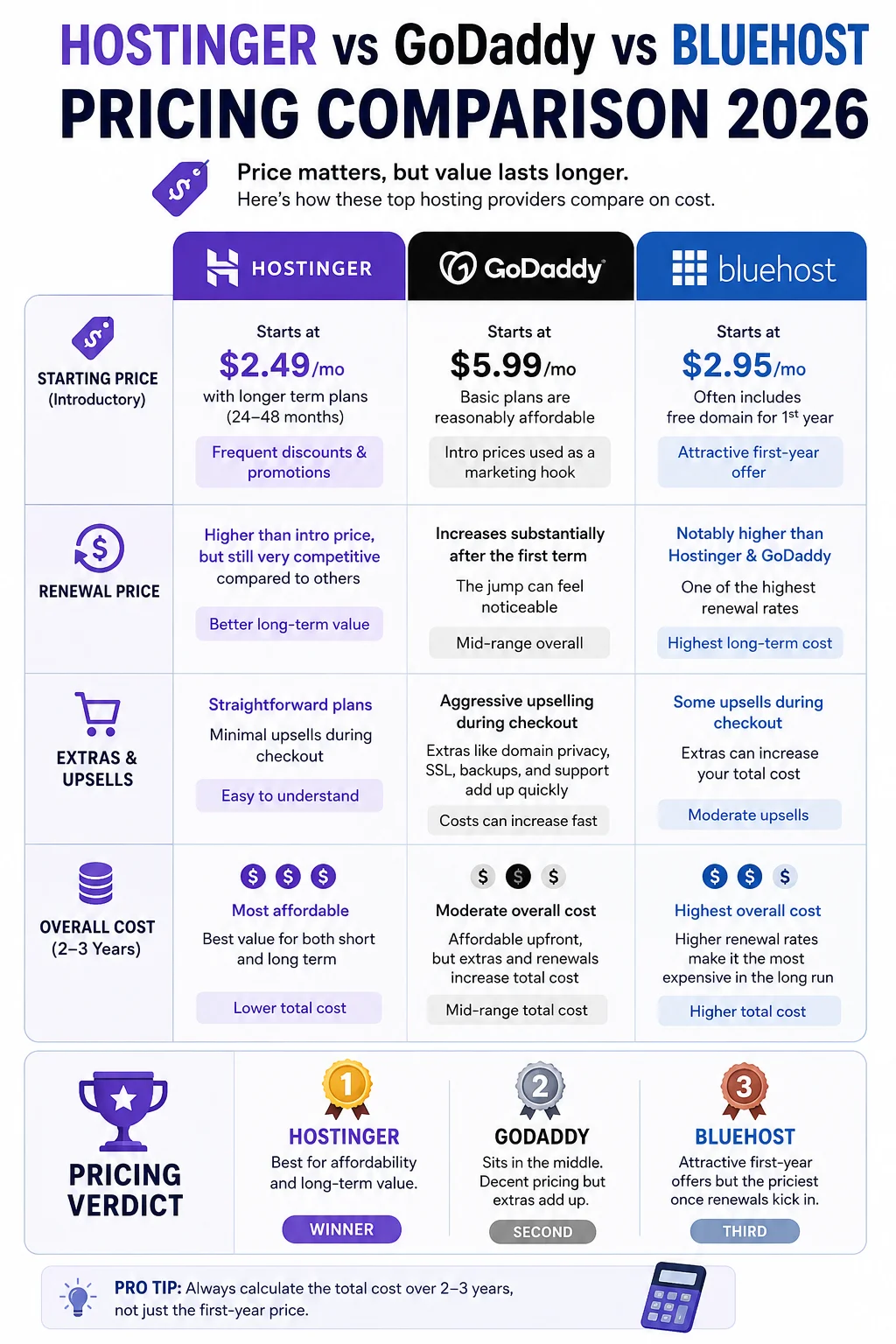
Hostinger is widely regarded as one of the most affordable hosting providers on the market. Its entry-level shared hosting plans often start at just a few dollars per month when you commit to a longer billing cycle (such as 24 or 48 months). Hostinger frequently runs promotional discounts, which can make the introductory pricing extremely attractive for budget-conscious website owners.
However, like most hosting companies, Hostinger’s renewal prices are higher than the introductory rate. It’s important to read the fine print and understand what you’ll be paying once your initial term ends. Even so, Hostinger’s renewal prices tend to remain competitive compared to GoDaddy and Bluehost.
GoDaddy Pricing
GoDaddy’s hosting plans are generally priced in the middle of the pack. Its basic shared hosting plans are reasonably affordable, but the cost can add up quickly once you start adding extras like domain privacy, SSL certificates, backups, and premium support. GoDaddy is also known for aggressive upselling during the checkout process, which can catch new customers off guard.
Renewal pricing at GoDaddy tends to increase substantially after the first term, similar to most hosts in this space, but the jump can feel steeper because GoDaddy’s introductory prices are often used as a marketing hook.
Bluehost Pricing
Bluehost’s introductory pricing is competitive, especially for its basic shared hosting plans, and it’s often bundled with a free domain for the first year. That said, Bluehost’s renewal rates are notably higher than both Hostinger and GoDaddy in many cases. If you’re planning to stick with a host long-term, it’s worth calculating the total cost over two or three years rather than just looking at the first-year price.
Pricing Verdict
If your primary concern is affordability — both for the first term and long-term renewals — Hostinger generally comes out ahead. GoDaddy sits in the middle, while Bluehost tends to be the priciest option once renewal rates kick in, despite having attractive first-year offers.
Performance and Speed
Website speed directly affects user experience, conversion rates, and SEO rankings. Google has confirmed that page speed is a ranking factor, so this is an area you shouldn’t overlook.
Hostinger Performance
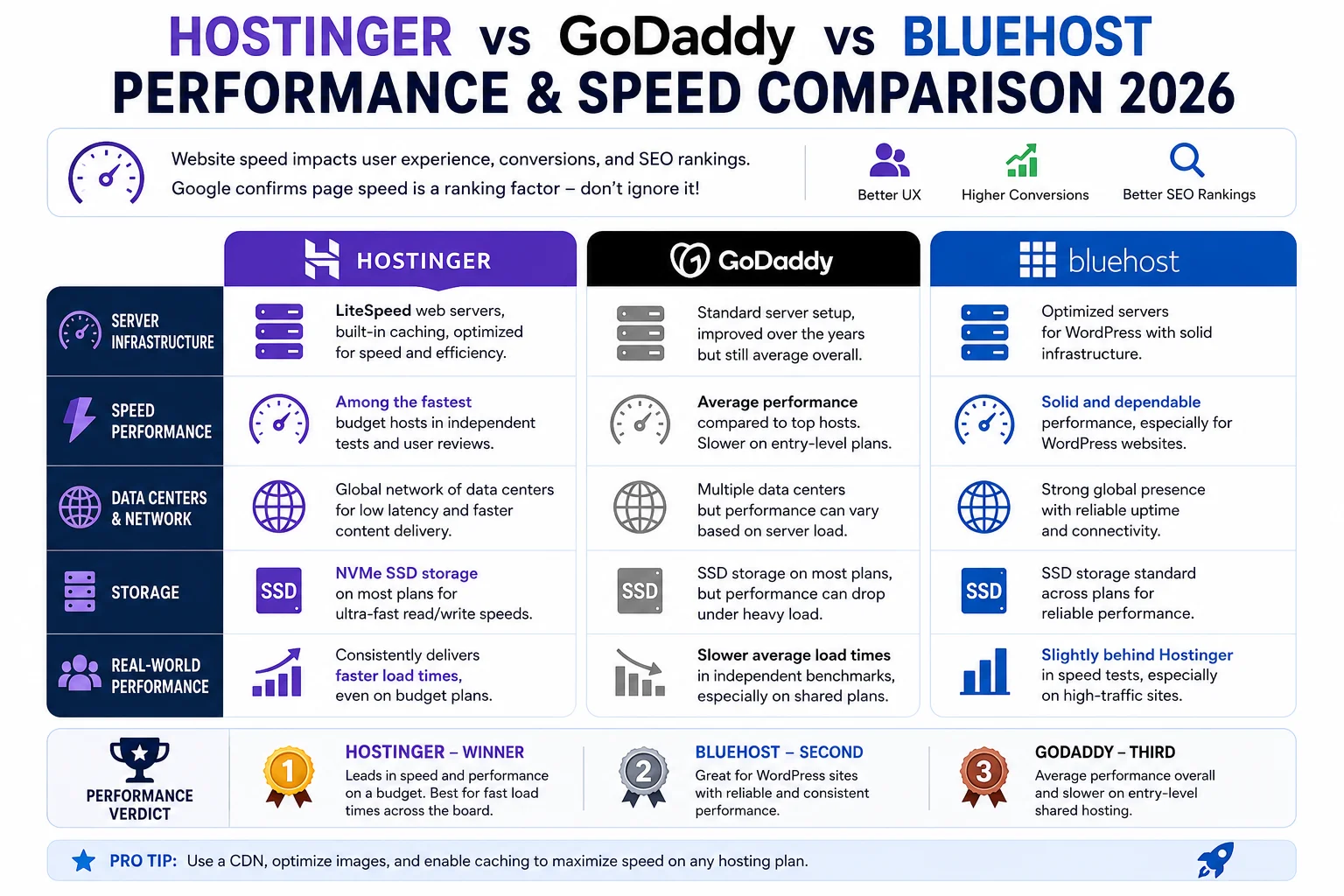
Hostinger has invested heavily in its infrastructure, including LiteSpeed web servers, built-in caching, and a global network of data centers. Independent speed tests and user reviews frequently place Hostinger among the fastest budget hosts available. Its use of NVMe SSD storage on most plans also contributes to quicker load times compared to hosts still relying on traditional SSDs or HDDs.
GoDaddy Performance
GoDaddy’s performance is generally considered average. While it’s improved its infrastructure over the years, independent benchmarks often show slower average load times compared to Hostinger, particularly on entry-level shared hosting plans. Performance can also vary depending on server load, since shared hosting means you’re sharing resources with other websites.
Bluehost Performance
Bluehost offers solid, dependable performance, especially for WordPress websites, thanks to its official partnership with WordPress.org and optimized server configurations. However, its speed on standard shared hosting plans is often reported as being slightly behind Hostinger’s, particularly for sites with higher traffic volumes.
Performance Verdict
For raw speed on a budget, Hostinger tends to lead the pack in most independent tests. Bluehost is a close second, especially for WordPress-specific workloads, while GoDaddy generally lags behind the other two on entry-level plans.
Uptime and Reliability
Uptime refers to the percentage of time your website is accessible to visitors. Even a small amount of downtime can mean lost traffic, lost sales, and a damaged reputation.
Hostinger Uptime
Hostinger advertises a 99.9% uptime guarantee and generally delivers on this promise according to third-party monitoring services. Its infrastructure investments, including redundant systems and multiple data centers, help maintain consistent reliability.
GoDaddy Uptime
GoDaddy also promises 99.9% uptime, and its large-scale infrastructure generally supports this claim. As one of the largest hosting companies in the world, GoDaddy has significant resources dedicated to keeping servers online, though isolated incidents of downtime have been reported by users over the years.
Bluehost Uptime
Bluehost similarly offers a 99.9% uptime guarantee and has a strong track record of reliability, particularly for WordPress hosting plans. Its long-standing partnership with WordPress.org means it has optimized much of its infrastructure specifically for WordPress performance and stability.
Uptime Verdict
All three hosts perform similarly well in this category, with each advertising and generally achieving 99.9% uptime. This is one area where the differences between Hostinger, GoDaddy, and Bluehost are relatively minor.
Ease of Use
For beginners, ease of use can be just as important as speed or price. A confusing control panel can turn a simple task into a frustrating ordeal.
Hostinger Ease of Use
Hostinger uses its own custom-built control panel called hPanel, which many users find more modern and intuitive than the traditional cPanel interface. hPanel simplifies tasks like installing WordPress, managing domains, and setting up email accounts. Hostinger also offers a straightforward website builder for users who don’t want to deal with WordPress at all.
GoDaddy Ease of Use
GoDaddy has its own custom dashboard as well, designed to be beginner-friendly. It offers one-click WordPress installation and a drag-and-drop website builder. However, some users find GoDaddy’s interface cluttered with upsells and add-on prompts, which can make navigation feel more complicated than necessary.
Bluehost Ease of Use
Bluehost uses a customized version of cPanel, which is a widely recognized and well-documented control panel used across the hosting industry. This familiarity can be an advantage for users who have hosted websites before. Bluehost also offers guided onboarding for new users, including a step-by-step WordPress setup process.
Ease of Use Verdict
All three providers are considered beginner-friendly, though Hostinger’s hPanel is often praised for its clean, modern design. GoDaddy’s frequent upsell prompts can be a minor annoyance, while Bluehost’s use of standard cPanel offers familiarity for more experienced users.
Customer Support
Reliable customer support is crucial, especially when something goes wrong with your website in the middle of the night.
Hostinger Support
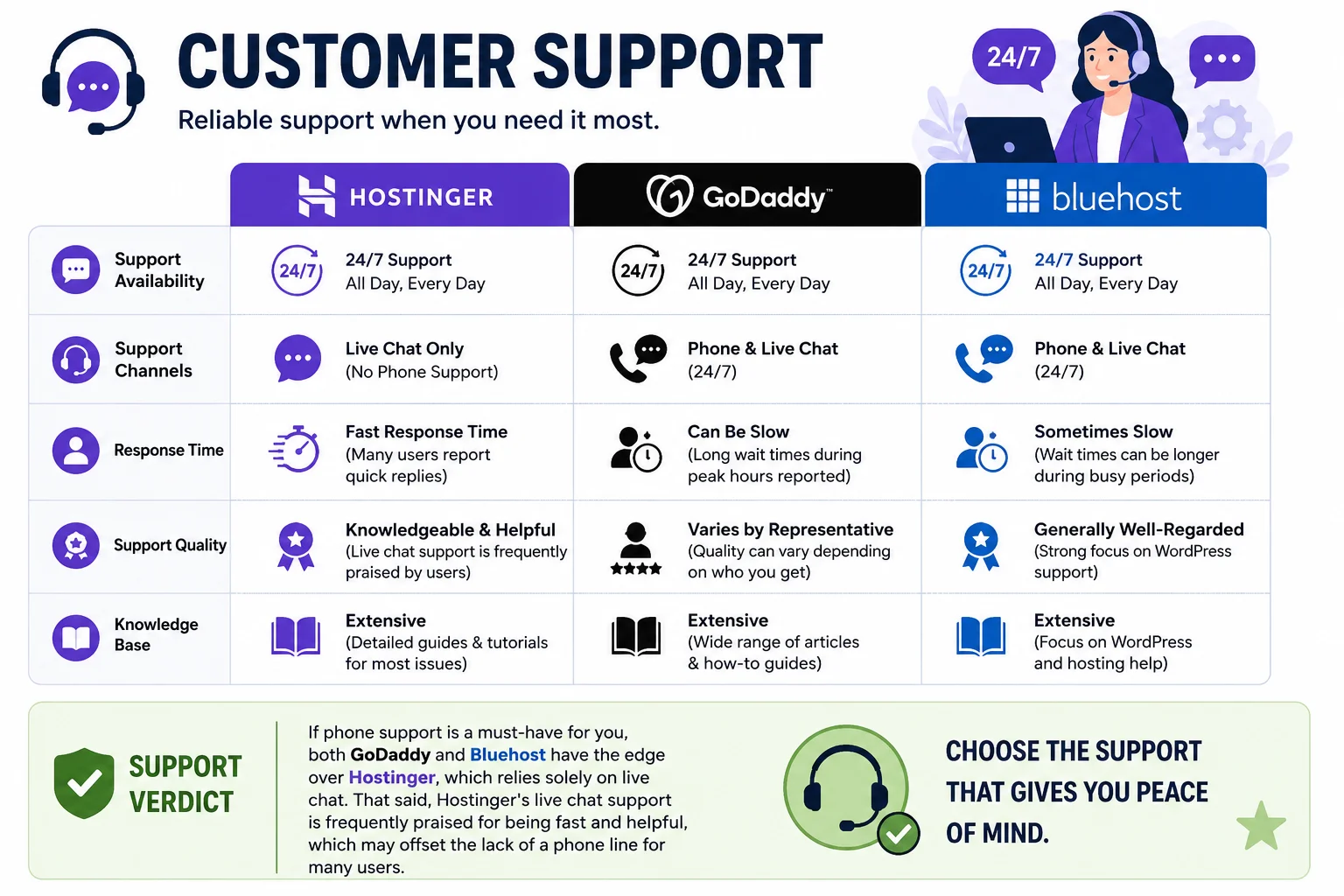
Hostinger offers 24/7 live chat support, and many users report fast response times and knowledgeable representatives. Hostinger does not offer phone support, which could be a downside for users who prefer speaking to someone directly, but its live chat and extensive knowledge base generally cover most common issues.
GoDaddy Support
GoDaddy provides 24/7 phone and live chat support, which is a significant advantage for users who prefer talking to a real person. However, some customers have reported long wait times during peak hours, and support quality can vary depending on the representative.
Bluehost Support
Bluehost offers 24/7 live chat and phone support as well, with a strong focus on WordPress-related issues given its official WordPress.org partnership. Support quality is generally well-regarded, though, like GoDaddy, wait times can occasionally be longer than expected during busy periods.
Support Verdict
If phone support is a must-have for you, both GoDaddy and Bluehost have the edge over Hostinger, which relies solely on live chat. That said, Hostinger’s live chat support is frequently praised for being fast and helpful, which may offset the lack of a phone line for many users.
Security Features
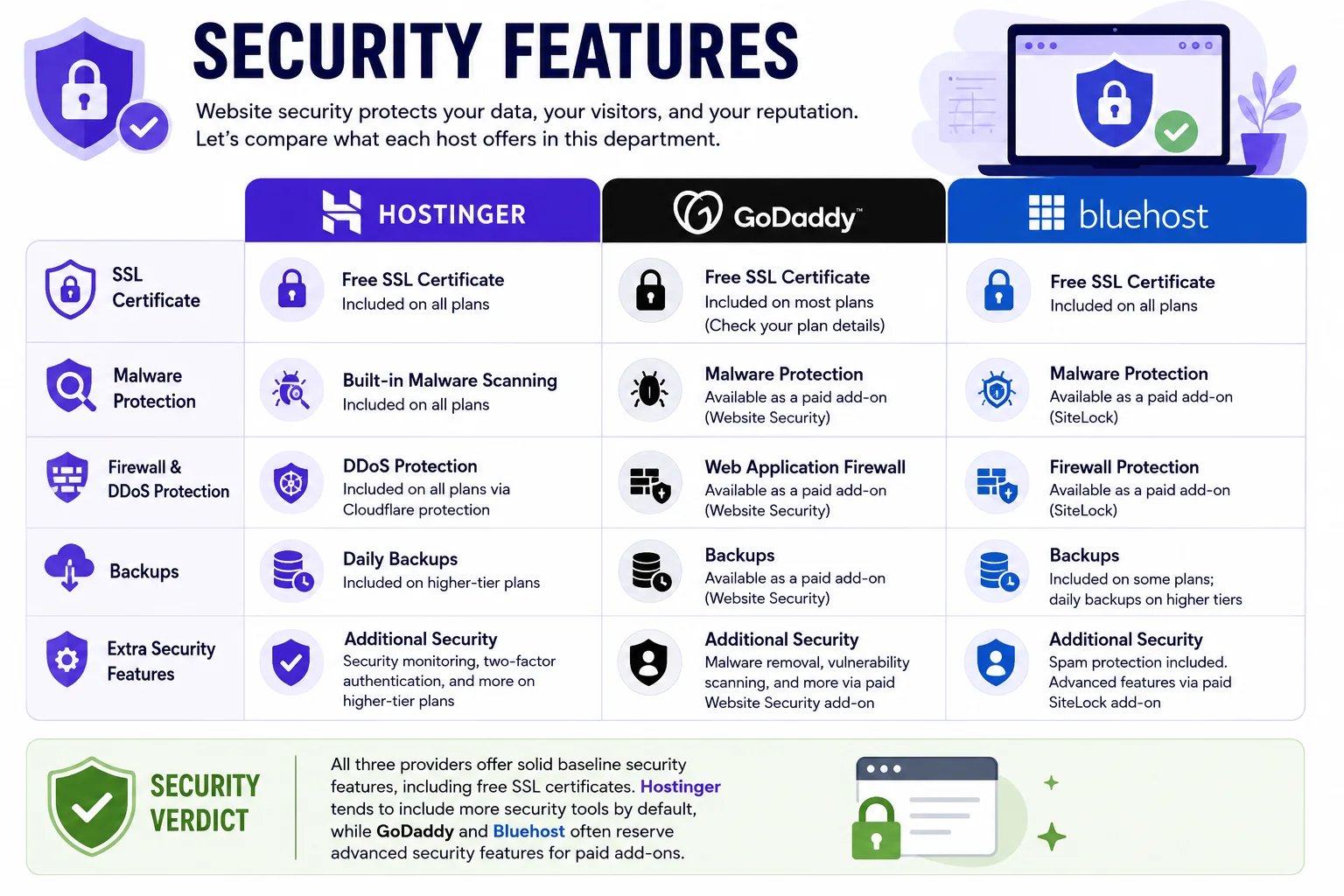
Website security protects your data, your visitors, and your reputation. Let’s compare what each host offers in this department.
Hostinger Security
Hostinger includes free SSL certificates on all plans, along with built-in malware scanning and DDoS protection. Higher-tier plans include daily backups and additional security monitoring tools. Hostinger also uses Cloudflare protection to help defend against attacks.
GoDaddy Security
GoDaddy includes a free SSL certificate on most plans, though in the past it has sometimes been offered only on higher-tier packages, so it’s worth double-checking your specific plan. GoDaddy also offers optional security add-ons, such as its Website Security product, for an additional fee, which includes malware removal and a web application firewall.
Bluehost Security
Bluehost includes free SSL certificates across its plans and offers a free domain privacy feature on some packages. Its security suite includes spam protection, and Bluehost also offers optional premium security add-ons like SiteLock for more advanced malware scanning and removal.
Security Verdict
All three providers offer solid baseline security features, including free SSL certificates. Hostinger tends to include more security tools by default, while GoDaddy and Bluehost often reserve advanced security features for paid add-ons.
WordPress Hosting Comparison
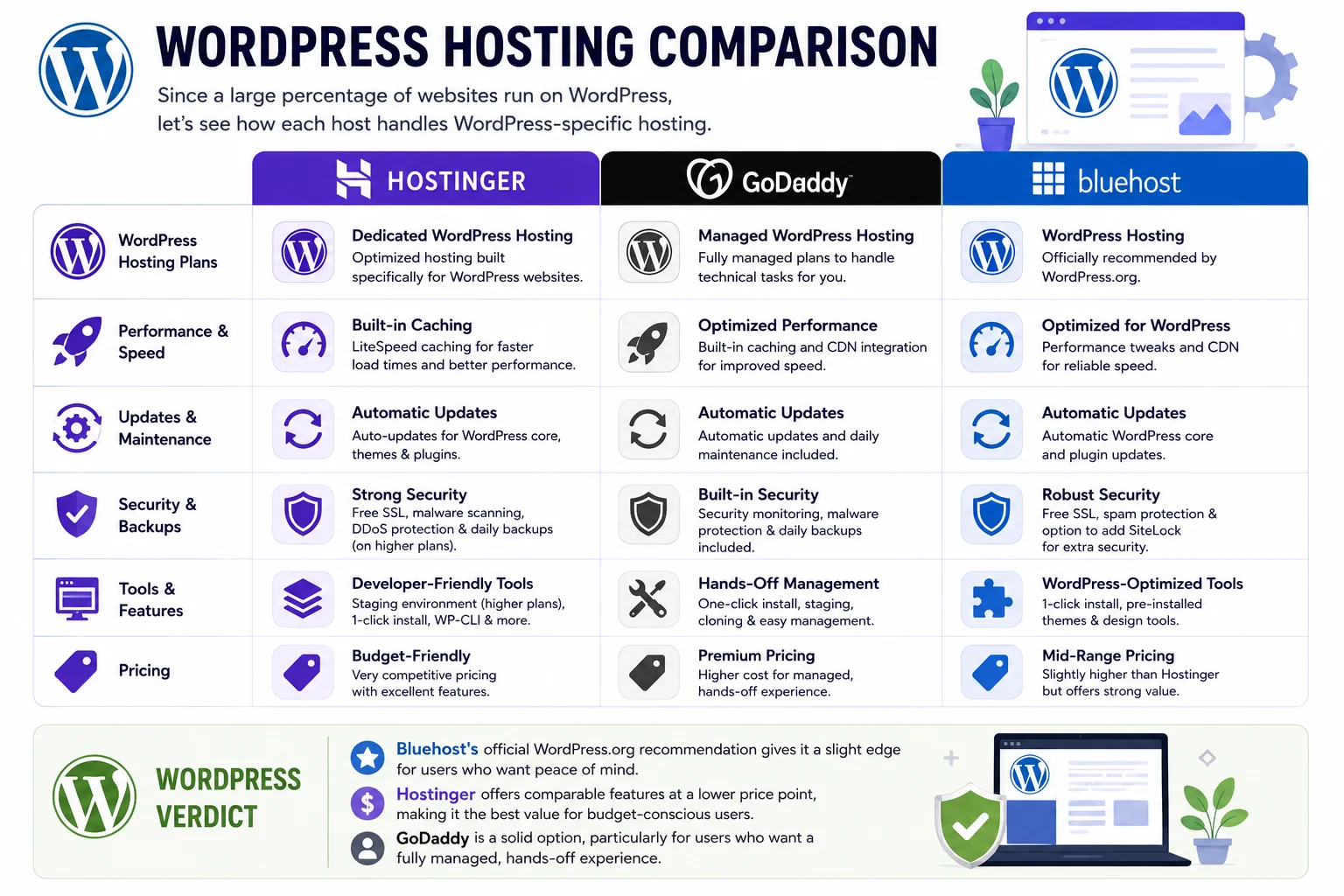
Since a large percentage of websites run on WordPress, it’s worth taking a closer look at how each host handles WordPress-specific hosting.
Hostinger for WordPress
Hostinger offers dedicated WordPress hosting plans with pre-installed WordPress, automatic updates, and built-in caching for faster load times. Its WordPress plans are competitively priced and include useful tools like a staging environment on higher-tier plans.
GoDaddy for WordPress
GoDaddy offers Managed WordPress Hosting plans that include automatic updates, daily backups, and built-in security monitoring. These plans are designed to take the technical burden off website owners, though they tend to be priced higher than Hostinger’s comparable offerings.
Bluehost for WordPress
Bluehost is the officially recommended hosting provider by WordPress.org, which gives it a unique level of credibility in this category. Its WordPress hosting plans include one-click installation, automatic updates, and a range of pre-installed themes designed specifically for WordPress websites.
WordPress Verdict
Bluehost’s official WordPress.org recommendation gives it a slight edge for users who want peace of mind, but Hostinger offers comparable features at a lower price point. GoDaddy is a solid option too, particularly for users who want a fully managed, hands-off experience.
Website Builder Options
If you don’t want to use WordPress or another content management system, a built-in website builder can be a convenient alternative.
Hostinger includes an AI-powered website builder with many of its plans, allowing users to generate a website layout in minutes using simple prompts. GoDaddy’s Website Builder is one of the most polished drag-and-drop tools in the industry, designed for users who want a simple, guided experience without touching code. Bluehost also offers a website builder, though it’s generally considered less feature-rich compared to Hostinger’s and GoDaddy’s offerings.
Storage and Bandwidth
Storage and bandwidth limits vary across plans and providers, so it’s worth checking the specifics before committing.
Hostinger’s entry-level plans typically include a set amount of SSD storage with room to scale up on higher tiers, along with generous or unmetered bandwidth on many plans. GoDaddy’s plans often include unmetered bandwidth as well, though actual usage limits may apply based on fair use policies. Bluehost typically offers similar unmetered bandwidth, with storage amounts increasing as you move up through its plan tiers.
In practice, most small to medium-sized websites won’t come close to hitting these limits, so this factor is less likely to be a deciding one for most users — unless you’re running a large e-commerce store or a media-heavy site.
Migration Services
If you’re moving your website from another host, migration support can save you significant time and technical headaches.
Hostinger offers a free automated migration tool for WordPress websites, along with the option for manual migration assistance on select plans. GoDaddy offers migration services as well, though in some cases they come with an additional fee depending on the complexity of your site. Bluehost provides a free WordPress migration plugin, along with paid migration assistance for more complex sites or non-WordPress platforms.
If a smooth, free migration is important to you, Hostinger’s approach tends to be the most straightforward for WordPress users, though all three hosts offer reasonable options in this category.
E-Commerce Hosting
If you’re planning to run an online store, it’s worth considering how each host supports e-commerce platforms like WooCommerce.
Hostinger offers WooCommerce-optimized hosting plans with pre-installed extensions and performance tuning designed specifically for online stores. GoDaddy offers its own e-commerce solutions, including WooCommerce hosting and its proprietary GoDaddy Online Store product, giving users flexibility depending on their technical comfort level. Bluehost also offers dedicated WooCommerce hosting plans, complete with pre-installed themes and plugins tailored for online retail.
All three providers can support a functional online store, but the right choice depends on your specific needs, such as whether you want a fully custom WooCommerce setup or a more guided, template-based store builder.
Data Center Locations
Server location affects how quickly your website loads for visitors in different parts of the world.
Hostinger operates data centers across multiple continents, including locations in the United States, Europe, and Asia, giving users flexibility to choose a server closer to their target audience. GoDaddy’s data centers are also spread across multiple global regions, providing similar geographic flexibility. Bluehost’s data centers are more concentrated, with a primary focus on U.S.-based infrastructure, which may be a consideration if most of your traffic comes from outside North America.
Pros and Cons Summary
To make things easier to digest, here’s a summary of the key advantages and drawbacks of each hosting provider.
Hostinger Pros: Affordable pricing, fast server performance, beginner-friendly hPanel interface, strong security features included by default, and a free AI website builder.
Hostinger Cons: No phone support, and long-term contracts are often required to get the lowest advertised prices.
GoDaddy Pros: All-in-one platform for domains and hosting, strong 24/7 phone support, and a polished drag-and-drop website builder.
GoDaddy Cons: Aggressive upselling during checkout, average performance compared to competitors, and add-ons can increase costs quickly.
Bluehost Pros: Official WordPress.org recommendation, reliable performance for WordPress sites, and solid 24/7 support options.
Bluehost Cons: Higher renewal pricing, data centers concentrated mainly in the U.S., and a less modern website builder.
Who Should Choose Hostinger?
Hostinger is a great fit for budget-conscious website owners, bloggers, freelancers, and small business owners who want strong performance without a high price tag. It’s also an excellent choice for beginners who want a clean, easy-to-navigate control panel and don’t necessarily need phone support.
Who Should Choose GoDaddy?
GoDaddy makes sense for users who want a true all-in-one platform — especially if you’re also registering a domain and want everything managed under one account. It’s a solid pick for those who value phone support and don’t mind paying a bit extra for convenience and brand recognition.
Who Should Choose Bluehost?
Bluehost is ideal for WordPress users who want the reassurance of an officially recommended host. It’s particularly well-suited for bloggers and small business owners building WordPress-based websites who prioritize reliability and don’t mind paying slightly higher renewal rates for that peace of mind.
Frequently Asked Questions
Which is cheaper: Hostinger, GoDaddy, or Bluehost? Hostinger is generally the most affordable option, both for introductory pricing and long-term renewal rates, though all three hosts run frequent promotions that can shift pricing temporarily.
Which host is fastest? Independent speed tests typically show Hostinger delivering the fastest average load times, followed closely by Bluehost, with GoDaddy generally trailing behind on entry-level plans.
Is Bluehost really the best host for WordPress? Bluehost’s official recommendation from WordPress.org gives it credibility, but Hostinger and GoDaddy both offer capable WordPress hosting plans as well, often at competitive prices.
Does Hostinger offer phone support? No, Hostinger currently relies on 24/7 live chat support rather than phone support, which may be a drawback for users who prefer speaking directly with a representative.
Can I switch hosts later if I change my mind? Yes, all three providers offer migration tools or services to help you move your website, though the ease of migration can depend on your website’s complexity and the platform you’re using.
Final Verdict: Hostinger vs GoDaddy vs Bluehost
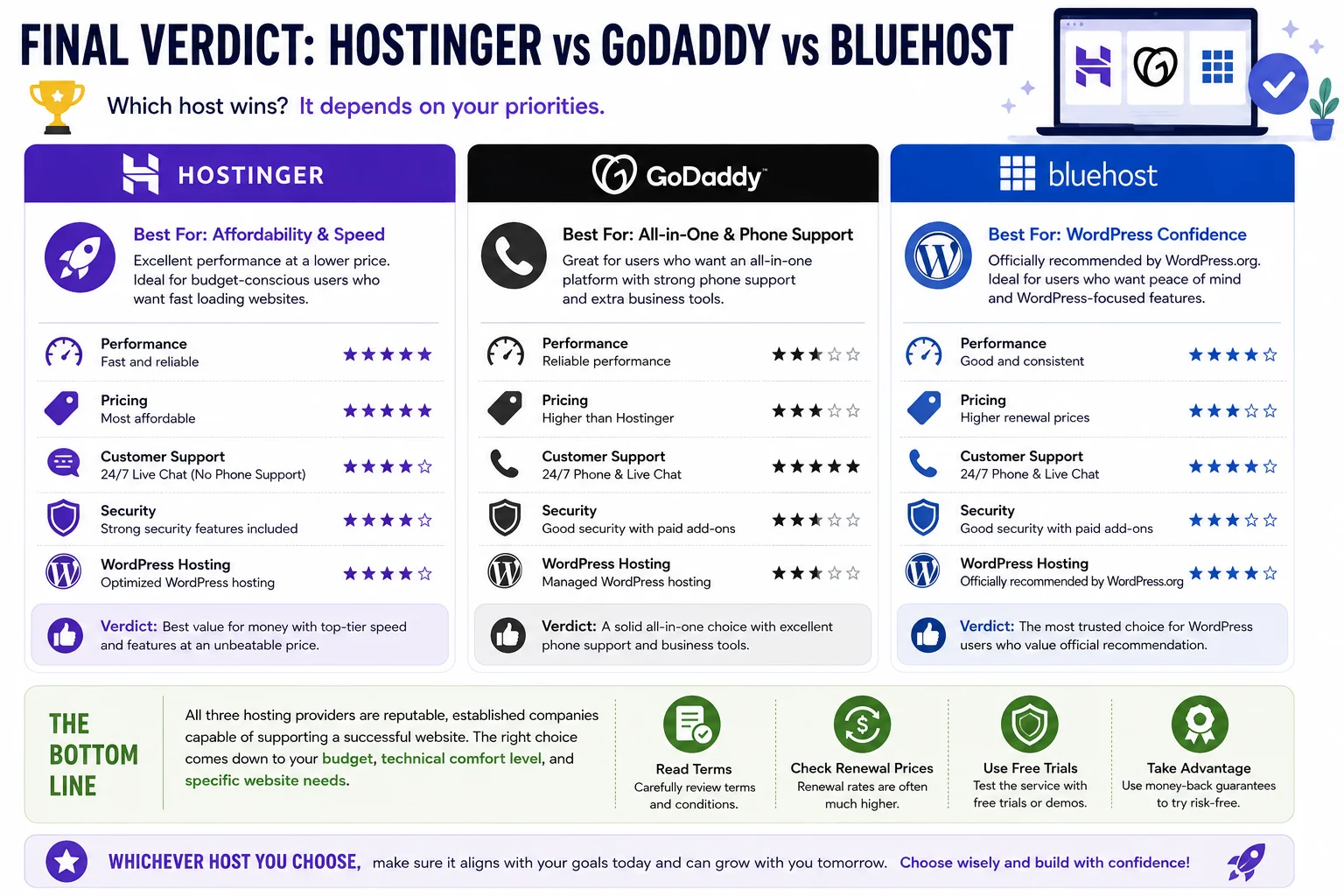
So, which host wins in the Hostinger vs GoDaddy vs Bluehost comparison? The honest answer is that it depends on your priorities.
If affordability and speed are your top concerns, Hostinger is likely your best bet. It consistently delivers strong performance at a lower price point, though you’ll need to rely on live chat for support rather than a phone line.
If you want an all-in-one platform with strong phone support and don’t mind paying a little more, GoDaddy is a reasonable choice, particularly if you’re already planning to register your domain through them.
If you’re building a WordPress website and want the confidence of an officially recommended host, Bluehost remains a solid option, even though its renewal pricing tends to run higher than the other two.
Ultimately, all three hosting providers are reputable, established companies capable of supporting a successful website. Take the time to consider your budget, your technical comfort level, and your website’s specific needs before making a final decision. Whichever host you choose, make sure to read the terms carefully, understand the renewal pricing, and take advantage of any free trials or money-back guarantees to test the service firsthand before committing long-term.