
WordPress Plugins Every Business Website Needs in 2026
If you run a company website on WordPress, you already know the platform gives you a strong foundation — but a fresh WordPress install is really just a blank canvas. To turn that canvas into a website that ranks on Google, converts visitors into customers, and stays safe from hackers, you need the right set of tools. That’s where the WordPress plugins every business website needs come in. These are the add-ons that handle SEO, security, speed, backups, lead capture, and more, so you don’t have to build any of it from scratch or hire a developer for every small change.
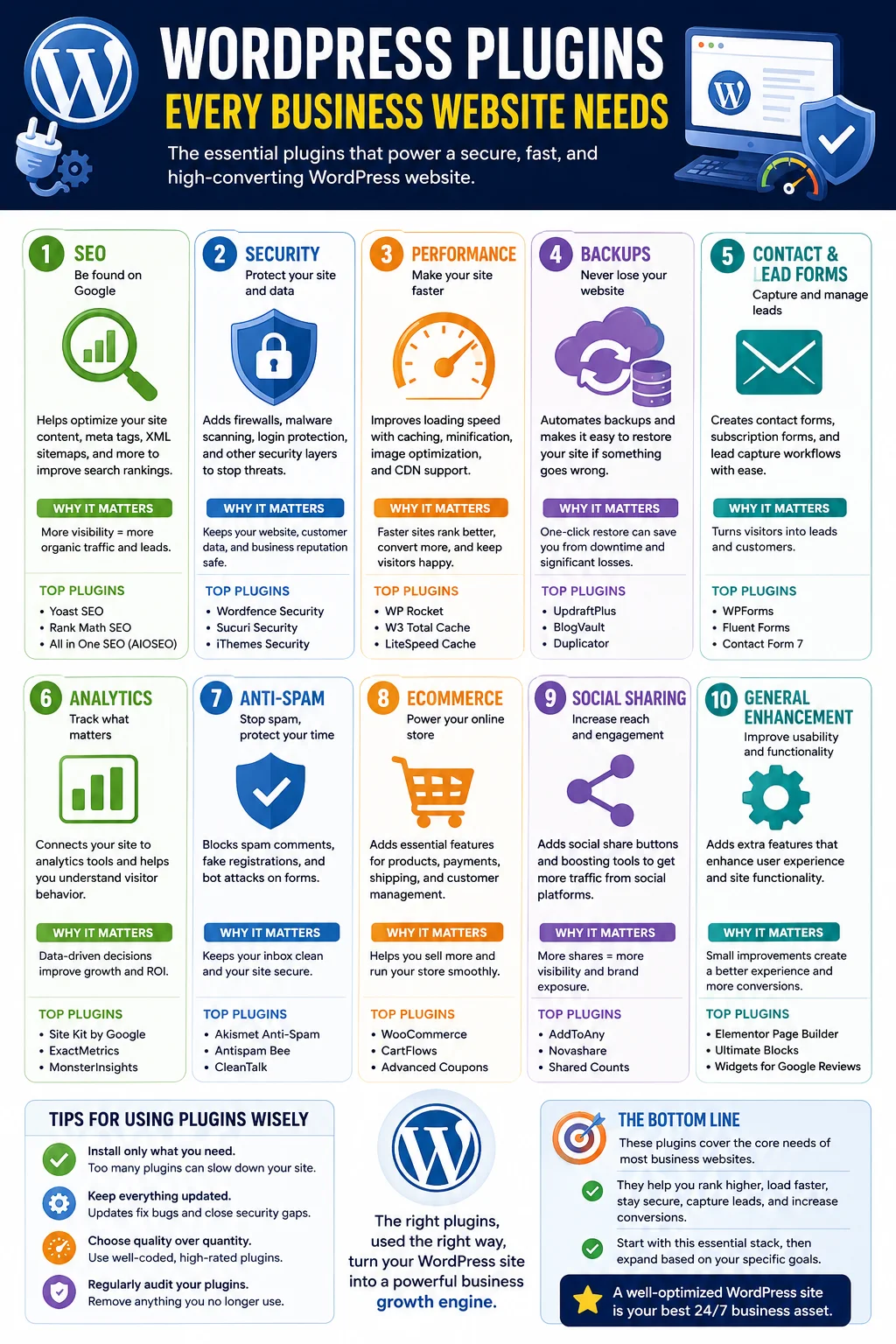
WordPress powers a huge share of the websites on the internet today, and one of the biggest reasons businesses choose it over other platforms is the plugin ecosystem. There are tens of thousands of plugins available, which is fantastic for flexibility but overwhelming when you’re trying to figure out which ones actually matter. Install too many, and your site slows to a crawl or breaks entirely. Install too few, and you’re leaving traffic, leads, and revenue on the table.
This guide walks through the essential categories of plugins every business website should have, explains what each one does, why it matters for a company site specifically (not just a personal blog), and how to choose between the popular options in each category. By the end, you’ll have a clear, practical shortlist you can install today.
Why the Right Plugins Matter for a Business Website
A personal blog can get away with a handful of basic tools. A business website carries more weight — it represents your brand, it’s often the first impression a prospective customer gets, and in many cases it’s directly tied to revenue through contact forms, bookings, or online sales. That changes what “essential” means.
For a business, the right plugins are not about adding flashy features. They’re about closing gaps that directly affect three things: whether people can find you (search visibility), whether they trust and can use your site once they arrive (performance and design), and whether your business is protected from things that could take the site down or damage its reputation (security and backups).
Think of plugins as the specialized staff you’d hire if you were running a physical storefront: someone to handle security, someone to keep the lights on and the aisles clean, someone to greet customers and answer questions, and someone to track how many people walk in and what they buy. WordPress plugins do the digital equivalent, and choosing well means your website runs like a well-staffed business rather than an empty shop with the doors propped open.
With that context in mind, let’s go through the categories that matter most.
1. SEO Plugins
If nobody can find your website on Google, none of your other efforts matter much. SEO plugins help you optimize titles, meta descriptions, headings, and internal structure without needing to touch code or hire an SEO specialist for every page you publish.
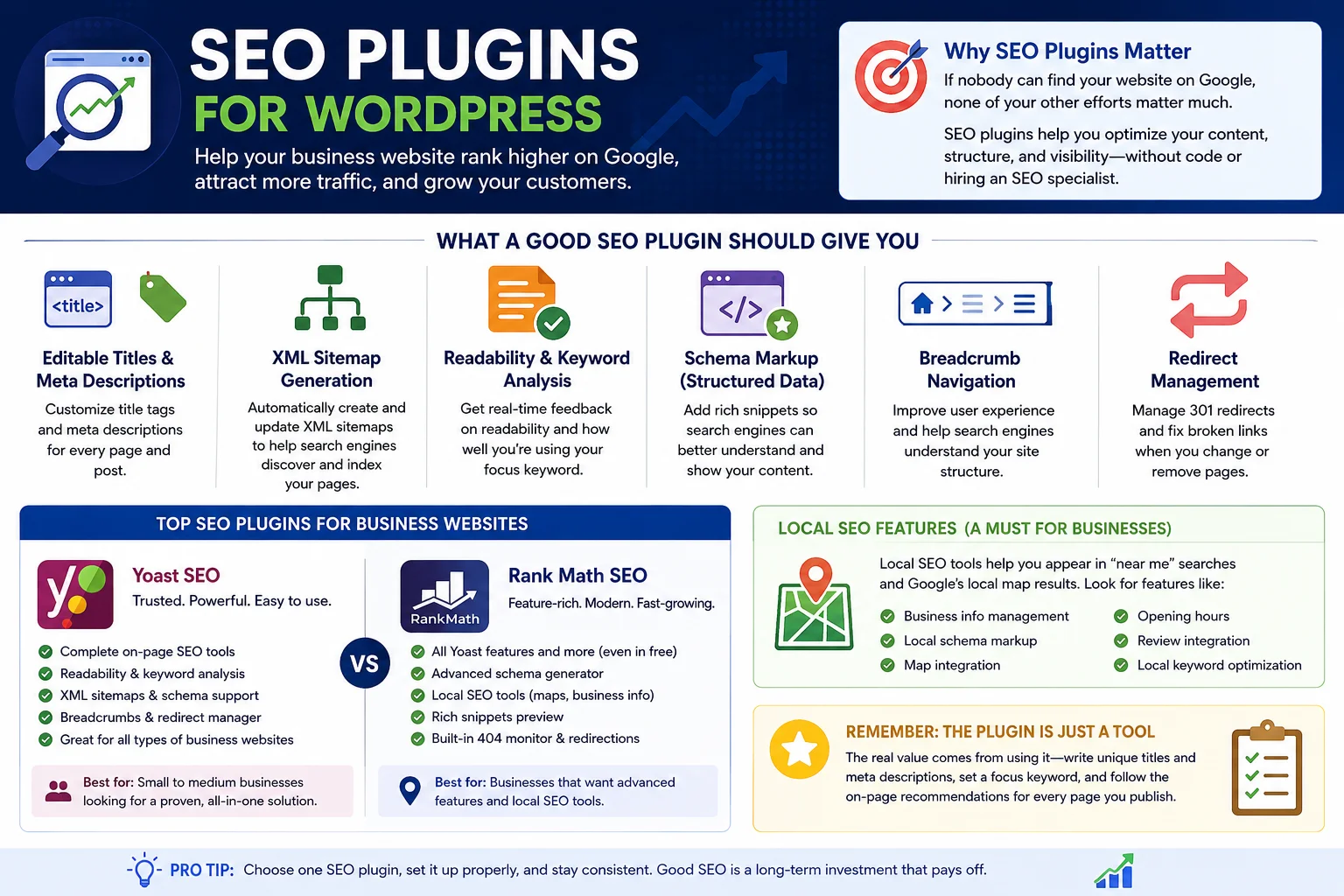
A good SEO plugin will typically give you:
- Editable title tags and meta descriptions for every page and post
- Automatic XML sitemap generation, which helps search engines discover and index your pages
- Readability and keyword-usage analysis as you write
- Schema markup (structured data) that helps search engines understand your content — for example, marking up a recipe, review, or local business listing
- Breadcrumb navigation to improve both user experience and search appearance
- Redirect management, so you don’t end up with broken links when you rename or remove a page
The two most widely used options in this category are well-established SEO plugins that have been refined over many years, alongside newer competitors that have gained ground by offering more advanced features in their free tiers, including local SEO tools and built-in schema generators. For a business site, local SEO features are particularly valuable if you serve customers in a specific city or region, since they help you show up in “near me” searches and Google’s local map results.
Whichever plugin you choose, the real value comes from actually using it — filling in meta descriptions, setting a focus keyword, and paying attention to the on-page recommendations rather than just installing it and forgetting about it.
2. Security Plugins
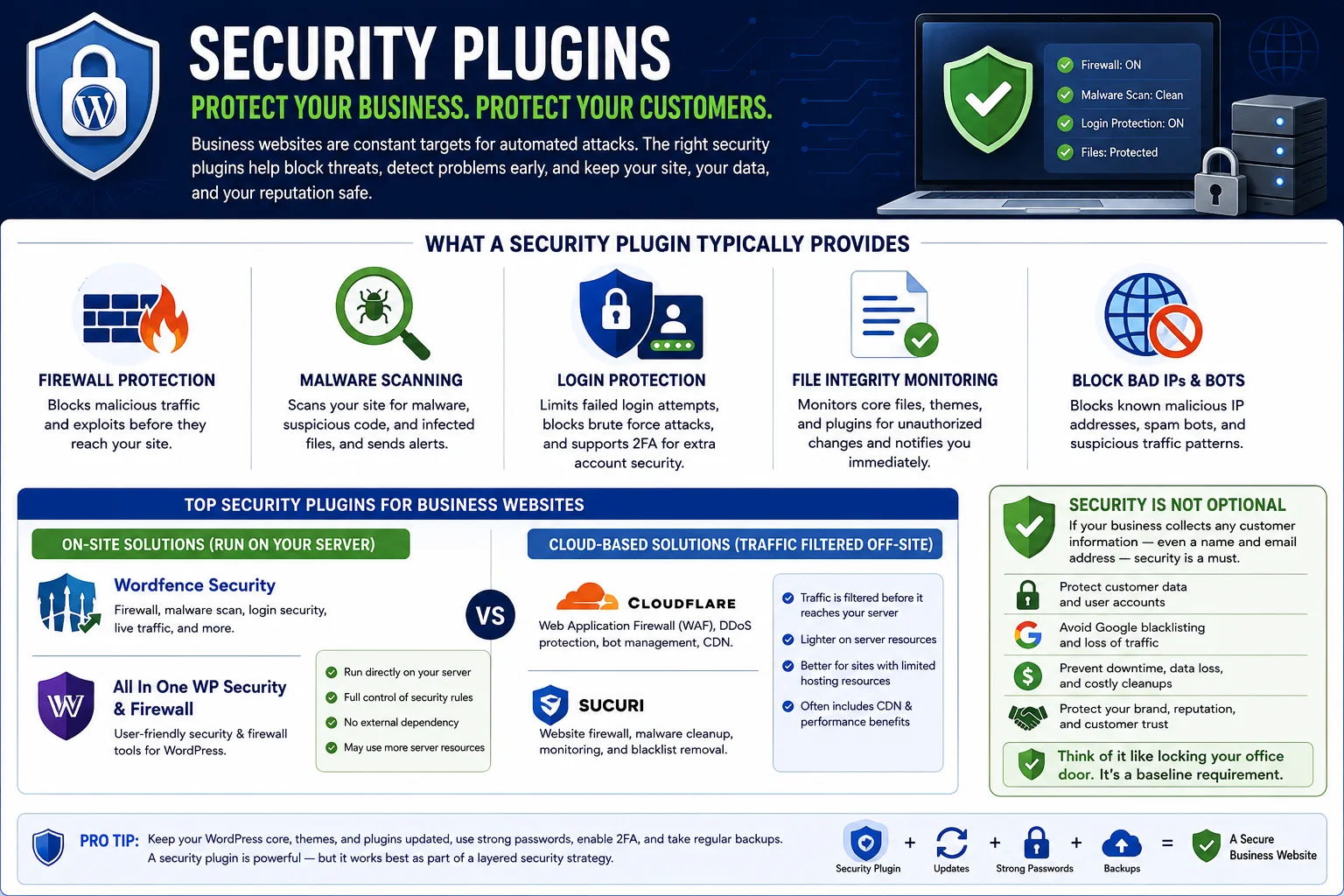
Business websites are attractive targets for automated attacks, not necessarily because a hacker is targeting you specifically, but because bots scan the entire internet looking for outdated plugins, weak passwords, and known vulnerabilities. A single breach can mean stolen customer data, defaced pages, blacklisting by Google, or a site that simply stops working — all of which cost you time, money, and trust.
A security plugin typically provides:
- A firewall that blocks malicious traffic before it reaches your site
- Malware scanning that alerts you to infected files
- Login protection, including limits on failed login attempts and optional two-factor authentication
- File integrity monitoring, which flags unauthorized changes to your website’s core files
- Blocklisting of known bad IP addresses and bots
Popular choices in this space include firewall-and-malware-scanning plugins that run directly on your server, as well as cloud-based security services that filter traffic before it ever reaches your hosting account. The cloud-based approach tends to be lighter on server resources since the filtering happens off-site, which can be a meaningful advantage if your hosting plan has limited resources.
For any business collecting customer information — even something as simple as a contact form — security isn’t optional. It’s a baseline requirement, similar to locking the front door of a physical office.
3. Backup Plugins
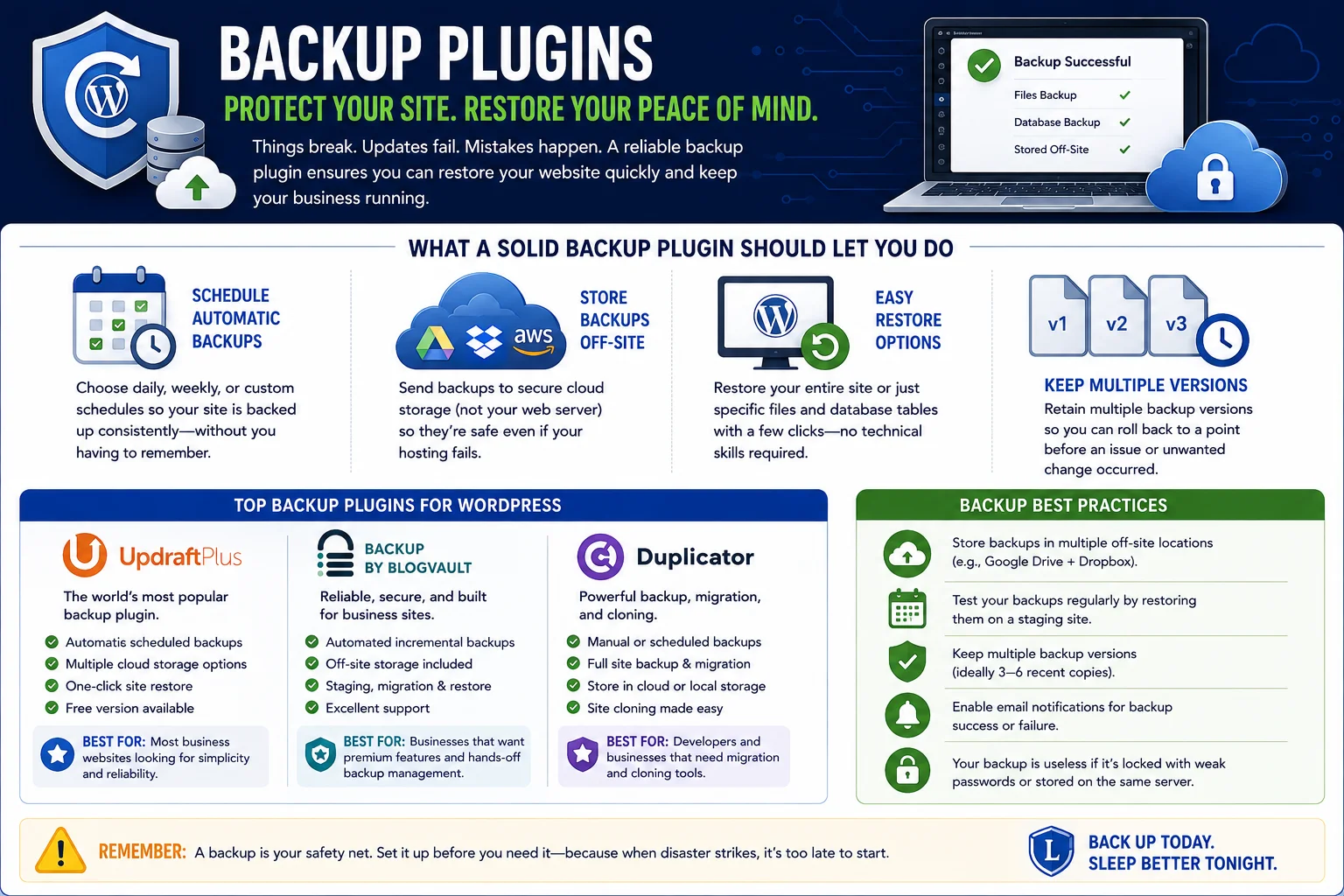
No security setup is completely foolproof, and even without an attack, things can go wrong: a bad plugin update, a hosting server issue, or a mistake during a redesign. Without a backup, any of these can mean losing pages, products, blog posts, or customer data permanently.
A solid backup plugin should let you:
- Schedule automatic backups on a daily, weekly, or custom basis
- Store backups off-site, in a cloud storage service rather than on the same server as your website
- Restore your entire site, or just specific files and database tables, with a few clicks
- Keep multiple backup versions so you can roll back to a point before an issue occurred
The safest setup separates your backups from your hosting account entirely, so if your host has an outage or your account is compromised, your backups are still intact somewhere else. Many business owners underestimate this until the day they need it — and by then, it’s too late to set it up.
4. Performance and Caching Plugins
Website speed affects everything: how long visitors stay, whether they complete a purchase or fill out a form, and how well you rank in search results, since page speed is a factor search engines take into account. A slow-loading business website quietly costs you customers every single day, often without you realizing it.
Caching and performance plugins improve speed by:
- Generating static versions of your pages so the server doesn’t have to rebuild them from scratch on every visit
- Minifying CSS and JavaScript files (removing unnecessary characters to reduce file size)
- Enabling lazy loading, so images below the fold only load once a visitor scrolls to them
- Optimizing your database by cleaning out old revisions, spam comments, and unused data
- Integrating with content delivery networks (CDNs) to serve your site faster to visitors regardless of their location
A premium, well-supported caching plugin is often worth paying for on a business site, since the setup is largely automated and the performance gains tend to be immediately noticeable, especially on shared or budget hosting plans where server resources are limited.
5. Image Optimization Plugins
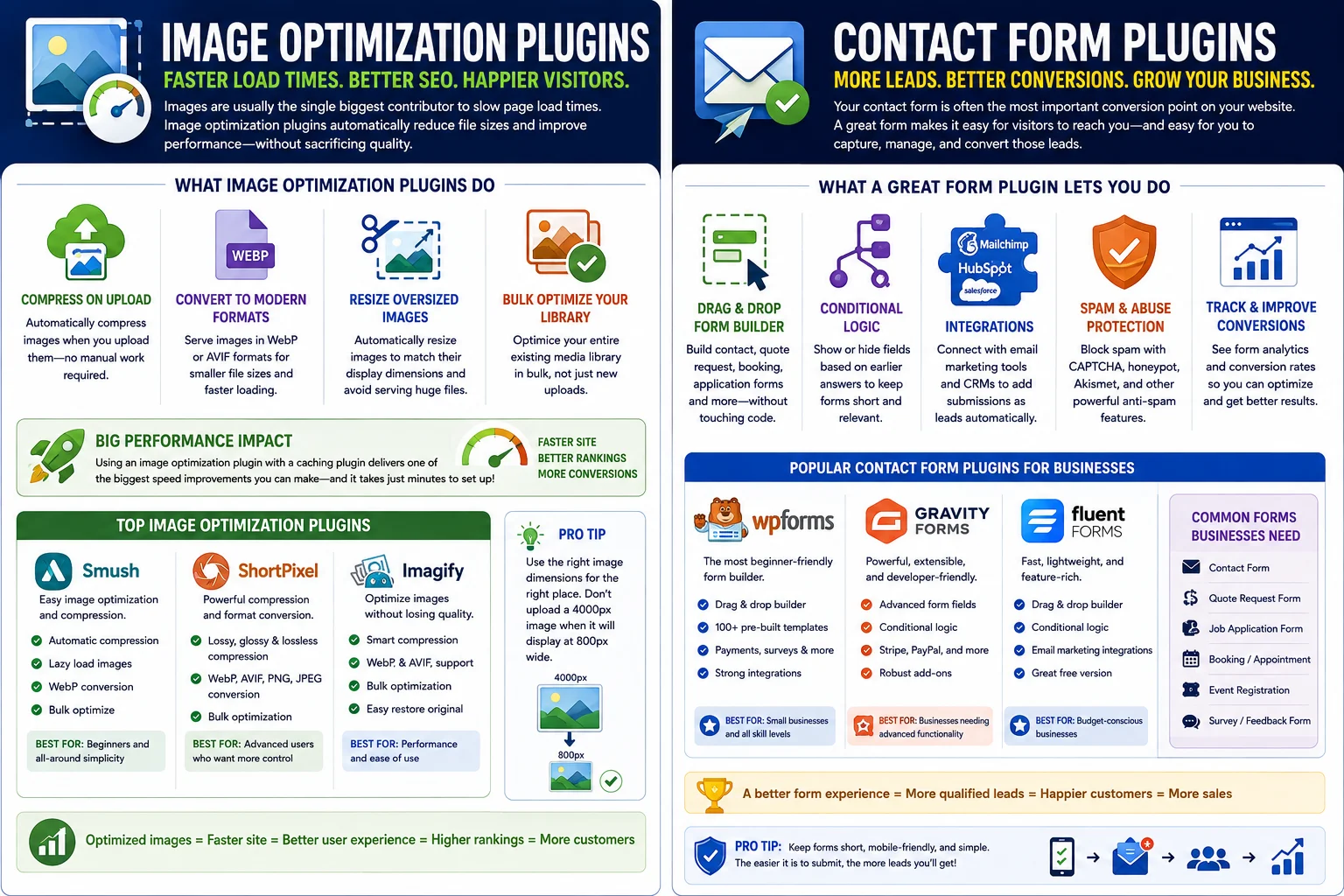
Images are usually the single biggest contributor to slow page load times. A product photo or blog header straight from a camera or stock photo site can easily be several megabytes — far larger than it needs to be for web use.
Image optimization plugins automatically:
- Compress images on upload without a noticeable drop in visual quality
- Convert images to modern, smaller formats
- Resize oversized images to fit their display dimensions
- Bulk-optimize your entire existing media library, not just new uploads
Pairing an image optimization plugin with your caching plugin usually delivers the biggest, most noticeable speed improvement you can make to a business website, and it typically takes only a few minutes to set up.
6. Contact Form Plugins
For most business websites, the contact form is the single most important conversion point on the entire site. It’s how a visitor becomes a lead. If your form is clunky, doesn’t work on mobile, or silently fails to deliver messages to your inbox, you’re losing business without even knowing it.
A good form-builder plugin lets you:
- Build contact, quote request, booking, or application forms with a drag-and-drop interface
- Add conditional logic, so certain fields only appear based on earlier answers
- Integrate with email marketing tools and CRMs to automatically add submissions as leads
- Include spam protection so your inbox isn’t flooded with junk submissions
- Track form conversion rates to see how well each form is performing
Beyond a basic contact form, consider whether your business needs a quote request form, a job application form, or a booking form — many of the leading form plugins support all of these use cases within a single tool, which keeps things simpler than juggling several different plugins.
7. Spam Protection Plugins
Related to forms, but worth calling out separately: spam is a constant, low-level drain on any public-facing website. Automated bots submit junk through comment sections and contact forms around the clock, and without protection, you’ll spend real time each week manually deleting spam or, worse, miss genuine customer inquiries buried among it.
Spam protection tools typically work invisibly in the background, using pattern recognition to filter out bot submissions before they ever reach you, without requiring visitors to solve annoying puzzle-style challenges. Many form plugins now include this kind of protection built in, but if yours doesn’t, adding a dedicated anti-spam plugin is a quick fix that saves ongoing headaches.
8. Analytics Plugins
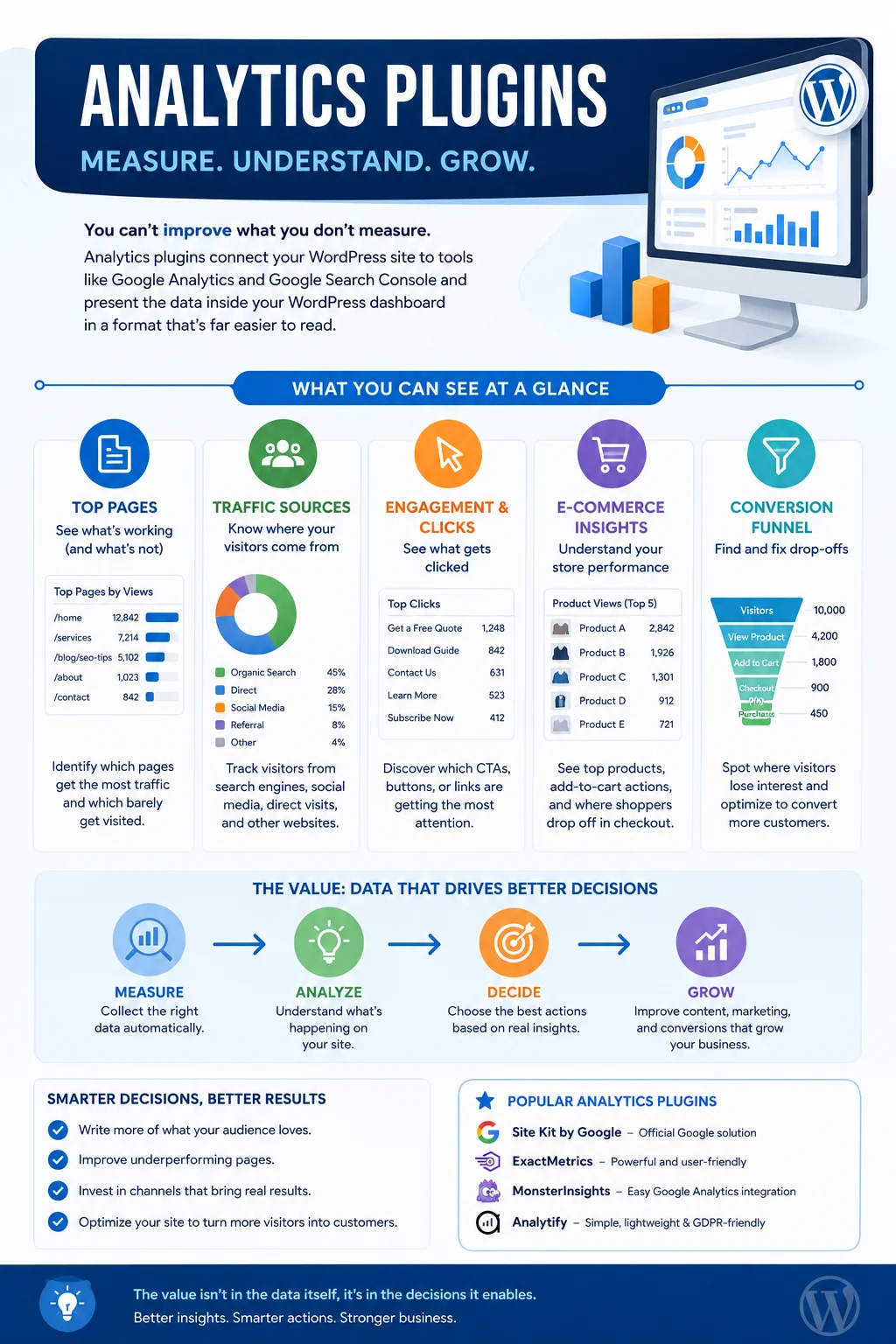
You can’t improve what you don’t measure. Analytics plugins connect your WordPress site to tools like Google Analytics and Google Search Console and then present the data inside your WordPress dashboard in a format that’s far easier to read than the raw analytics interface.
With a good analytics plugin, a business owner (not just a marketer) can quickly see:
- Which pages get the most traffic and which barely get visited
- Where visitors are coming from — search engines, social media, direct visits, or referrals from other sites
- Which calls-to-action, buttons, or forms are actually being clicked
- E-commerce data, such as which products are viewed most and where shoppers drop off before completing checkout
The value here isn’t the data itself, it’s the decisions it enables — knowing which blog topics to write more of, which pages need better calls-to-action, and which marketing channels are actually worth the investment.
9. Lead Generation and Conversion Plugins
Getting traffic to your site is only half the battle; converting that traffic into leads or sales is the other half. Lead generation plugins help you capture visitor interest before they leave, using tools like:
- Exit-intent popups that appear when a visitor is about to leave the page
- Timed or scroll-triggered popups offering a discount, guide, or newsletter signup
- Floating bars or slide-in forms that stay visible without being intrusive
- A/B testing tools to compare which offers and designs convert best
These tools work best when used with restraint. A business site covered in aggressive popups can hurt user experience and even affect search rankings if search engines flag it as disruptive. Used thoughtfully — one well-timed offer, a clear value proposition, and an easy way to dismiss it — these plugins can meaningfully increase the number of leads your site generates from the same amount of traffic.
10. Email Marketing and CRM Plugins
Turning a one-time visitor into a repeat customer usually requires email — most people don’t buy or commit on their very first visit to a business website. Email marketing and CRM plugins let you manage that relationship directly from your WordPress dashboard, rather than juggling a separate platform.
These tools typically offer:
- Automated welcome sequences and follow-up emails
- Contact segmentation, so different types of leads get different messaging
- Campaign tracking, showing open rates, click rates, and conversions
- Integration with your contact forms and e-commerce plugin, so new leads and customers are added automatically
For small and mid-sized businesses especially, having email marketing built into the same platform as your website reduces complexity and cost compared to running entirely separate marketing software.
11. Page Builder Plugins
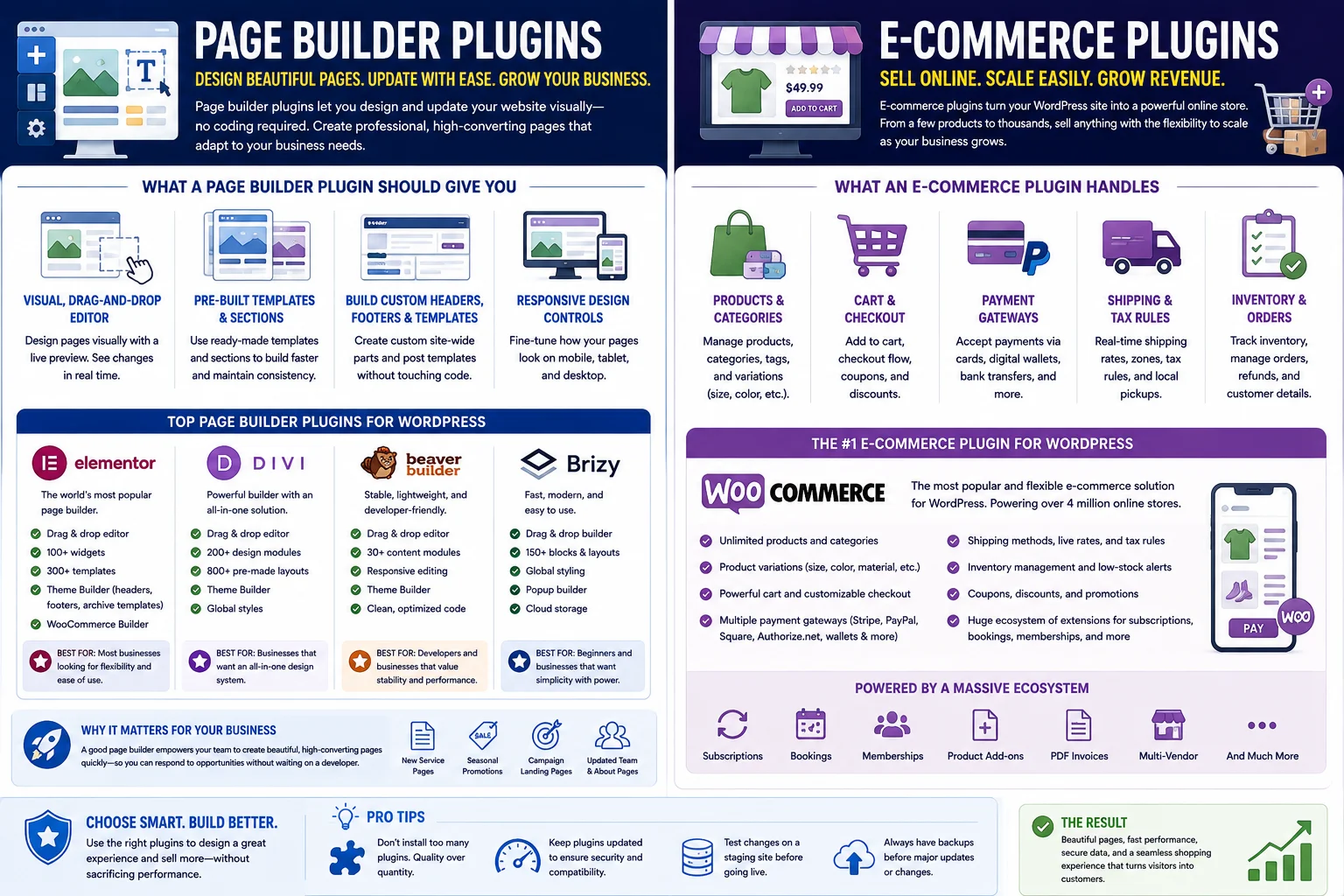
Unless you’re comfortable editing code, you’ll want a page builder that lets you design and update pages visually. This matters most for a business site because your needs will keep evolving — new service pages, seasonal promotions, updated team pages, and landing pages for specific marketing campaigns.
A page builder plugin should give you:
- A visual, drag-and-drop editor with a live preview
- Pre-built templates and sections you can customize rather than starting from a blank page
- The ability to build custom headers, footers, and post templates without touching theme code
- Responsive design controls, so pages look right on mobile, tablet, and desktop
The leading page builders in the WordPress ecosystem have matured significantly and now handle full site design, not just individual pages, which means less reliance on a developer for routine updates.
12. E-commerce Plugins
If your business sells products or services directly through your website, an e-commerce plugin turns WordPress into a fully functional online store. This is one of the biggest reasons businesses choose WordPress over more limited website builders — the flexibility to scale from a handful of products to a full catalog.
An e-commerce plugin handles:
- Product listings, categories, and variations (size, color, etc.)
- Shopping cart and checkout functionality
- Payment gateway integration for cards, digital wallets, and other payment methods
- Shipping calculations and tax rules
- Inventory tracking and order management
The dominant e-commerce plugin for WordPress integrates deeply with the platform and has an enormous ecosystem of extensions for subscriptions, bookings, memberships, and more, making it a strong choice whether you’re selling five products or five thousand.
13. Live Chat and Customer Support Plugins
Modern customers often expect an immediate way to ask a question, rather than waiting on a contact form response. Live chat plugins add a chat widget to your site that lets visitors message you (or a support team) in real time, or leave a message that gets answered as soon as someone is available.
These plugins can also:
- Route conversations to the right team member or department
- Offer canned responses for frequently asked questions
- Work alongside chatbots for after-hours coverage
- Sync conversations with your CRM so support history is tracked alongside the customer relationship
For service-based businesses in particular, live chat can noticeably increase the number of inquiries a website generates, simply by lowering the barrier between “I have a question” and “I asked it.”
14. Accessibility Plugins
An accessible website isn’t just good practice, it’s increasingly a legal requirement in many regions, and it directly expands the number of people who can use and buy from your site. Accessibility plugins help identify and, in some cases, automatically fix common issues.
They typically assist with:
- Automated scans that flag accessibility issues like missing alt text or poor color contrast
- Keyboard navigation support for visitors who don’t use a mouse
- Screen-reader compatibility improvements
- Accessibility statements and toolbars that let visitors adjust text size, contrast, and other display settings
While automated tools can’t guarantee full compliance on their own, they’re a strong starting point and demonstrate a genuine effort toward inclusive design, which matters both ethically and legally.
15. Legal and Compliance Plugins (Cookies, Privacy, GDPR)
If your business collects any visitor data — and nearly every website does, even just through analytics or contact forms — you likely need to disclose that and, in many regions, obtain consent before certain types of tracking begin. Compliance plugins help you meet these requirements without hiring a lawyer for every website update.
These plugins commonly provide:
- Cookie consent banners that let visitors accept or decline non-essential cookies
- Auto-generated or customizable privacy policy and terms of service templates
- Consent logging, so you have a record of when and how consent was given
- Region-specific rule sets for regulations like GDPR in Europe or similar privacy laws elsewhere
Compliance requirements vary significantly by country and industry, so while a plugin can handle the technical implementation, it’s worth confirming with a legal professional that your policies match what your specific business actually does with visitor data.
How to Choose the Right Plugins for Your Business
With so many categories and options, it helps to have a simple framework for deciding what to install.
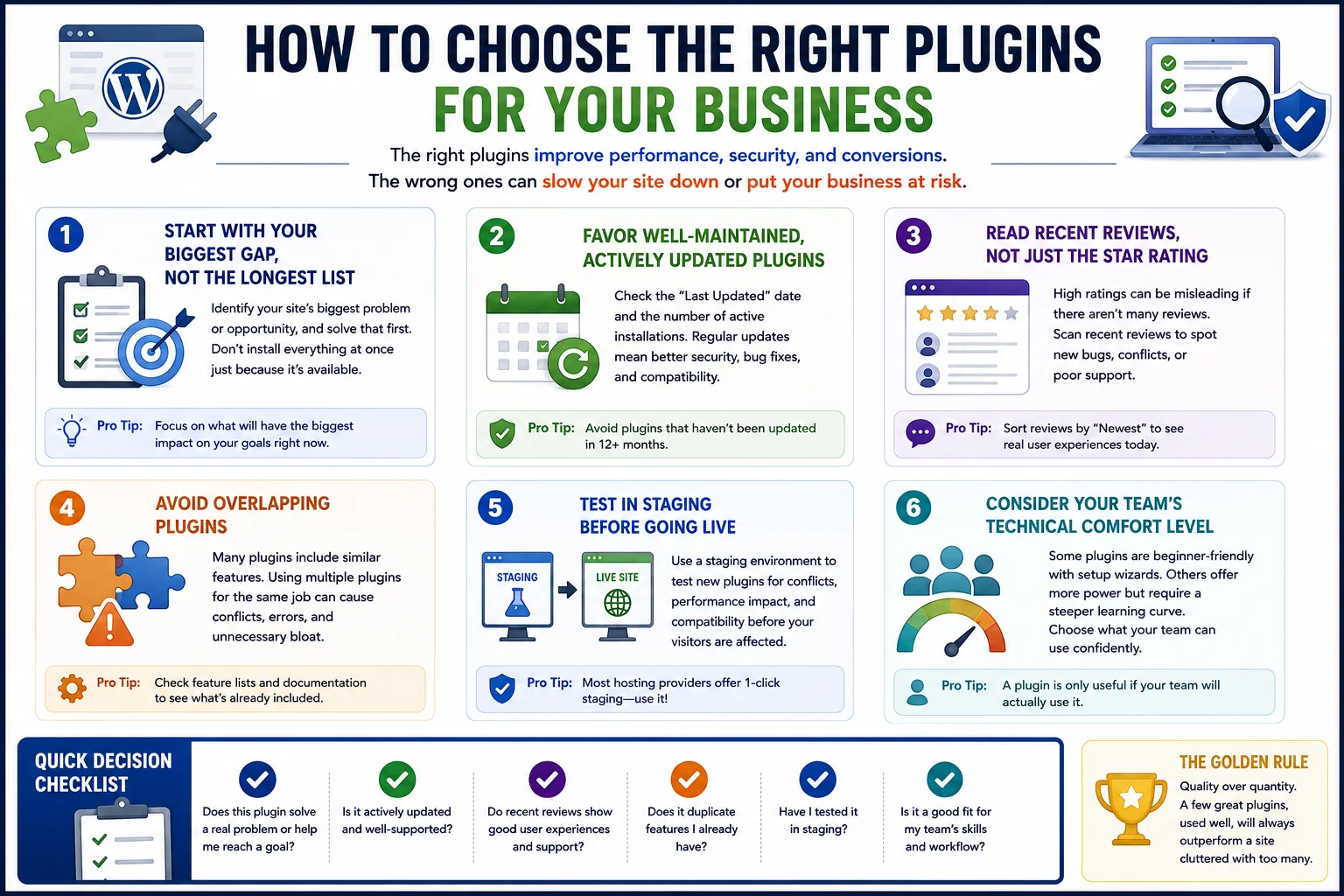
Start with your biggest gap, not the longest list. If your site loads slowly, prioritize performance and image optimization before anything else. If you’re not generating leads, focus on forms and conversion tools. Don’t install everything on this list at once just because it’s available.
Favor well-maintained, actively updated plugins. Before installing anything, check when it was last updated and how many active installations it has. A plugin that hasn’t been updated in over a year is a security and compatibility risk, even if it’s popular.
Read recent reviews, not just the star rating. A 4.5-star rating with thousands of reviews tells a different story than the same rating with only a handful. Look specifically at recent reviews to catch new bugs or support issues.
Avoid overlapping plugins. Many plugins now bundle multiple features — an SEO plugin might include basic redirect management, or a security plugin might include basic backups. Running two plugins that do the same job can cause conflicts and unnecessary bloat.
Test in staging before going live. If your hosting provider offers a staging environment, use it to test new plugins before activating them on your live site. This catches compatibility issues before your customers ever see them.
Consider your team’s technical comfort level. Some plugins are more beginner-friendly with guided setup wizards, while others offer more power but a steeper learning curve. Choose based on who will actually be managing the site day to day.
Common Mistakes Businesses Make With Plugins
Even with the right list of categories, businesses commonly run into the same avoidable problems.
Installing too many plugins. Every plugin adds some amount of load time and a potential point of failure. A common guideline is to regularly review your installed plugins and remove anything you’re not actively using — a bloated plugin list is one of the most common causes of a slow, fragile website.
Ignoring updates. Outdated plugins are one of the leading causes of WordPress site hacks. Set aside time weekly, or use a managed update service, to keep everything current.
Choosing free plugins for mission-critical functions and hoping for the best. Free plugins can absolutely be excellent, but for functions tied directly to revenue or security — payments, backups, firewalls — the premium version often includes support, faster updates, and features that are worth the cost for a business.
Not testing after updates. A plugin update can occasionally break something else on your site. After major updates, do a quick check of your key pages, forms, and checkout process to catch issues early.
Forgetting mobile. A significant share of business website traffic now comes from mobile devices. Always check how new plugins — especially popups, forms, and page builders — actually look and function on a phone, not just a desktop browser.
Putting It All Together: A Practical Starter Stack
If you’re setting up a new business website or auditing an existing one, here’s a practical way to think about a minimum viable plugin stack, organized by priority:
Non-negotiable (install these first): An SEO plugin, a security plugin, a backup plugin, and a caching/performance plugin. These four cover visibility, protection, and speed — the fundamentals every business site needs regardless of industry.
High-impact additions: A contact form plugin, an analytics plugin, and an image optimization plugin. These directly affect lead generation and give you the data to make informed decisions going forward.
Growth-stage additions: A page builder (if you don’t already have strong design flexibility), an email marketing/CRM plugin, and a lead generation/conversion tool. Add these once your fundamentals are solid and you’re ready to actively grow traffic and conversions.
Situational additions: E-commerce, live chat, accessibility tools, and compliance plugins — necessary if they apply to your specific business, but not universal for every type of company site.
This tiered approach keeps your site lean at every stage instead of front-loading dozens of plugins before you actually need them.
Ongoing Plugin Maintenance: What It Actually Takes
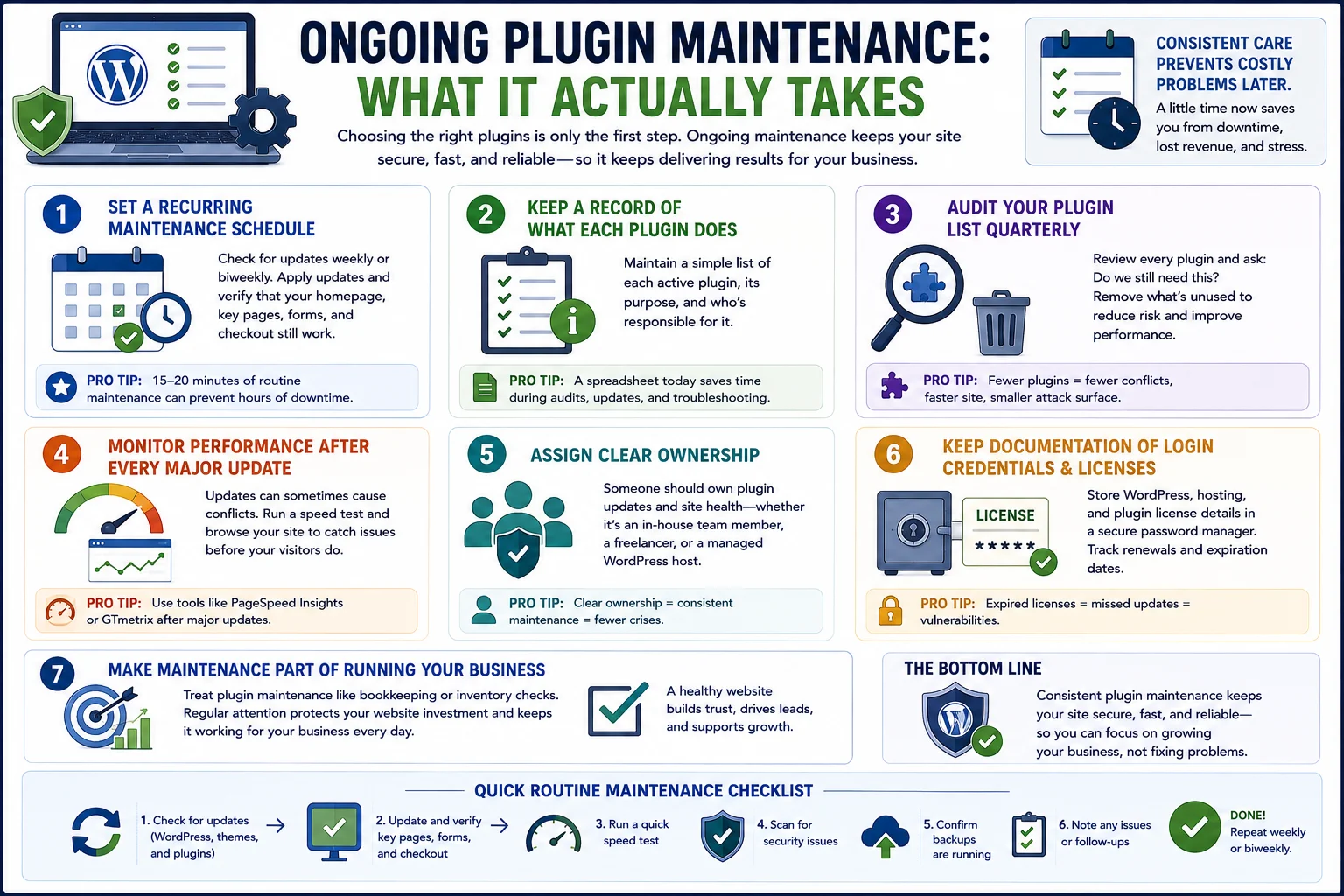
Choosing the right plugins is only the first step. Business websites are living assets, not one-time projects, and plugins need ongoing attention to keep delivering value without introducing risk. This is the part many business owners skip, usually because it feels like a low priority compared to marketing or sales — right up until something breaks.
Set a recurring maintenance schedule. A weekly or biweekly check-in is usually enough for most small business sites. During that time, review available updates, apply them, and quickly verify that your homepage, key landing pages, contact forms, and checkout process (if you have one) still work as expected. This doesn’t need to take more than fifteen or twenty minutes once it becomes routine.
Keep a record of what each plugin does. As your site grows, it’s easy to forget why a particular plugin was installed in the first place. A simple spreadsheet listing each active plugin, its purpose, and who’s responsible for it makes future audits far faster and helps you spot redundant tools before they cause conflicts.
Audit your plugin list quarterly. Every few months, go through your installed plugins and ask whether each one is still necessary. Marketing campaigns end, seasonal tools get forgotten, and plugins installed for a one-time task often linger long after they’re needed. Deactivating and deleting unused plugins reduces your attack surface and keeps your site running efficiently.
Monitor performance after every major update. WordPress core, your theme, and your plugins are developed independently, which means updates can occasionally introduce compatibility issues. After significant updates, run a quick speed test and browse your site as a visitor would to catch problems before customers do.
Assign clear ownership. Even in a small business, someone should be responsible for plugin updates and site health — whether that’s an in-house team member, a freelance developer, or a managed WordPress hosting plan that handles updates for you. Ambiguity around ownership is one of the most common reasons maintenance gets neglected until there’s a crisis.
Keep documentation of login credentials and licenses in a secure password manager. Many premium plugins require an active license key to receive updates. Losing track of these renewals is a surprisingly common way businesses end up running outdated, vulnerable versions of otherwise excellent plugins.
Treating plugin maintenance as an ongoing part of running your business — similar to bookkeeping or inventory checks — rather than a one-time setup task is one of the simplest ways to protect the investment you’ve already made in your website.
Balancing Functionality With Simplicity
It’s worth repeating a theme that runs through this entire guide: more plugins do not automatically mean a better website. The goal is a lean, purposeful set of tools where every plugin earns its place by solving a real problem for your visitors or your team.
Before installing anything new, ask a few quick questions. Does this solve a problem you actually have right now, or does it just look useful? Is there a feature already built into a plugin you’re using that could handle this instead of adding something new? Will your team actually configure and use this, or will it sit dormant, consuming resources without providing value?
A business website built on a small number of well-chosen, well-maintained plugins will almost always outperform one crowded with dozens of half-configured tools, both in terms of speed and in terms of how manageable it is day to day.
Frequently Asked Questions
How many plugins should a business website have? There’s no fixed number, but quality matters far more than quantity. Many well-optimized business sites run comfortably with somewhere between ten and twenty carefully chosen plugins. What matters most is that each plugin serves a clear purpose and is kept up to date.
Do plugins slow down a WordPress website? They can, but not automatically. Poorly coded or outdated plugins are the usual culprits, not plugins in general. A caching plugin and image optimization plugin will often offset the impact of your other plugins, and choosing well-maintained, reputable options minimizes the risk.
Are free plugins safe to use for a business website? Many free plugins are safe, well-maintained, and used by millions of sites. The key is checking that a plugin is actively updated, has a solid support history, and comes from a reputable developer. For functions tied directly to security or revenue, a premium plugin’s dedicated support can be worth the investment.
What’s the difference between a plugin and a theme? A theme controls your website’s overall design and layout. A plugin adds specific functionality — like a contact form, SEO tools, or an online store — that works within whatever theme you’re using. Most business websites need both a solid theme and a curated set of plugins.
How often should plugins be updated? Ideally, check for updates weekly and apply them promptly, especially security patches. Many hosting providers and management tools can automate this process while still notifying you of major updates that might need manual testing first.
Can too many plugins cause conflicts? Yes. Plugins that modify similar parts of your site — two SEO plugins, for example, or two security firewalls — can conflict with each other, sometimes causing errors or broken functionality. Stick to one plugin per core function whenever possible.
Final Thoughts
The WordPress plugins every business website needs aren’t about chasing every new tool that comes along — they’re about covering the fundamentals that let your site do its job well: getting found in search, loading quickly, staying secure, capturing leads, and giving you the data to keep improving. Start with the non-negotiables — SEO, security, backups, and performance — then layer in the tools that match where your business is right now, whether that’s lead generation, e-commerce, or customer support.
A thoughtfully built plugin stack turns a basic WordPress installation into a genuine business asset: one that works quietly in the background to protect your site, support your marketing, and help turn visitors into customers, day after day.