
15 Signs Your Website Needs a Redesign (And What to Do Next)
If you’ve been asking yourself whether your site still works for your business, you’re not alone. Recognizing the signs your website needs a redesign early can save you from losing customers, traffic, and revenue to competitors with sharper, faster, more modern sites. A website is rarely “finished.” Design trends shift, technology evolves, customer expectations rise, and what looked cutting-edge three or four years ago can quickly start to feel dated, clunky, or untrustworthy. The tricky part is that most business owners are too close to their own site to notice the problems a first-time visitor sees immediately.
This guide walks through the most reliable signs your website needs a redesign, explains why each one matters, and outlines practical next steps so you can decide whether a full overhaul, a partial refresh, or a few targeted fixes make the most sense for your situation.
Why Recognizing These Signs Matters
Your website is often the very first interaction a potential customer has with your brand. Long before someone calls your office, walks into your store, or emails your sales team, they form an opinion about your business based on your homepage. Research on user behavior consistently shows that people judge credibility within seconds of landing on a page. If your site looks outdated, loads slowly, or is hard to navigate on a phone, visitors don’t stick around to give you the benefit of the doubt. They simply leave and choose a competitor instead.
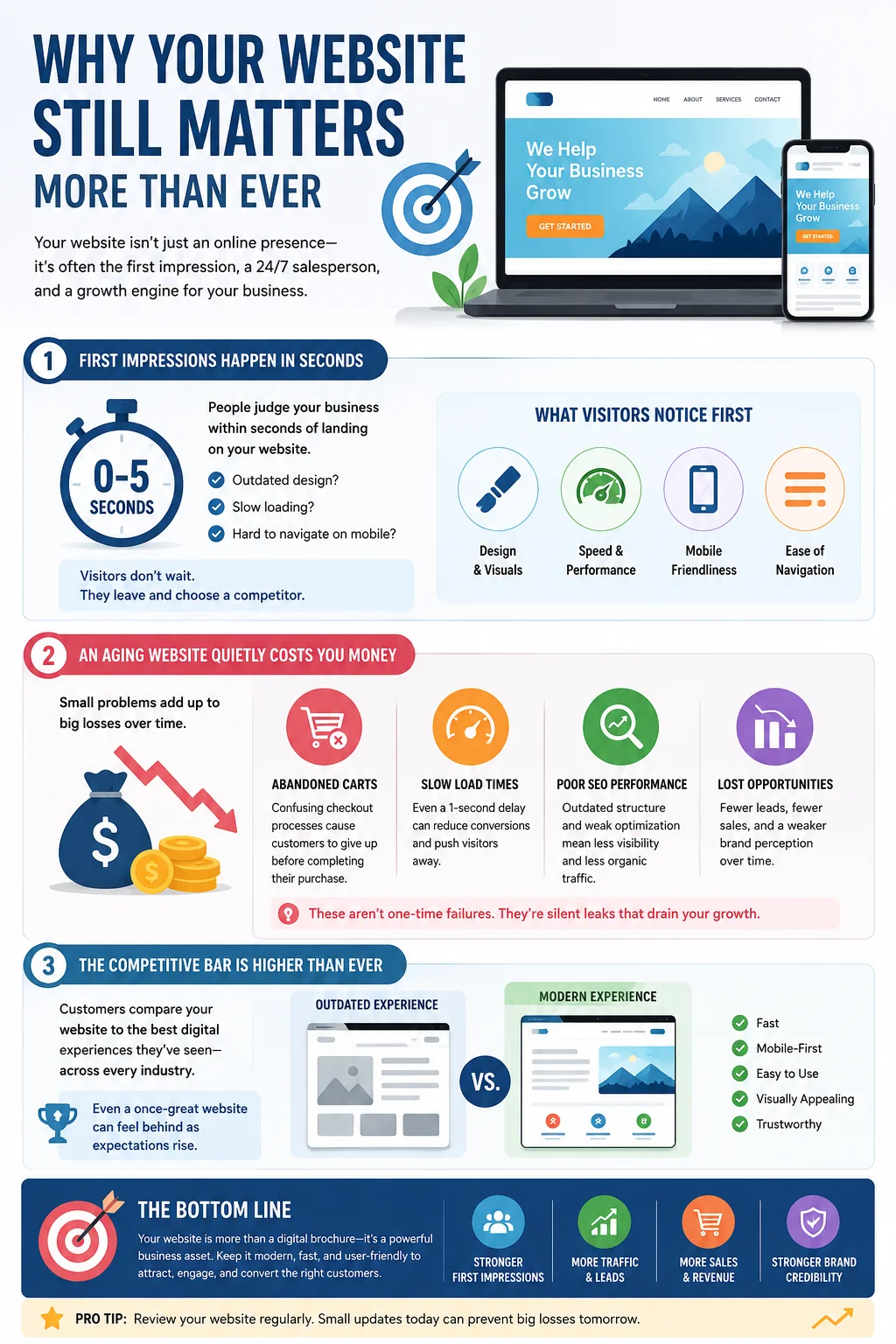
Beyond first impressions, an aging website can quietly cost you money in ways that are hard to trace back to a single cause. A confusing checkout process leads to abandoned carts. A slow-loading page pushes visitors away before they ever see your offer. Search engines that no longer favor your outdated structure send less organic traffic your way each month. None of these problems show up as one dramatic failure — instead, they chip away at your results little by little until the decline becomes impossible to ignore.
There’s also a competitive dimension to consider. Your customers are constantly comparing your site, whether consciously or not, to every other polished, fast, well-designed website they interact with, regardless of industry. Expectations aren’t set by your direct competitors alone; they’re shaped by the best digital experiences people encounter anywhere online. That means even a site that was considered strong when it launched can start to feel behind simply because the overall bar has risen around it.
That’s exactly why it helps to know the concrete, observable signs your website needs a redesign, rather than waiting for a crisis. Below are the most common indicators, grouped by how they typically show up: design and usability, performance, mobile experience, content and structure, and business results.
1. Your Site Looks Outdated
This is usually the most obvious sign, and yet many business owners overlook it simply because they see their website every day and stop noticing its flaws. Design trends move quickly. Elements that felt modern several years ago — heavy drop shadows, tiny fonts crammed with text, flashing banner ads, auto-playing music, or Flash-based animations — now read as instantly dated to a new visitor.
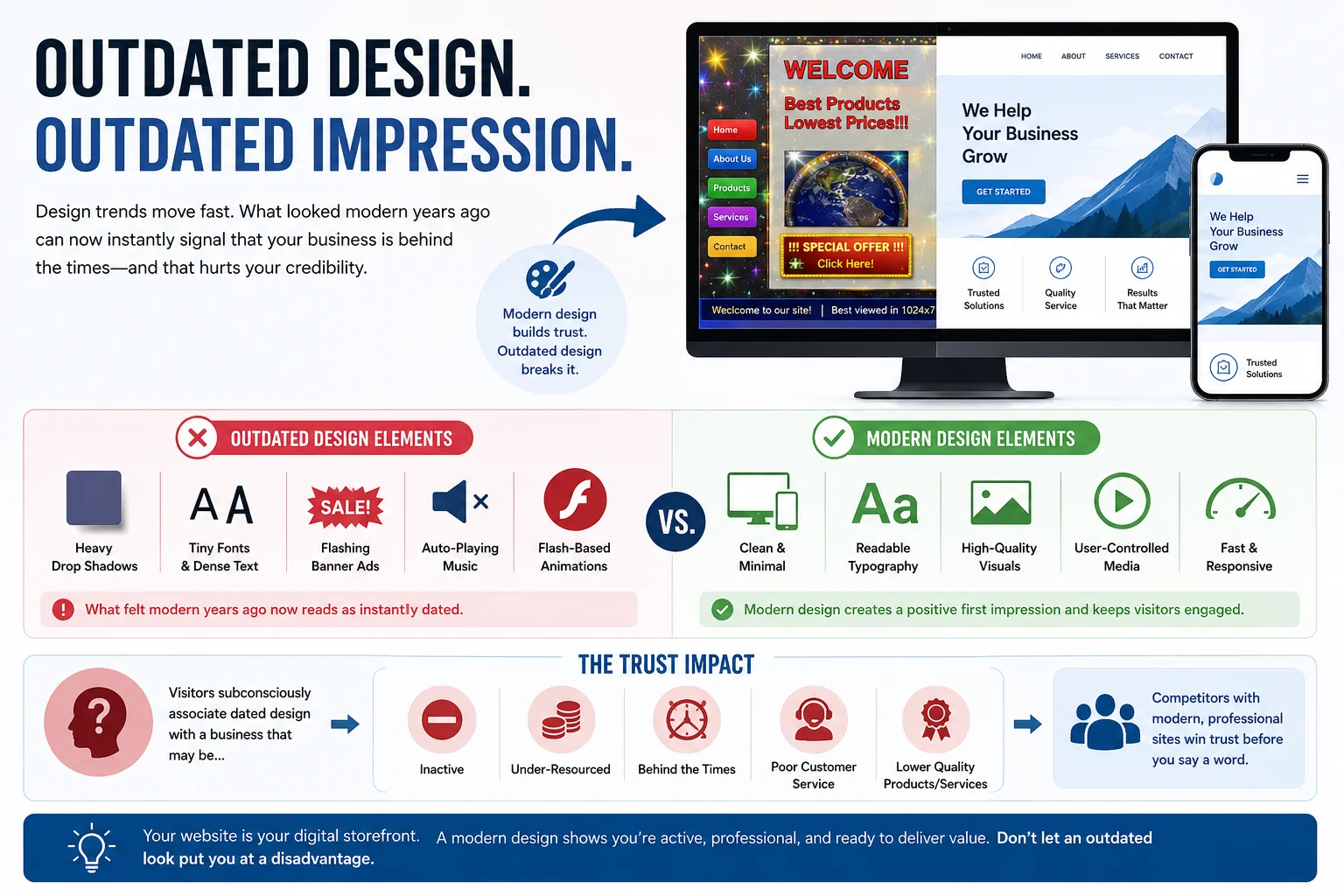
An outdated look does more than seem unfashionable; it actively damages trust. Visitors subconsciously associate a dated design with a business that may be inactive, under-resourced, or behind the times in other areas too, such as customer service or product quality. If your competitors have sleek, modern sites and yours still uses design conventions from a decade ago, you are putting yourself at a real disadvantage before a visitor even reads a word of your content.
A simple test: pull up your homepage next to three competitors’ homepages. If yours looks noticeably older, less polished, or visually cluttered by comparison, that’s a strong signal it’s time for a refresh.
2. It Isn’t Mobile-Friendly
Mobile traffic now makes up the majority of web browsing for most industries. If your site wasn’t built with a responsive, mobile-first approach, visitors on phones and tablets are likely dealing with tiny text they have to pinch and zoom to read, buttons that are too small or too close together to tap accurately, images that don’t scale properly, or menus that don’t work well with touch navigation.
A poor mobile experience doesn’t just frustrate visitors — it also affects your search rankings. Search engines prioritize mobile-friendly sites in their results, meaning a non-responsive design can actively suppress your visibility in search, on top of driving away the mobile visitors who do find you. If you pull up your site on your own phone and find yourself annoyed by how it behaves, that’s one of the clearest signs your website needs a redesign.
3. Slow Page Load Times
Speed is one of the most measurable, and most damaging, technical issues a website can have. Visitors expect pages to load in a couple of seconds. When a page takes significantly longer, a large share of visitors abandon it before it even finishes loading. That’s traffic you paid for, earned through content, or generated through referrals — gone before your message ever reaches them.
Slow load times are often caused by bloated code, unoptimized images, outdated hosting, or years of plugins and add-ons layered on top of one another without cleanup. While some speed issues can be fixed with optimization alone, chronic slowness across an entire site is frequently a sign that the underlying structure needs to be rebuilt rather than patched. A redesign gives you the opportunity to start with clean, modern, efficient code instead of continuing to build on a shaky foundation.
4. Confusing Navigation
If visitors can’t quickly find what they’re looking for, they won’t stick around to search for it. Confusing navigation shows up in a few common ways: menus with too many items crammed together, unclear labels that don’t match what visitors are actually searching for, important pages buried several clicks deep, or an inconsistent structure where similar content lives in completely different sections of the site.
Good navigation should feel almost invisible. Visitors shouldn’t have to think about how to find your services, pricing, or contact information — it should simply be where they expect it to be. If you regularly have to explain to people how to find something on your own site, or if your analytics show visitors bouncing quickly from key pages, confusing navigation is very likely part of the problem, and a redesign focused on information architecture can make a significant difference.
5. High Bounce Rate and Low Time on Site
Your analytics tell a story, whether or not you’re paying attention to it. A high bounce rate — visitors leaving after viewing just one page — combined with low average time on site is a strong behavioral signal that something about the experience isn’t working. It could be slow loading, unclear messaging, poor design, irrelevant content, or a combination of all of these.
While some bounce is normal and expected, especially for simple informational pages, a consistently high rate across your most important pages (like your homepage, services pages, or product pages) deserves attention. Compare your numbers against industry benchmarks for your type of site. If you’re significantly above average, that data is telling you visitors aren’t finding what they expected, or aren’t finding it easily enough to stay.
6. Declining Conversion Rates
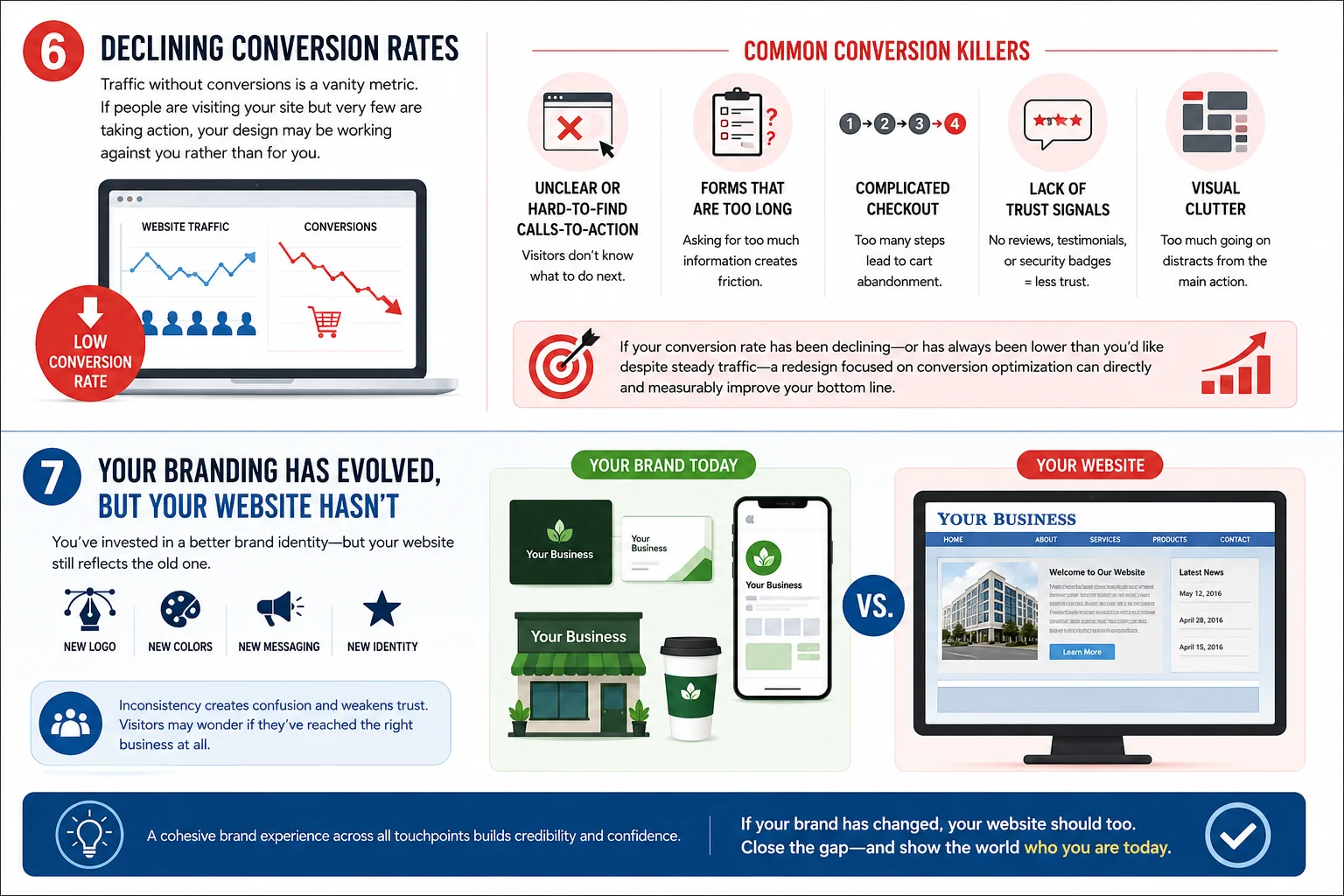
Traffic without conversions is a vanity metric. If people are visiting your site but very few are filling out contact forms, making purchases, booking calls, or taking whatever action matters most to your business, your design may be working against you rather than for you.
Common conversion killers include calls-to-action that are hard to find or unclear about what happens next, forms that are too long or ask for unnecessary information, a checkout process with too many steps, lack of trust signals like reviews, testimonials, or security badges, and overall visual clutter that distracts from the primary action you want visitors to take. If your conversion rate has been declining over time, or has always been lower than you’d like despite steady traffic, a redesign centered on conversion optimization can directly and measurably improve your bottom line.
7. Your Branding Has Evolved, But Your Website Hasn’t
Many businesses refresh their logo, color palette, messaging, or overall brand identity over time, but forget to carry those changes through to the website. The result is a jarring disconnect: your business cards, social media, and physical signage look one way, while your website still reflects an old version of your brand.
This inconsistency undermines the professional, cohesive image you’re trying to build. Visitors who encounter your updated branding elsewhere and then land on an outdated website may wonder if they’ve reached the right business at all. If your brand has changed and your site hasn’t kept pace, that gap alone is one of the more overlooked signs your website needs a redesign.
8. Security Vulnerabilities or Outdated Technology
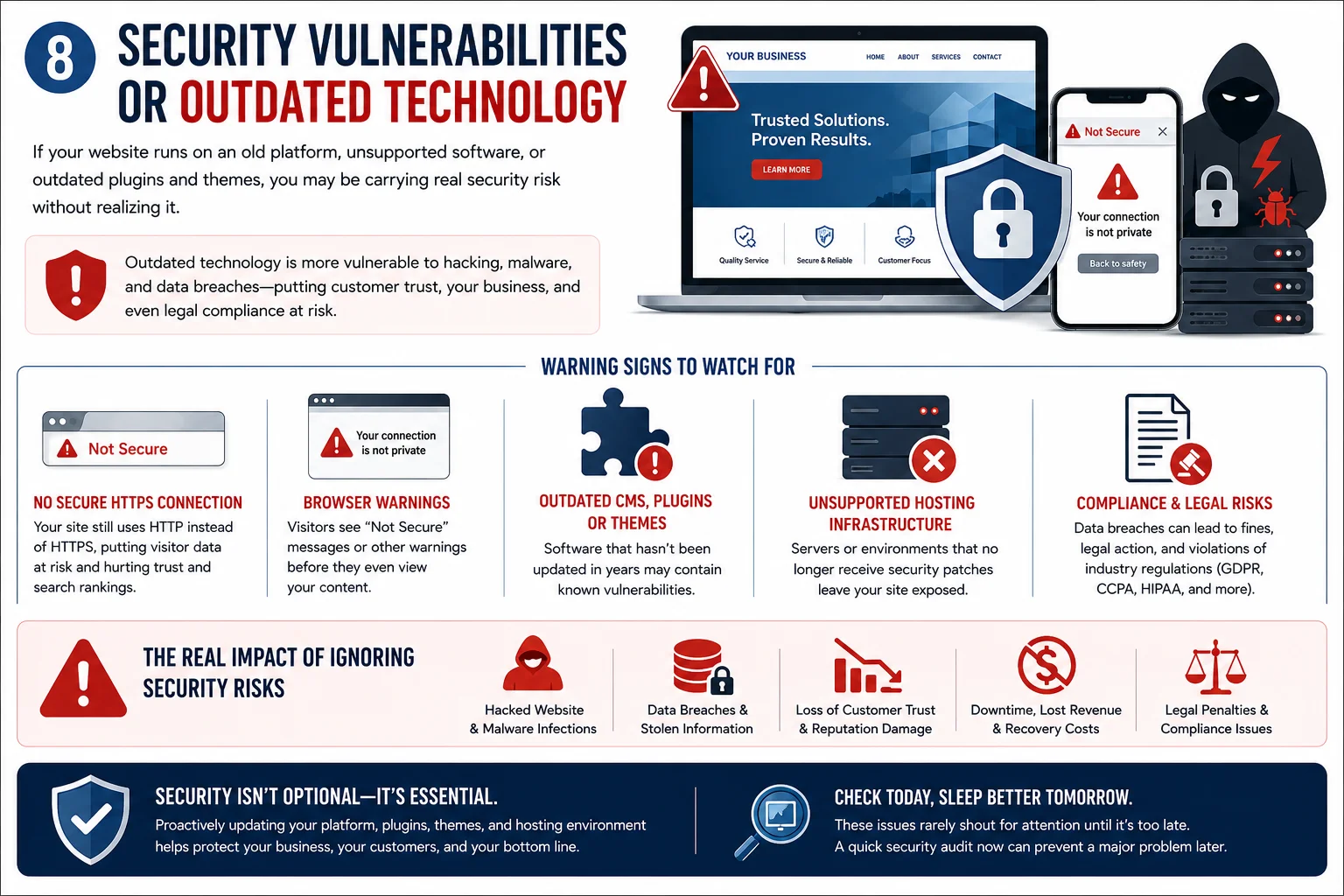 If your website runs on an old platform, unsupported software, or outdated plugins and themes, you may be carrying real security risk without realizing it. Outdated technology is more vulnerable to hacking, malware, and data breaches, all of which can damage customer trust, disrupt your business, and in some cases carry legal or compliance consequences depending on your industry.
Warning signs include a site that still isn’t using a secure HTTPS connection, browser warnings when visitors try to access your pages, a content management system or plugins that haven’t been updated in years, or hosting infrastructure that no longer receives security patches. These issues rarely announce themselves clearly until something goes wrong, which is exactly why they’re worth checking proactively rather than waiting for a problem to force your hand.
ion of it grows too wide, small content updates are no longer enough. A redesign lets you rebuild the site around your current strategy rather than trying to retrofit old content to fit new realities.
9. Poor Search Engine Rankings
If your site isn’t showing up where it should in search results, outdated technical foundations are often at least part of the reason. Search engines factor in page speed, mobile-friendliness, site structure, secure connections, and content quality when determining rankings. A site built years ago on older technology may be missing many of these elements entirely, or may be quietly working against you in ways that aren’t obvious without a technical audit.
If you’ve tried updating content and building links without meaningful movement in your rankings, it may be worth asking whether your foundation itself is holding you back. A redesign built with current search engine best practices in mind — clean code, fast loading, proper heading structure, and mobile optimization — can remove technical barriers that content alone can’t fix.
10. It’s Difficult to Update
Your website should be a living asset that you can update as your business evolves, not a static object that requires a developer for every small change. If adding a blog post, updating your pricing, or swapping out an image requires significant technical work, calling in outside help, or navigating a confusing back-end system, that friction discourages you from keeping your site current at all.
Over time, this leads to exactly the kind of stagnant, outdated content and design discussed elsewhere in this list. A modern redesign, especially one built on a flexible and user-friendly content management system, empowers you or your team to make routine updates confidently and quickly, which keeps the entire site healthier over the long run.
11. Inconsistent Design Across Pages
As sites grow organically over the years — new pages added here, a landing page built for a specific campaign there, a blog section designed by a different person entirely — visual inconsistency tends to creep in. Fonts, colors, button styles, and layouts can end up varying noticeably from page to page.
This kind of patchwork inconsistency signals a lack of cohesion and can make even genuinely good content feel less credible. A redesign gives you the chance to establish and apply a single, unified design system across your entire site, so every page feels like part of the same professional experience regardless of when it was created.
12. It Doesn’t Reflect Your Current Products or Services
Businesses grow and change. You may have added new services, discontinued old products, shifted your target audience, or repositioned your brand entirely since your website was last built. If your site still emphasizes offerings you no longer provide, or fails to mention services that are now central to your business, it’s actively working against your current goals.
A website should be an accurate, up-to-date reflection of what you do today, not a snapshot frozen at the moment it was launched. When the gap between your actual business and your website’s description of it grows too wide, small content updates are no longer enough. A redesign lets you rebuild the site around your current strategy rather than trying to retrofit old content to fit new realities.
13. Your Competitors’ Websites Outshine Yours
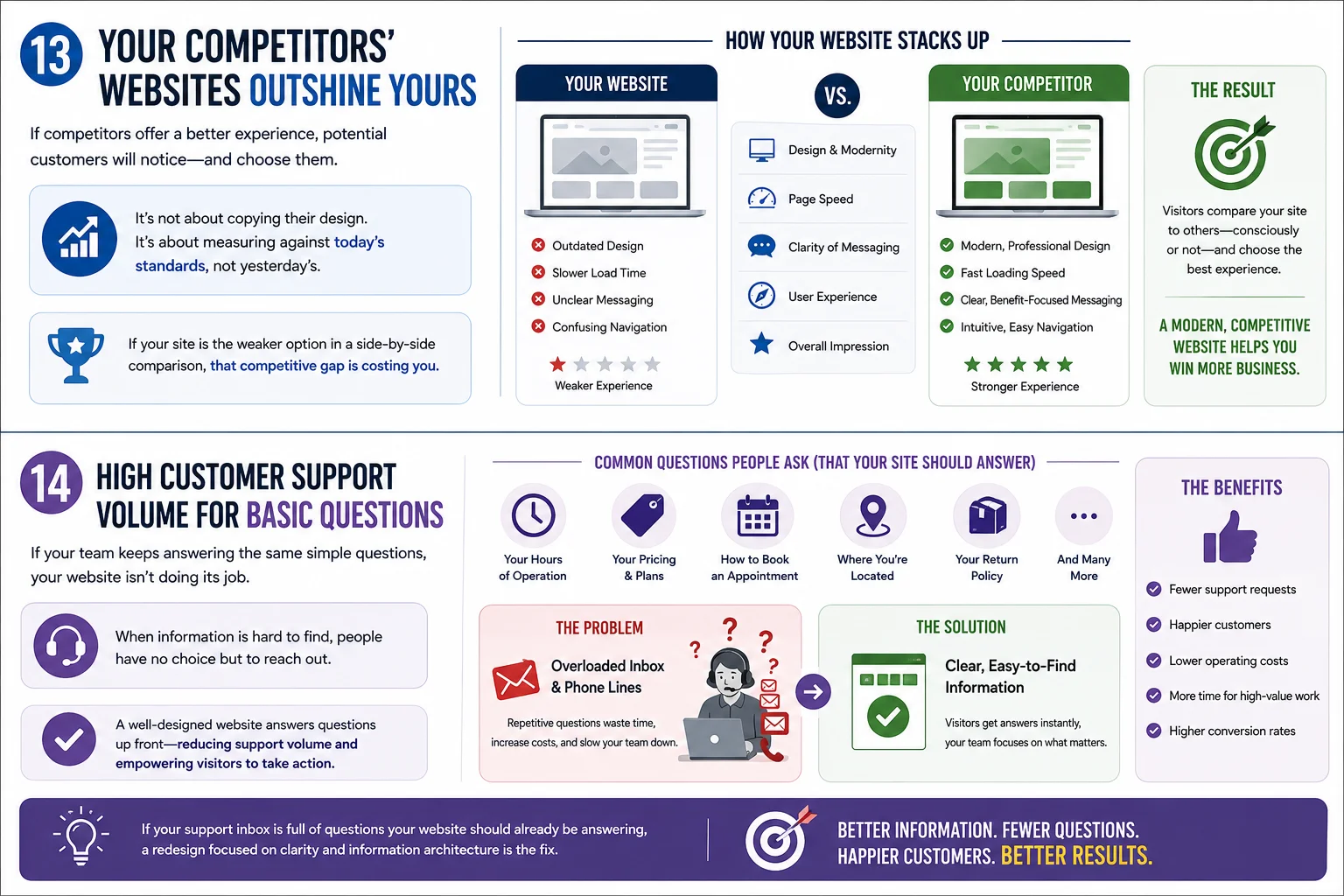
Take an honest look at how your website compares to your direct competitors. If their sites feel more modern, load faster, communicate more clearly, and generally offer a smoother experience, potential customers researching their options are likely to notice the same gap you do, and choose accordingly.
This doesn’t mean copying a competitor’s design, but it does mean benchmarking yourself against the current standard in your industry rather than against where your own site stood when it launched. If you consistently find yourself feeling like your website is the weaker option in a side-by-side comparison, that competitive gap is a strong practical reason to invest in a redesign.
14. High Customer Support Volume for Basic Questions
Pay attention to the questions your customer service team fields repeatedly. If people are frequently calling or emailing to ask things that should be easy to find on your website — your hours, your pricing, how to book an appointment, where you’re located, or how your return policy works — that’s a sign your site isn’t communicating clearly enough on its own.
A well-designed website should answer the majority of common questions proactively, reducing the burden on your support team and giving visitors the confidence to act without needing to reach out first. If your support inbox is full of questions your website should already be answering, a redesign focused on clarity and information architecture can meaningfully reduce that load.
15. It’s Simply Been Several Years Since Your Last Update
Even if you can’t point to one specific problem, the passage of time itself is a legitimate factor to weigh. As a general guideline, most websites benefit from a meaningful redesign every two to four years, depending on your industry and how quickly your competitive landscape moves. Technology, design standards, and user expectations shift steadily, and a site that hasn’t been touched in five, six, or more years is almost certainly behind in multiple areas at once, even if no single issue feels urgent on its own.
If you genuinely can’t remember the last time your website received more than a minor content edit, it’s worth scheduling an honest audit, even if things seem to be working fine on the surface.
16. Cluttered Design and Content Overload
Some websites accumulate content the way a garage accumulates boxes: a promotional banner added for a campaign that ended two years ago, a pop-up that was never removed, sidebar widgets nobody looks at, and paragraphs of text competing for attention with images, buttons, and ads all at once. Individually, none of these elements seems like a big problem. Together, they create visual noise that makes it hard for visitors to know where to look or what to do next.
Cluttered design increases cognitive load, meaning visitors have to work harder to process your page, and people generally aren’t willing to do that work on a website. They’ll simply leave and find a competitor whose site makes the next step obvious. A redesign is an opportunity to apply the principle of visual hierarchy properly: clear focal points, generous white space, and a deliberate path that guides the visitor’s eye toward your most important message and call to action, rather than asking them to sort through everything at once.
17. Poor Accessibility for All Users
Accessibility is often overlooked until it becomes a real problem, but it’s an increasingly important sign your website needs a redesign. If your site relies on color alone to convey information, uses text that’s difficult to read against its background, lacks proper alt text for images, or can’t be navigated using a keyboard, you’re excluding a meaningful portion of potential visitors, including people using screen readers or other assistive technology.
Beyond the ethical case for building an inclusive site, there are practical business reasons to care. Accessible sites tend to have cleaner code and clearer structure, which also benefits search engine performance. In some regions and industries, accessibility has also become a legal requirement, and non-compliant sites can face real liability. If an accessibility audit of your site turns up significant gaps, that’s a strong argument for rebuilding key pages with accessibility built in from the start rather than bolted on after the fact.
How to Know Whether You Need a Full Redesign or Just Updates
Not every one of these signs requires starting from scratch. Sometimes targeted updates are enough: optimizing images and code to improve speed, updating outdated content, refreshing a color palette, or improving specific pages with high bounce rates. Other times, especially when multiple signs are present at once, a full redesign is the more effective and ultimately more cost-efficient path forward.
As a general rule, consider a full redesign when you’re dealing with three or more of the signs above simultaneously, when your site’s underlying technology is outdated or insecure, when your branding has changed substantially, when your business model or offerings have shifted significantly since launch, or when patchwork fixes have already been tried without meaningfully moving the needle on your key metrics. A partial refresh may be sufficient if your foundation is solid and technically sound, but specific elements — content, imagery, a handful of pages, or visual polish — are what’s holding you back.
It also helps to think about the underlying platform your site is built on. If your content management system is old, no longer receives updates, or simply doesn’t offer the flexibility your business needs going forward, that’s usually a sign the problem runs deeper than the visible design layer. In cases like this, even a fresh coat of visual paint won’t resolve the performance, security, and scalability issues sitting underneath it, and a rebuild on a more current platform becomes the more sensible long-term choice.
Steps to Take If You Recognize These Signs
1. Run a full audit. Before making any changes, get a clear picture of where things stand. Review your analytics for traffic, bounce rate, and conversion data. Test your site’s speed using a tool built for that purpose. Check how it performs on multiple devices and browsers. Document specific pain points rather than relying on general impressions alone.
2. Define clear goals. A redesign should be driven by outcomes, not aesthetics alone. Are you trying to increase conversions, improve search rankings, reduce support inquiries, better reflect a new brand identity, or all of the above? Clear goals will guide every decision in the process and give you a way to measure success afterward.
3. Research your options. Depending on your budget, timeline, and technical needs, you might work with a freelance designer, a full-service agency, or build on a platform yourself with the right guidance. Look at examples of past work, read reviews, and make sure whoever you work with understands both design and the technical fundamentals that affect performance and search visibility.
4. Plan your content alongside your design. A redesign is an ideal opportunity to revisit your messaging, update outdated information, and restructure your content around what customers actually search for and need to know. Design and content should be planned together, not treated as separate afterthoughts.
5. Prioritize mobile and speed from the start. Rather than designing for desktop and adapting afterward, build with mobile performance and load speed as core requirements from day one. This is far more effective than trying to retrofit speed and responsiveness onto a finished design later.
6. Test before and after launch. Before going live, test thoroughly across devices, browsers, and screen sizes. After launch, monitor your key metrics closely to confirm the redesign is delivering the improvements you set out to achieve, and be prepared to make adjustments based on real user behavior.
7. Set up redirects and preserve what’s working. If your redesign involves changing URLs, restructuring pages, or removing old content, make sure proper redirects are in place so you don’t lose the search rankings and inbound links you’ve already earned. It’s also worth identifying which existing pages or content perform well and intentionally carrying that value forward, rather than discarding everything simply because it’s old. A redesign should build on your site’s strengths, not just erase its history.
The Cost of Waiting Too Long
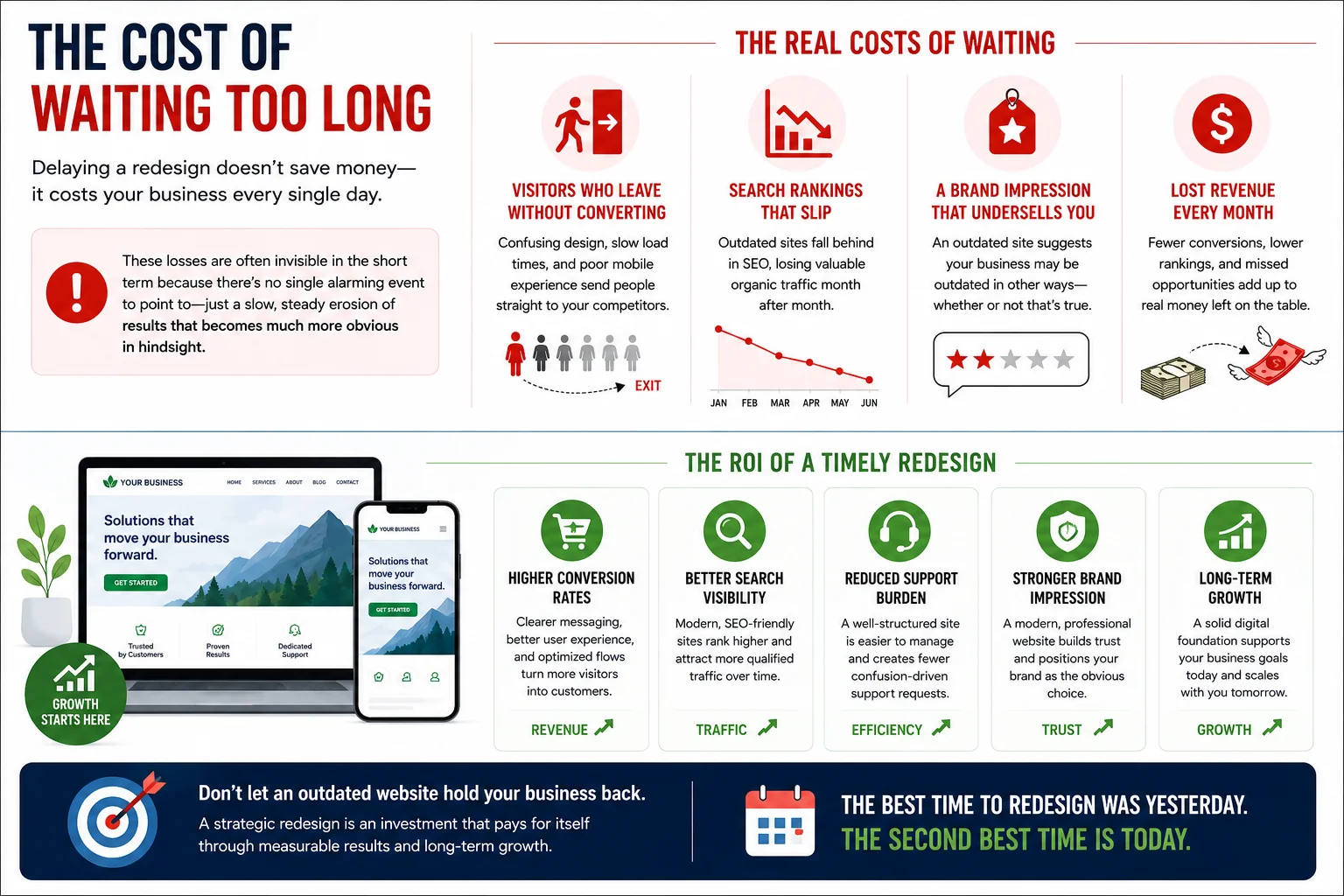
It’s worth being direct about the risk of ignoring these signs your website needs a redesign for too long. Every month spent on an outdated, slow, or hard-to-navigate site is a month of lost opportunities: visitors who leave without converting, search rankings that continue to slip, and a brand impression that undersells the quality of what you actually offer. These losses are often invisible in the short term because there’s no single alarming event to point to — just a slow, steady erosion of results that becomes much more obvious in hindsight.
On the other hand, a well-planned redesign tends to pay for itself over time through improved conversion rates, better search visibility, reduced support burden, and a stronger overall brand impression. Many businesses find that the investment is recovered well within the first year through the additional revenue and efficiency a modern, well-functioning site generates.
There’s also a compounding effect to consider. Search engines reward sites that consistently perform well for users, and a faster, more usable site tends to earn better rankings over time, which in turn brings in more organic traffic without additional ad spend. Meanwhile, an outdated site tends to compound in the opposite direction: poor performance leads to lower rankings, lower rankings lead to less traffic, and less traffic makes it easier to justify continuing to delay the investment a redesign requires. Breaking that cycle sooner rather than later generally costs less, both in dollars and in lost opportunity, than waiting until the gap between your site and your competitors’ has grown even wider.
Final Thoughts
A website is never truly “done.” It’s a living part of your business that needs to evolve alongside your brand, your customers’ expectations, and the broader digital landscape. Recognizing the signs your website needs a redesign — an outdated look, slow load times, poor mobile performance, confusing navigation, declining conversions, and the other indicators covered in this guide — puts you in a position to act before small problems compound into serious ones.
If several of these signs sound familiar, take it as a prompt to start with an honest audit rather than assuming things will improve on their own. A thoughtful redesign, grounded in clear goals and built on modern, secure, mobile-first foundations, can transform your website from a liability into one of your strongest business assets. The businesses that treat their website as an ongoing investment, rather than a one-time project to check off a list, are consistently the ones that stay ahead of their competition online.
Frequently Asked Questions
How often should a website be redesigned? Most websites benefit from a substantial redesign every two to four years, though this can vary based on your industry, how quickly your competitors evolve, and how significantly your business changes over that period. Some sites may need more frequent updates if they operate in a fast-moving digital space, while others in more stable industries can go somewhat longer between major overhauls.
How do I know if I need a full redesign or just minor updates? If you’re dealing with one or two isolated issues, such as an outdated color scheme or a handful of slow pages, targeted updates are often enough. If you’re seeing several of the signs described above at once, especially issues with speed, mobile experience, and conversions together, a full redesign is usually the more efficient and effective long-term solution.
Will a redesign hurt my current search rankings? A poorly planned redesign can temporarily affect rankings, particularly if URLs change without proper redirects or if content is removed without a strategy behind it. A well-planned redesign, done with search visibility in mind from the start, typically improves rankings over time rather than harming them, since search engines favor fast, mobile-friendly, well-structured sites.
How long does a website redesign typically take? Timelines vary widely depending on the size and complexity of the site, but a thorough redesign process — including audit, planning, design, development, content updates, and testing — commonly takes anywhere from a few weeks for a smaller site to several months for a larger, more complex one.
What’s the first step if I think my website needs a redesign? Start with an honest audit of your current site’s performance, including analytics, speed tests, and mobile usability checks. This gives you concrete data to work from, rather than relying on impressions alone, and helps you and anyone you work with prioritize the changes that will have the biggest impact.
How much does a website redesign typically cost? Costs vary enormously depending on the size of the site, the complexity of the functionality involved, and whether you work with a freelancer, a small studio, or a larger agency. A modest redesign for a small business site may cost a few thousand dollars, while a large, custom-built site with advanced functionality can run into the tens of thousands. Getting a few quotes based on a clear scope of work is the best way to understand what’s realistic for your specific situation.
Can I redesign my website myself, or do I need to hire a professional? It depends on your skills, your timeline, and how complex your site needs to be. Modern website builders and content management systems have made it possible for non-designers to put together a reasonably polished site on their own, especially for smaller businesses with straightforward needs. However, if your goals include strong search performance, custom functionality, or a highly distinctive brand experience, working with an experienced designer or developer typically produces a more effective and durable result.