
Best WordPress Hosting for Small Business: A Complete 2026 Guide
Choosing the best WordPress hosting for small business is one of the most important decisions you’ll make when building your website — arguably more important than the theme you pick or the plugins you install. Your hosting provider determines how fast your site loads, how well it handles traffic spikes, how secure your customer data is, and how much downtime (if any) you experience. For a small business, where every visitor and every second of load time can affect sales or leads, the wrong hosting choice can quietly cost you money and credibility.
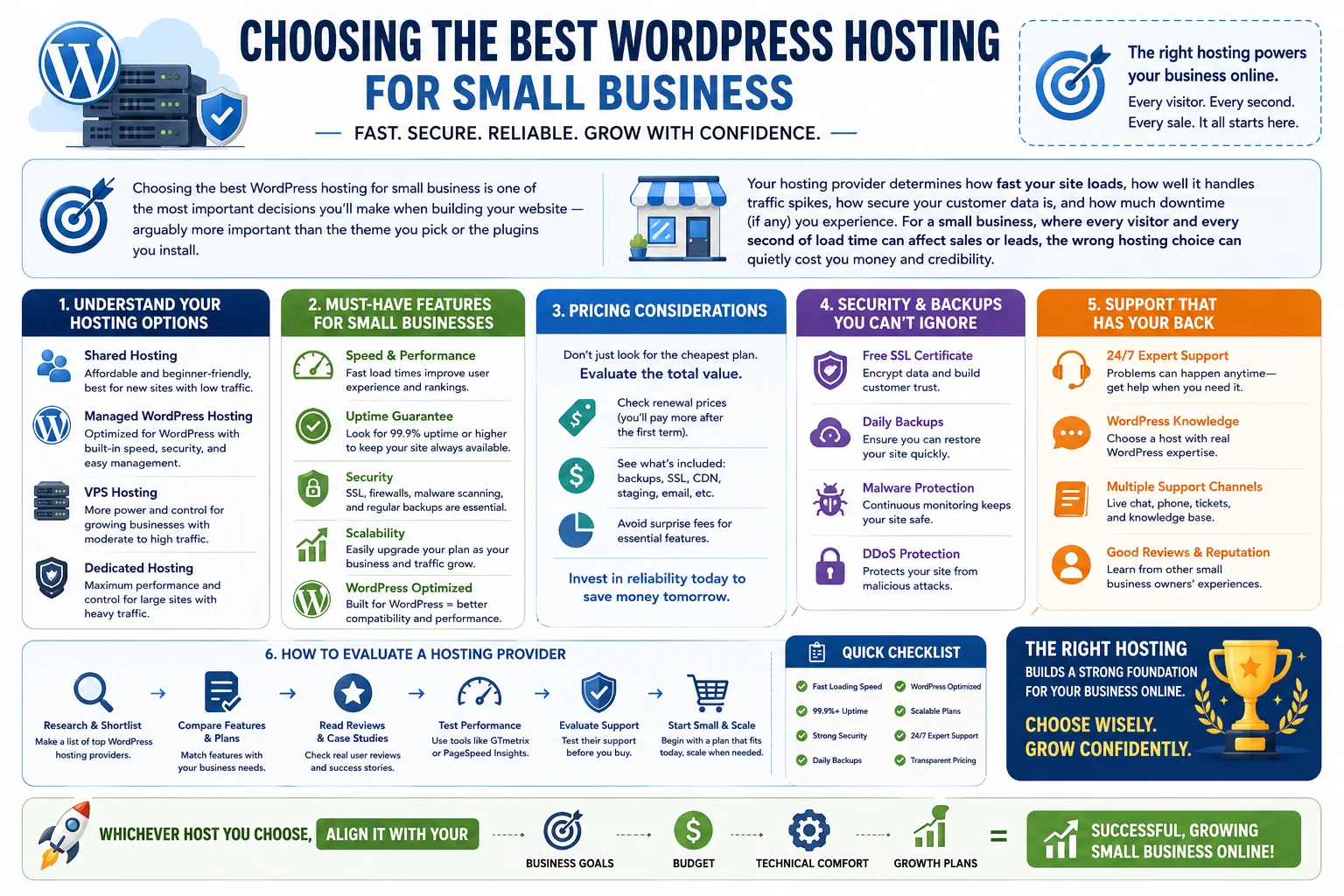
With dozens of hosting providers all claiming to be “the best,” it’s easy to get overwhelmed. This guide breaks down everything a small business owner needs to know to choose the best WordPress hosting for small business — including hosting types, must-have features, pricing considerations, security, support, and how to evaluate providers so you can make a confident, informed decision.
Table of Contents
- Why Hosting Matters More Than You Think
- Types of WordPress Hosting Explained
- Key Features to Look for in Small Business Hosting
- Performance and Speed Considerations
- Security Features You Shouldn’t Skip
- Backups and Disaster Recovery
- Customer Support Quality
- Pricing and Value for Money
- Scalability for Growing Businesses
- Managed vs Unmanaged WordPress Hosting
- E-commerce Considerations for Small Business Hosting
- Migration and Onboarding
- Common Hosting Mistakes Small Businesses Make
- How to Evaluate and Compare Hosting Providers
- Checklist: What to Look for Before You Buy
- Frequently Asked Questions
- Final Thoughts
1. Why Hosting Matters More Than You Think
Many small business owners treat hosting as an afterthought — something to pick quickly so they can move on to design and content. But hosting is the foundation everything else sits on. A beautifully designed website with slow load times, frequent downtime, or weak security won’t perform well, no matter how good the content is.
Consider what’s actually at stake:
- Page speed affects conversions. Studies consistently show that even a one-second delay in load time can meaningfully reduce conversions and increase bounce rates.
- Downtime means lost business. If your site goes down during business hours, potential customers can’t reach you, and you may lose sales or leads permanently to competitors.
- Search rankings are affected by hosting quality. Site speed and uptime are factors search engines consider when ranking pages, so poor hosting can indirectly hurt your SEO.
- Security breaches damage trust. A hacked website can expose customer data, get blacklisted by search engines, and severely damage your brand’s reputation.
For a small business with limited marketing budget and no room for costly technical mishaps, choosing reliable, well-suited hosting isn’t a minor detail — it’s a core business decision.
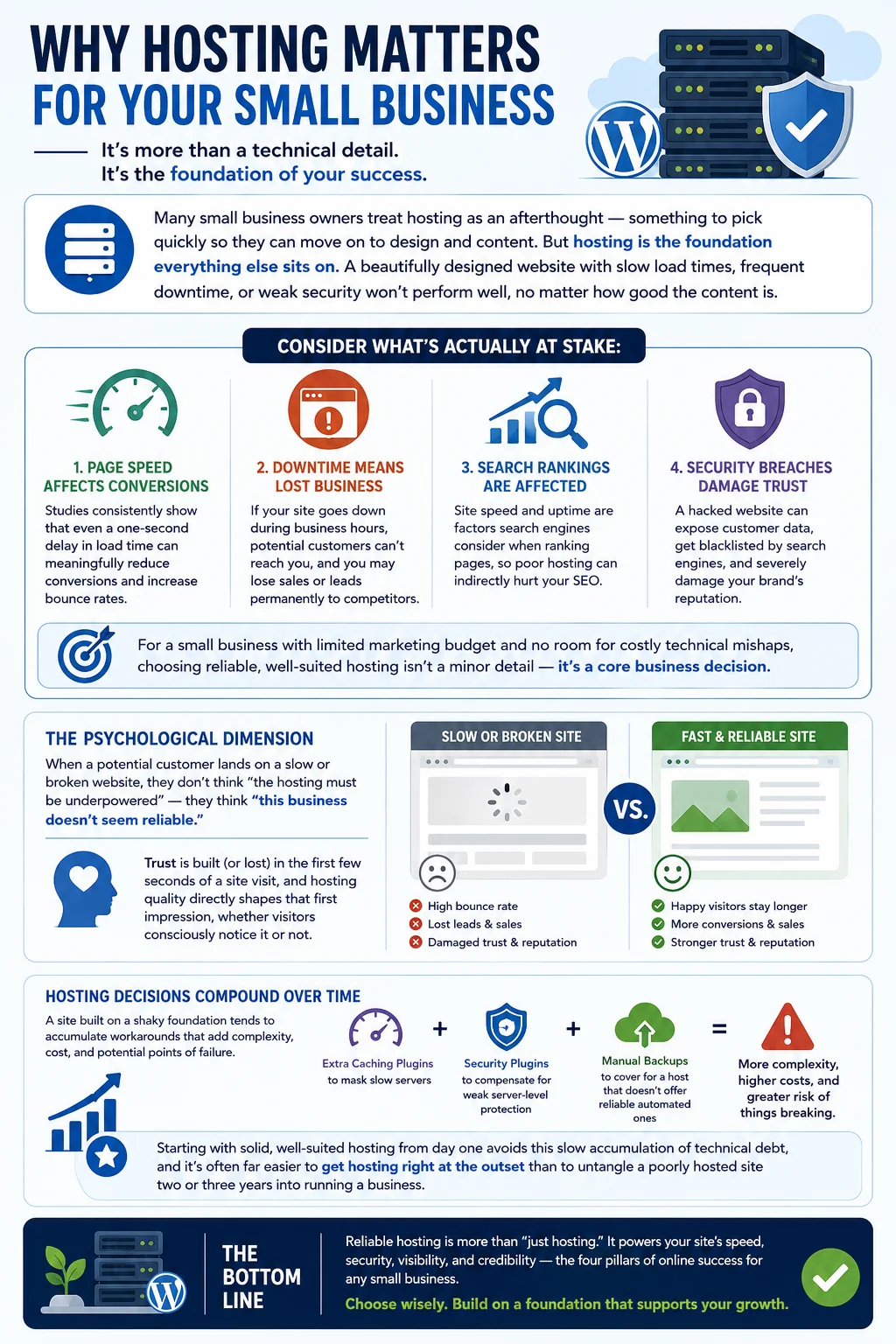
There’s also a psychological dimension to this that’s easy to overlook. When a potential customer lands on a slow or broken website, they don’t think “the hosting must be underpowered” — they think “this business doesn’t seem reliable.” Trust is built (or lost) in the first few seconds of a site visit, and hosting quality directly shapes that first impression, whether visitors consciously notice it or not.
It’s also worth remembering that hosting decisions compound over time. A site built on a shaky foundation tends to accumulate workarounds — extra caching plugins to mask slow servers, security plugins to compensate for weak server-level protection, and manual backup routines to cover for a host that doesn’t offer reliable automated ones. Each of these workarounds adds complexity, cost, and potential points of failure. Starting with solid, well-suited hosting from day one avoids this slow accumulation of technical debt, and it’s often far easier to get hosting right at the outset than to untangle a poorly hosted site two or three years into running a business.
2. Types of WordPress Hosting Explained
Not all WordPress hosting is the same. Understanding the main types will help you evaluate providers more effectively.
Shared Hosting
Shared hosting means your website lives on a server alongside many other websites, all sharing the same resources (CPU, memory, bandwidth). It’s the cheapest option and a common starting point for very small or new websites. The downside is that if another site on the same server experiences a traffic spike or security issue, your site’s performance can be affected too.
VPS (Virtual Private Server) Hosting
VPS hosting divides a physical server into multiple virtual, isolated environments. You get a dedicated slice of resources, so your site’s performance isn’t affected by other users on the same physical machine. It offers a good middle ground between affordability and performance, suitable for growing small businesses.
Dedicated Hosting
With dedicated hosting, an entire physical server is allocated to your website alone. This offers maximum performance and control but comes at a much higher price point, making it more suitable for larger businesses with high traffic volumes rather than most small businesses just starting out.
Managed WordPress Hosting
Managed WordPress hosting is a specialized service where the provider handles WordPress-specific tasks like updates, backups, caching, and security, on infrastructure optimized specifically for WordPress. This is often an excellent option for small businesses that want strong performance and security without needing deep technical expertise.
Cloud Hosting
Cloud hosting distributes your site across multiple interconnected servers rather than relying on a single machine. This offers strong reliability and scalability, since traffic can be automatically balanced across resources, making it a solid option for businesses expecting variable or growing traffic.
For most small businesses, managed WordPress hosting or a solid VPS/cloud hosting plan tends to offer the best balance of performance, ease of use, and cost — though shared hosting can still be a reasonable starting point for very small, low-traffic sites with tight budgets.
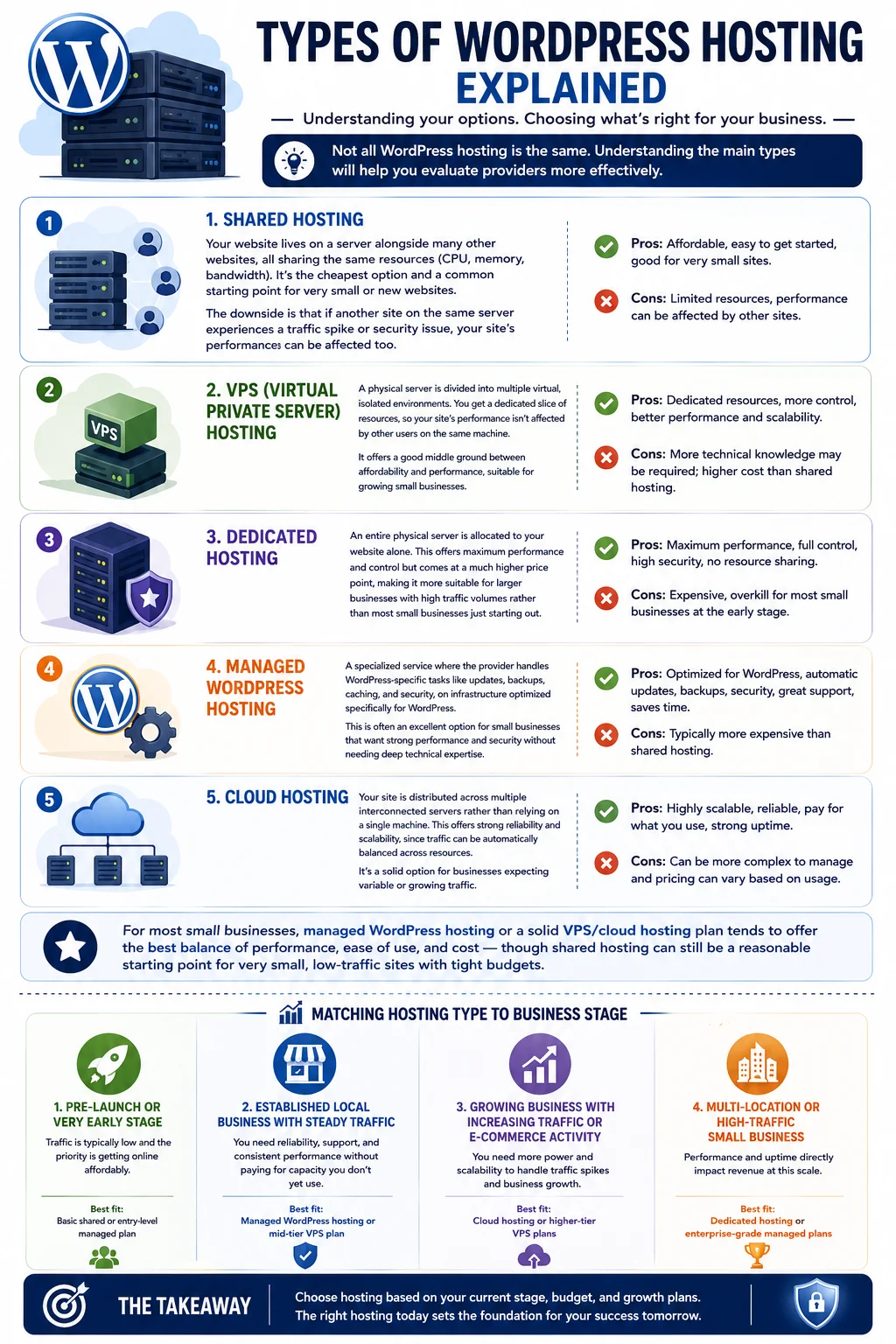
Matching Hosting Type to Business Stage
It helps to think of these hosting types less as a strict hierarchy and more as a set of options tied to where your business currently is:
- Pre-launch or very early stage: A basic shared or entry-level managed plan is usually sufficient, since traffic is typically low and the priority is getting online affordably.
- Established local business with steady traffic: Managed WordPress hosting or a mid-tier VPS plan tends to offer the reliability and support needed without paying for capacity you don’t yet use.
- Growing business with increasing traffic or e-commerce activity: Cloud hosting or higher-tier VPS plans provide the headroom to handle traffic spikes without frequent replatforming.
- Multi-location or high-traffic small business: Dedicated hosting or enterprise-grade managed plans become worth the investment, since performance and uptime directly translate into revenue at this scale.
Thinking in terms of business stage, rather than simply “cheapest vs most expensive,” makes it easier to choose a plan that fits both your current budget and your near-term growth trajectory, without over- or under-committing.
3. Key Features to Look for in Small Business Hosting
When comparing providers, look beyond the price tag and evaluate the following core features:
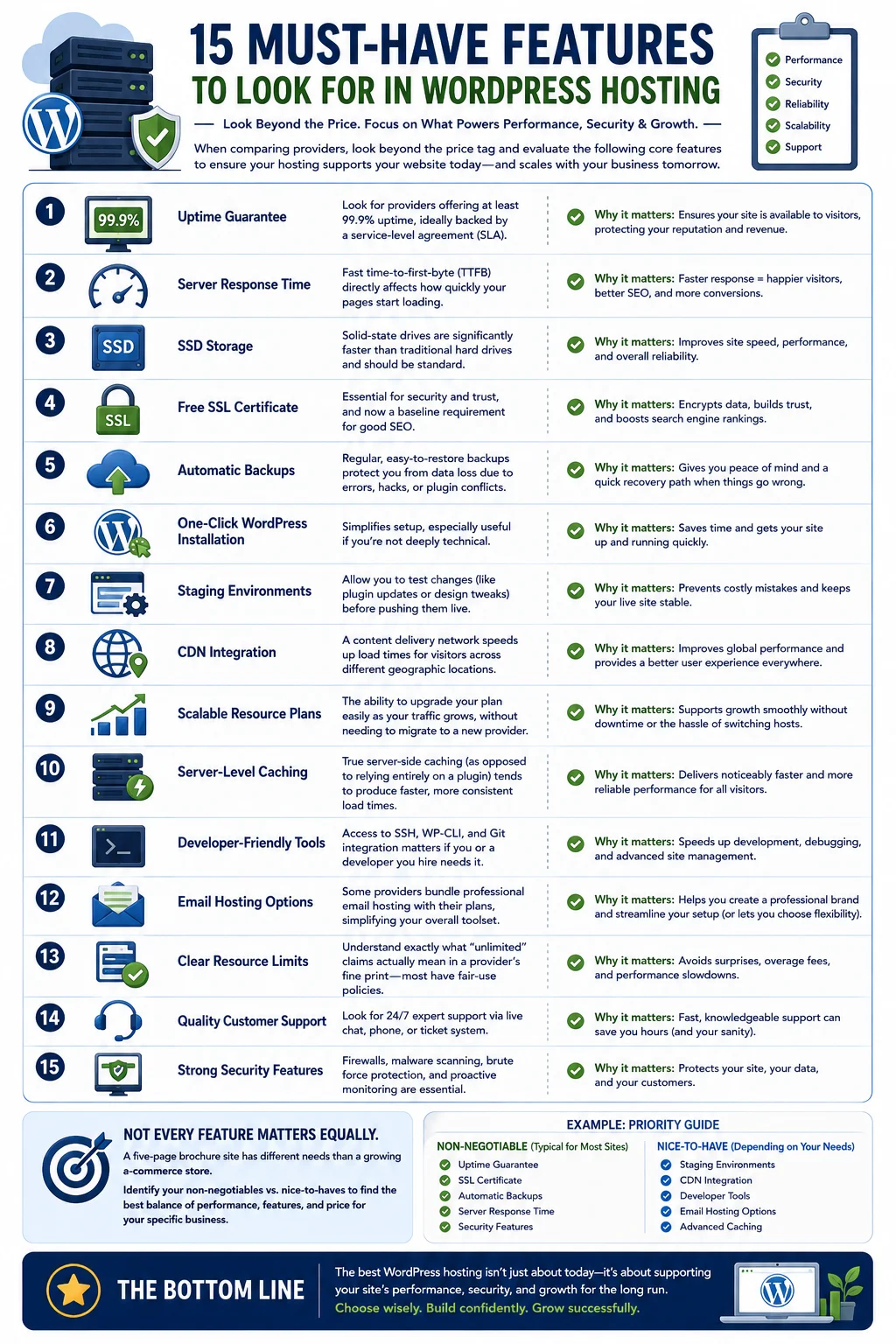
- Uptime guarantee: Look for providers offering at least 99.9% uptime, ideally backed by a service-level agreement (SLA).
- Server response time: Fast time-to-first-byte (TTFB) directly affects how quickly your pages start loading.
- SSD storage: Solid-state drives are significantly faster than traditional hard drives and should be standard on any hosting plan you consider.
- Free SSL certificate: Essential for security and trust, and now a baseline requirement for good SEO.
- Automatic backups: Regular, easy-to-restore backups protect you from data loss due to errors, hacks, or plugin conflicts.
- One-click WordPress installation: Simplifies setup, especially useful if you’re not deeply technical.
- Staging environments: Allow you to test changes (like plugin updates or design tweaks) before pushing them live.
- CDN integration: A content delivery network speeds up load times for visitors across different geographic locations.
- Scalable resource plans: The ability to upgrade your plan easily as your traffic grows, without needing to migrate to a new provider.
- Server-level caching: True server-side caching (as opposed to relying entirely on a plugin) tends to produce noticeably faster and more consistent load times.
- Developer-friendly tools: Access to SSH, WP-CLI, and Git integration matters if you or a developer you hire ever needs to work directly with the site’s files or deployment process.
- Email hosting options: Some providers bundle professional email hosting (e.g., yourname@yourbusiness.com) with their plans, which can simplify your overall toolset, though many businesses now prefer separate, dedicated email providers for better deliverability.
- Clear resource limits: Understand exactly what “unlimited” claims actually mean in a provider’s fine print — most “unlimited” hosting plans still have fair-use policies that cap resource-heavy sites in practice.
Not every feature on this list will matter equally to every business — a small local service business with a five-page brochure site has very different needs than a growing e-commerce store. The goal is to identify which of these features are non-negotiable for your specific situation, and which are nice-to-haves you can live without in exchange for a lower price.
4. Performance and Speed Considerations
Website speed is influenced by many factors, but hosting infrastructure plays a foundational role. When evaluating hosting for speed, consider:
- Server location: Choose a host with data centers close to your target audience, or one that offers a global CDN to reduce latency.
- Caching technology: Good hosts implement server-level caching (not just plugin-based caching), which significantly improves load times.
- Resource allocation: Make sure the plan offers sufficient CPU and memory resources for your expected traffic — insufficient resources are a common cause of slow, unresponsive sites.
- PHP version support: Hosting that supports the latest stable PHP versions ensures better performance and compatibility with modern WordPress themes and plugins.
- Database optimization: Since WordPress relies heavily on MySQL databases, hosts with optimized database configurations perform noticeably better under load.
A good practice is to run speed tests (using tools like Google PageSpeed Insights or GTmetrix) on demo sites hosted by providers you’re considering, if such demos are available, or to read independent speed benchmark comparisons before committing.
It’s also worth understanding that speed isn’t determined by hosting alone — theme bloat, unoptimized images, and too many plugins can slow down even the best-hosted site. That said, good hosting sets the ceiling for how fast your site can be; no amount of front-end optimization will fully compensate for underpowered or poorly configured servers. Think of hosting as the performance foundation, and front-end optimization as the finishing work built on top of it. A small business that invests in solid hosting and then follows basic best practices — compressing images, limiting unnecessary plugins, and using a lightweight theme — will typically see the best real-world results.
5. Security Features You Shouldn’t Skip
Small businesses are frequent targets for cyberattacks, partly because they’re often assumed to have weaker defenses than larger companies. When evaluating hosting security, look for:
- Free SSL/TLS certificates on all plans
- Web application firewalls (WAF) to block malicious traffic before it reaches your site
- Malware scanning and removal included as part of the hosting package
- DDoS protection to guard against traffic-based attacks
- Automatic WordPress core updates or at least clear tools to manage updates easily
- Isolated hosting environments (especially important with shared hosting, to prevent cross-contamination from other sites on the same server)
- Two-factor authentication (2FA) support for your hosting account and WordPress login
Security isn’t just about avoiding attacks — it’s also about how quickly a provider can help you recover if something does go wrong. Ask about a host’s incident response process before signing up.
It’s worth noting that no hosting provider, however good, makes your site completely immune to security issues — outdated plugins, weak passwords, and poor user account hygiene remain common entry points for attackers regardless of hosting quality. Good hosting reduces the attack surface at the server level and gives you tools to respond quickly, but ongoing vigilance on your end (keeping plugins updated, using strong unique passwords, and limiting the number of admin-level user accounts) remains an essential part of the overall security picture. Think of hosting-level security and your own WordPress hygiene as two halves of the same protection strategy, not substitutes for one another.
6. Backups and Disaster Recovery
Even with strong security, things can still go wrong — a bad plugin update, human error, or an unexpected server issue. Reliable backups are your safety net.
Look for hosting providers that offer:
- Automatic daily backups (not just weekly, especially for stores or frequently updated sites)
- Off-site backup storage, so backups aren’t lost if the server itself fails
- Easy one-click restore functionality, so you don’t need technical expertise to recover your site
- Backup retention policies that keep multiple recent backups, not just the most recent one, in case you need to roll back further
For an e-commerce or lead-generation small business site, losing even a day’s worth of orders or form submissions due to poor backup practices can be costly — so this feature deserves careful attention rather than being treated as a checkbox.
7. Customer Support Quality
As a small business owner, you likely don’t have an in-house IT team, which makes responsive, knowledgeable hosting support essential. When comparing providers, consider:
- Availability: Is support available 24/7, or only during limited business hours?
- Channels: Does the provider offer live chat, phone support, and email/ticket support?
- WordPress-specific expertise: General hosting support isn’t always equipped to troubleshoot WordPress-specific issues; managed WordPress hosts typically have staff trained specifically for this.
- Response times: Look for published average response times, and check independent reviews to see if those numbers hold up in practice.
- Self-service resources: A strong knowledge base, tutorials, and community forums can help you solve minor issues quickly without waiting on support.
Reading recent, independent customer reviews (rather than relying solely on testimonials on the provider’s own website) is one of the best ways to gauge real-world support quality.
8. Pricing and Value for Money
Hosting prices can range from just a few dollars a month for basic shared hosting to well over a hundred dollars a month for premium managed hosting or higher-tier cloud plans. When evaluating cost, keep these points in mind:
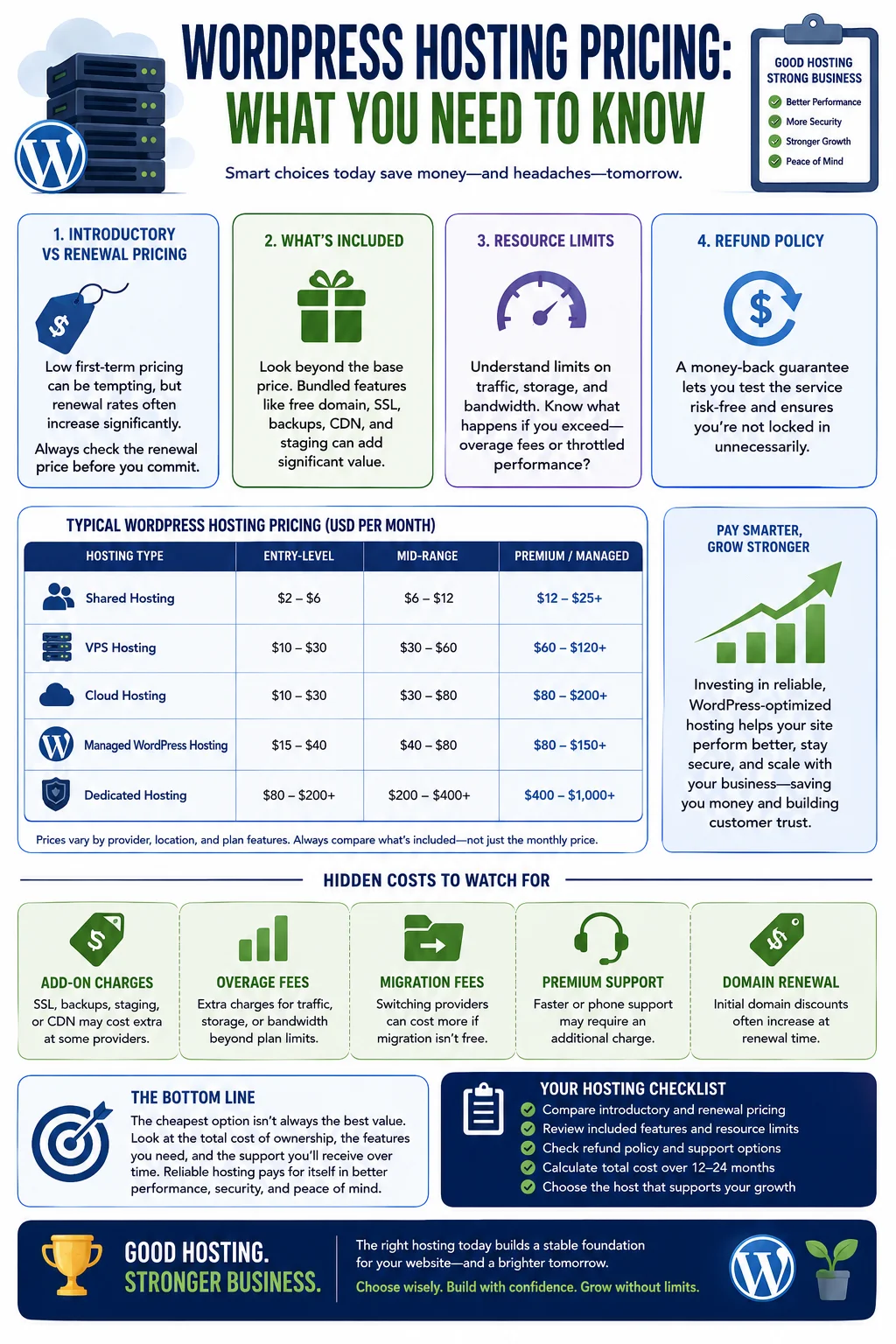
- Introductory vs renewal pricing: Many hosts advertise low first-term pricing that increases substantially upon renewal. Always check the renewal rate before committing.
- What’s included: Compare what’s bundled into the price — free domain, SSL, backups, CDN, staging environments — since these can add significant value beyond the base price.
- Resource limits: Understand what happens if you exceed traffic, storage, or bandwidth limits — some hosts charge overage fees, while others simply throttle performance.
- Refund policy: A money-back guarantee period lets you test a host risk-free before fully committing.
For a small business, it’s often worth paying a bit more for a reliable, WordPress-optimized host rather than choosing the cheapest possible option, since poor hosting can end up costing more in lost sales, downtime, or emergency fixes down the line.
Hidden Costs to Watch For
Beyond the advertised monthly fee, be alert to costs that aren’t always obvious at signup:
- Add-on charges for SSL, backups, or staging environments that competitors may include for free
- Bandwidth or storage overage fees once your site grows past initial plan limits
- Migration fees if you decide to switch providers later and the new host doesn’t offer free migration
- Premium support tiers that gate faster response times or phone support behind an additional charge
- Domain renewal price increases, if you registered your domain through the same provider at a discounted first-year rate
None of these hidden costs are necessarily dealbreakers, but factoring them into your total cost of ownership — rather than comparing only the sticker price — gives you a much more accurate picture of what you’ll actually spend over a year or two.
9. Scalability for Growing Businesses
Your hosting needs today may not match your needs a year from now. A good host should let you scale smoothly as your business grows, without requiring a painful migration to a new provider.
Look for:
- Easy plan upgrades that let you add resources (CPU, RAM, storage) without significant downtime
- Support for traffic spikes, such as seasonal sales or viral marketing campaigns, without the site crashing
- Multiple hosting tiers within the same provider, so you can move from shared to VPS to dedicated or cloud hosting as needed
- Compatibility with growth-related tools, like advanced caching, multiple staging environments, or team collaboration features for when you bring on more employees or contractors
Choosing a provider with room to grow saves you the hassle and risk of migrating your entire site later, which can otherwise introduce SEO disruptions and downtime.
10. Managed vs Unmanaged WordPress Hosting
This is one of the most important distinctions for small business owners to understand.
Unmanaged hosting (typical of basic shared or VPS plans) gives you the server resources but leaves WordPress-specific management — updates, security hardening, performance optimization — largely up to you.
Managed WordPress hosting takes care of WordPress-specific tasks on your behalf, including:
- Automatic core, theme, and plugin updates (or at least staged testing before updates)
- Built-in caching optimized specifically for WordPress
- Enhanced security monitoring tailored to common WordPress vulnerabilities
- Expert support staff who understand WordPress deeply, not just general server administration
For small business owners without dedicated technical staff, managed WordPress hosting often provides the best balance of convenience, performance, and peace of mind — even though it typically costs more than basic unmanaged hosting.
11. E-commerce Considerations for Small Business Hosting
If your small business site includes an online store (via WooCommerce or a similar plugin), hosting requirements become more demanding. Consider:
- PCI compliance support, especially if you’re handling payment data directly rather than through a fully hosted checkout
- Database performance, since e-commerce sites rely heavily on dynamic database queries for inventory, orders, and customer accounts
- Higher resource allocations, since e-commerce sites tend to be more resource-intensive than simple brochure or blog sites
- Uptime reliability during peak sales periods, such as holiday seasons or promotional campaigns
- SSL and secure checkout support as a baseline requirement, not an add-on
Some hosting providers offer plans specifically optimized for WooCommerce, bundling relevant caching, security, and performance configurations tailored to e-commerce needs.
It’s also worth thinking ahead to seasonal demand. Many small e-commerce businesses see the bulk of their annual revenue concentrated into a handful of peak shopping periods. Hosting that performs well on an average Tuesday but buckles under the load of a major sale event isn’t just an inconvenience — it can mean lost revenue at the exact moment your business needs it most. When evaluating e-commerce hosting, ask providers directly how their infrastructure handles sudden traffic surges, and whether scaling up temporarily (for a sale event, for instance) is something you can do easily and affordably, rather than something that requires a lengthy plan change or support ticket.
12. Migration and Onboarding
If you’re moving from an existing host, migration ease matters. Look for providers that offer:
- Free migration services, where their team handles the technical transfer for you
- Migration plugins or tools that simplify a DIY transfer if you prefer to handle it yourself
- Minimal downtime guarantees during the migration process
- Post-migration support to troubleshoot any issues that arise from the switch, such as broken links, missing files, or DNS propagation delays
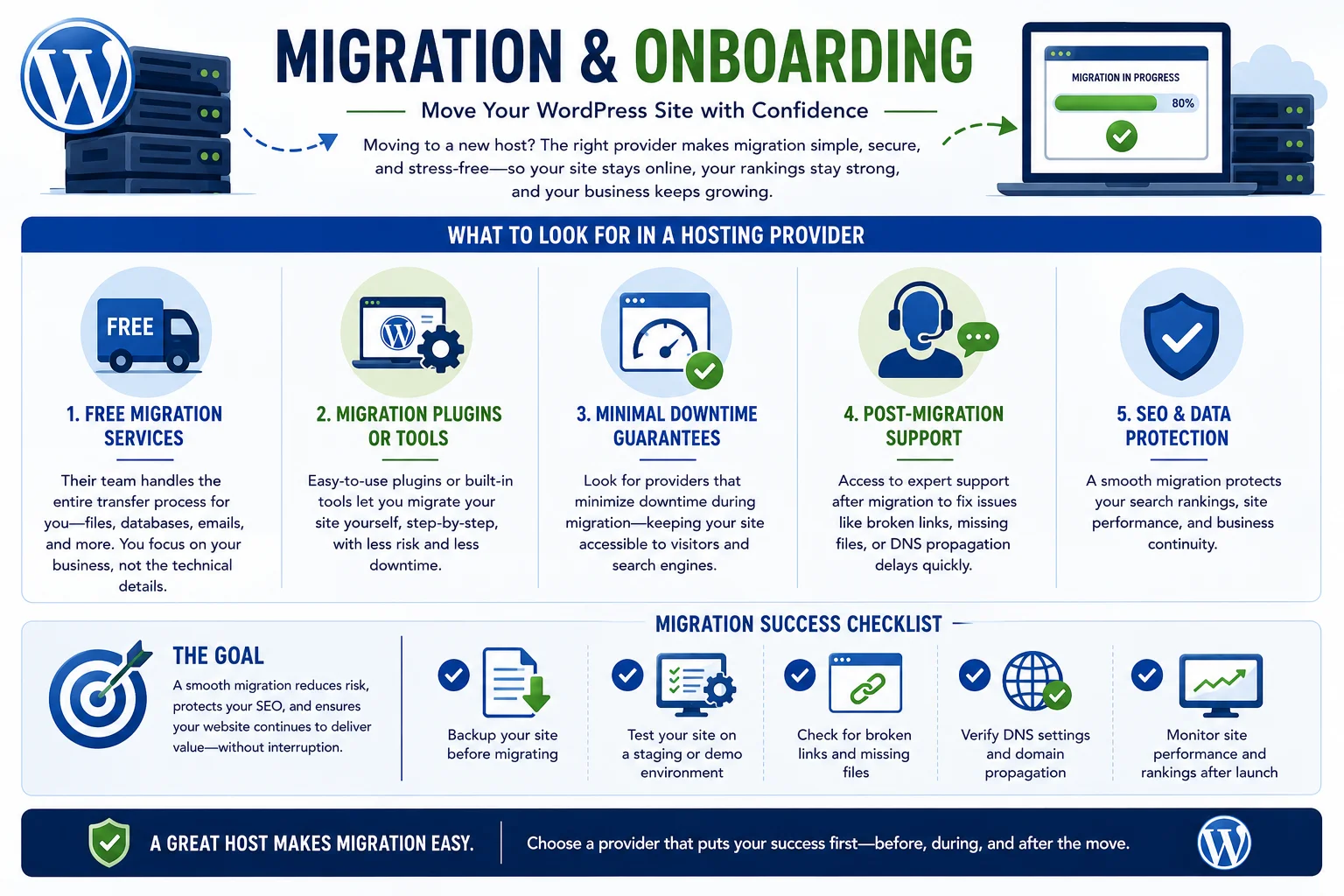
A smooth migration process reduces the risk of losing search rankings or experiencing extended downtime during the transition.
13. Matching Hosting to Different Kinds of Small Businesses
Hosting needs aren’t one-size-fits-all, even within the broad category of “small business.” A few common scenarios illustrate how requirements shift depending on what the site actually does:
Local service businesses (contractors, salons, clinics, consultants): These sites are typically low-traffic and content-focused, with the main goals being fast load times, a professional appearance, and reliable contact form delivery. A solid shared or entry-level managed plan is usually more than sufficient, and the priority should be on uptime and support responsiveness rather than raw performance headroom.
Content and membership sites (blogs, courses, niche publications): These sites benefit most from strong caching, good database performance (especially if using membership or forum plugins), and hosting that supports growing storage needs as media libraries expand over time.
E-commerce stores (WooCommerce-based): As covered in more detail below, these sites need higher resource allocations, strong database performance, and hosting plans specifically built or optimized for transactional, dynamic content rather than mostly static pages.
Multi-location or franchise businesses: These often benefit from WordPress Multisite-compatible hosting, allowing multiple related sites to be managed from a single dashboard, along with higher resource allocations to support several sites running simultaneously.
Agencies or businesses managing multiple client sites: These benefit from hosting plans designed for developers and agencies, offering staging environments, white-label options, and centralized management tools across many WordPress installations.
Identifying which of these categories best describes your business — or which combination applies — makes it much easier to filter out hosting plans that are either overbuilt (and overpriced) for your needs or underpowered for what you’re actually trying to run.
14. Common Hosting Mistakes Small Businesses Make
Avoid these frequent pitfalls when selecting hosting:
- Choosing based on price alone, without considering performance, security, or support quality
- Ignoring renewal pricing, leading to unexpected cost increases after the first term
- Underestimating resource needs, especially for e-commerce or content-heavy sites
- Skipping backups, assuming the host will “handle everything” without confirming backup frequency and restore processes
- Not testing customer support before committing to a long-term contract
- Overpaying for unnecessary features, such as dedicated hosting for a low-traffic site that doesn’t need that level of resource allocation
Taking time to evaluate your actual needs — rather than reacting to marketing claims or the lowest advertised price — leads to a much better long-term hosting decision.
15. How to Evaluate and Compare Hosting Providers
When comparing hosting providers for your small business, use a structured approach:
- Define your site’s requirements: Traffic expectations, e-commerce needs, technical skill level, and budget.
- Shortlist providers based on reputation, independent reviews, and WordPress-specific optimization.
- Compare core features side by side: uptime guarantees, security, backups, support, and scalability options.
- Check renewal pricing, not just introductory offers.
- Read recent, independent customer reviews, focusing especially on support responsiveness and uptime reliability.
- Test support responsiveness yourself by reaching out with pre-sales questions before committing.
- Take advantage of money-back guarantees to test real-world performance risk-free.
This structured comparison process helps you avoid being swayed by flashy marketing and instead choose a provider that genuinely fits your business’s needs.
16. Checklist: What to Look for Before You Buy
Before finalizing your hosting decision, confirm the provider offers:
- At least 99.9% uptime guarantee
- Free SSL certificate
- SSD storage
- Automatic daily backups with easy restore
- Strong security features (firewall, malware scanning, DDoS protection)
- Responsive, WordPress-knowledgeable customer support
- Transparent renewal pricing
- Easy scalability to higher-tier plans
- Free or affordable migration assistance
- Staging environment availability
17. Frequently Asked Questions
What is the best type of hosting for a small business WordPress site? It depends on your traffic and technical comfort level, but managed WordPress hosting or a solid VPS/cloud plan typically offers the best balance of performance, security, and ease of use for most small businesses.
Is shared hosting good enough for a small business website? Shared hosting can work for very small, low-traffic sites on a tight budget, but it may struggle with performance and security as your traffic grows, making it less ideal for businesses expecting steady growth.
How much should a small business expect to pay for good WordPress hosting? Costs vary widely, but reliable small business hosting typically falls in a moderate monthly range depending on the provider and plan tier — always check renewal pricing, not just introductory rates, when budgeting.
Do I need managed WordPress hosting for a small business site? Not necessarily, but it’s often worth the extra cost if you don’t have technical staff to manage updates, security, and performance optimization yourself.
How important is customer support when choosing hosting? Very important, especially for small businesses without in-house technical expertise — responsive, knowledgeable support can save you significant time and stress when issues arise.
Can I switch hosting providers later if my business grows? Yes, migration to a new host is possible at any time, though it’s smoother if you choose a provider that already offers scalable plans, reducing the need to migrate entirely in the first place.
Does hosting really affect SEO rankings? Yes, indirectly. Site speed and uptime are factors search engines weigh when ranking pages, so slow or unreliable hosting can quietly hold back your SEO performance even if your content and on-page optimization are strong.
What’s the difference between a free SSL certificate and a paid one? Both encrypt data the same way; the main differences are in the level of validation (domain validation vs. more extensive organization validation) and any warranty or support included. For most small business sites, a free SSL certificate provides sufficient security.
Should I host my email with the same provider as my website? It depends on your needs — bundling can simplify management, but many small businesses find better deliverability and features using a dedicated email service separate from their web hosting.
18. Final Thoughts
Finding the best WordPress hosting for small business isn’t about chasing the cheapest plan or the flashiest marketing claims — it’s about matching a provider’s performance, security, support, and scalability to your specific business needs and technical comfort level. Take the time to evaluate uptime guarantees, security features, backup reliability, and customer support quality, and don’t forget to check renewal pricing before committing.
A well-chosen hosting provider becomes a quiet, reliable foundation that lets you focus on growing your business, rather than worrying about downtime, slow load times, or security vulnerabilities. Invest the time upfront to choose wisely, and your website — and your business — will benefit from it for years to come.